Answer

Send PO to multiple email addresses

  • March 31, 2022
  • 10 replies
  • 855 views

Jeff96
Captain II
Forum|alt.badge.img+4

When upgrading to 2021 R2 we lost the ability to send a PO to multiple email addresses of the same vendor. The email addresses are set up with a ; and a space between them, but it fails to send it to the second email. 

In 2019 R2 it did work. 

The notification template has ((Document.VendorLocationID.DefContactID.EMail)) as the “to” email address. 

Best answer by Jeff96

It seems it was an issue in the Acumatica build which is now fixed.

10 replies

Forum|alt.badge.img+6
  • Captain II
  • March 31, 2022

Hello, can I ask a side question. It might have nothing to do with your problem.
Did you upgrade directly from 2019R2 to 2021R2?


Forum|alt.badge.img+12
  • Acumatica Support Team
  • March 31, 2022

Hi @Jeff96 

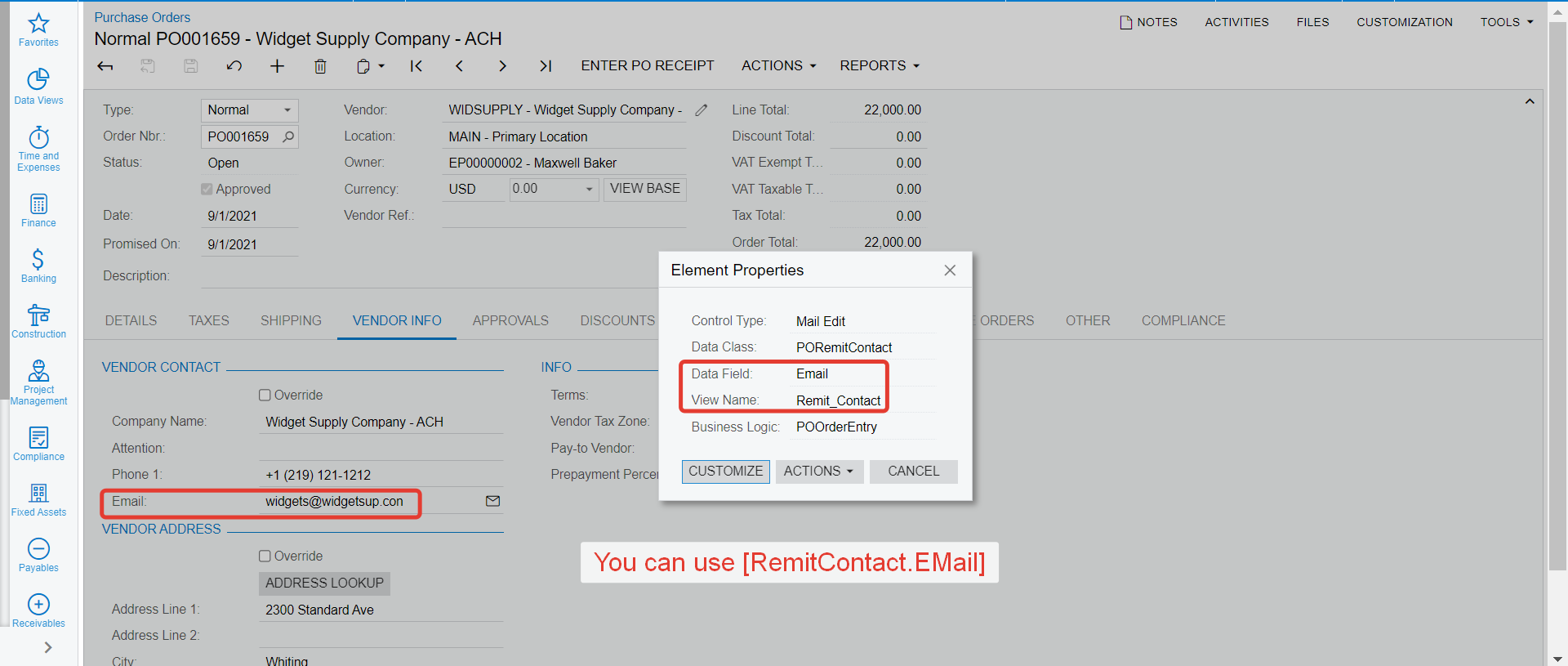
Which email do you want to select on recipient email address from Purchase order document? If its the following, then refer to the screenshot below. If you want to select any other email, let me know, I will find correct field name to use.

Regards,


Laura03
Captain II
Forum|alt.badge.img+19
  • Captain II
  • March 31, 2022

Hello,

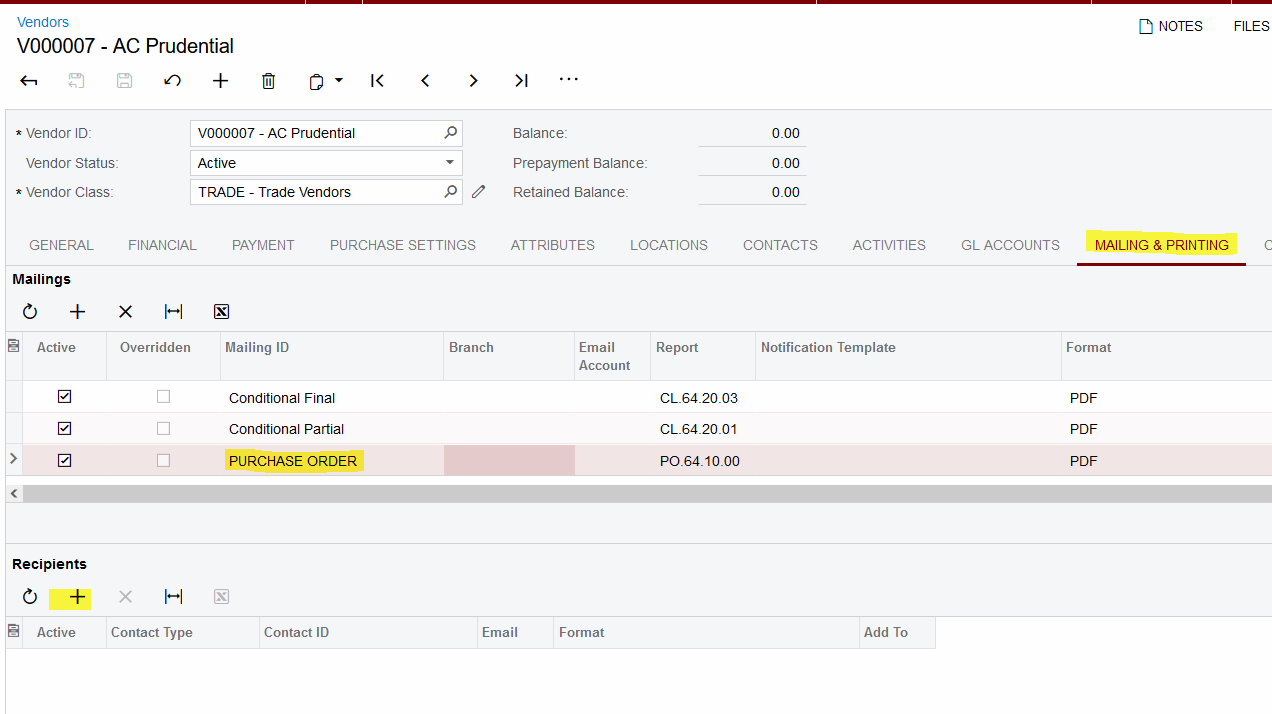
As a work-around, we can add emails and Purchase Order recipients on Vendors → Mailing tab. This will send each new PO to the same group of contacts for the vendor.


Jeff96
Captain II
Forum|alt.badge.img+4
  • Author
  • Captain II
  • April 4, 2022

Hi @Jeff96 

Which email do you want to select on recipient email address from Purchase order document? If its the following, then refer to the screenshot below. If you want to select any other email, let me know, I will find correct field name to use.

Regards,

Yes it’s this email. When I enter [remitcontact.email] it fails to send anything and gives me an error


Jeff96
Captain II
Forum|alt.badge.img+4
  • Author
  • Captain II
  • April 4, 2022

Hello,

As a work-around, we can add emails and Purchase Order recipients on Vendors → Mailing tab. This will send each new PO to the same group of contacts for the vendor.


Will that send it along with our purchase order template?


Jeff96
Captain II
Forum|alt.badge.img+4
  • Author
  • Captain II
  • April 4, 2022

Hello, can I ask a side question. It might have nothing to do with your problem.
Did you upgrade directly from 2019R2 to 2021R2?

My mistake, we came from 2020


Laura03
Captain II
Forum|alt.badge.img+19
  • Captain II
  • April 4, 2022

@Jeff96 , Hi Jeff.  Are you saying you have a custom PO report format that you’d like to use?  When using the Mailing & Printing tab as shown above, Acumatica will use your default PO format, even if it’s custom. To have different PO formats go out to different vendors, you can attach the custom po (with different report number)  in the “Report” column on the Mailing & Printing tab of individual vendors.


Jeff96
Captain II
Forum|alt.badge.img+4
  • Author
  • Captain II
  • Answer
  • April 6, 2022

It seems it was an issue in the Acumatica build which is now fixed.


Forum|alt.badge.img
  • Jr Varsity II
  • July 28, 2022

Hi guys,


How did you fix this issue? by upgrading the build?


Jeff96
Captain II
Forum|alt.badge.img+4
  • Author
  • Captain II
  • July 28, 2022

Hi guys,


How did you fix this issue? by upgrading the build?

We modified our report settings to ([RemitContact.Email],[VendorContact.EMail])