Answer

Scan and Transfer -- Not using default warehouse

  • May 8, 2024
  • 5 replies
  • 94 views

Situation:

There are the following warehouses:

  • Warehouse1
  • Warehouse2

Each warehouses has the following locations:

  • Location1
  • Location2
  • Location3

The default warehouse in the User Profile is Warehouse1. Thus, when using Scan and Transfer, that warehouse is auto-selected.

The transfers are always within the default warehouse.

Problem:

In Scan and Transfer, when I scan the Source Location (for example, Location1), I get this message:

The Location1 location is defined in multiple warehouses.

Scan the barcode of the warehouse to which the Location1 location belongs.

How do I stop this from happening? I want it to use the default warehouse.

Best answer by apanchamia

You will need to consider having unique LocationCD  across warehouses.

5 replies

Forum|alt.badge.img+1
  • Semi-Pro II
  • May 10, 2024

Maybe this can help:

And then setting the Default Warehouse on the User


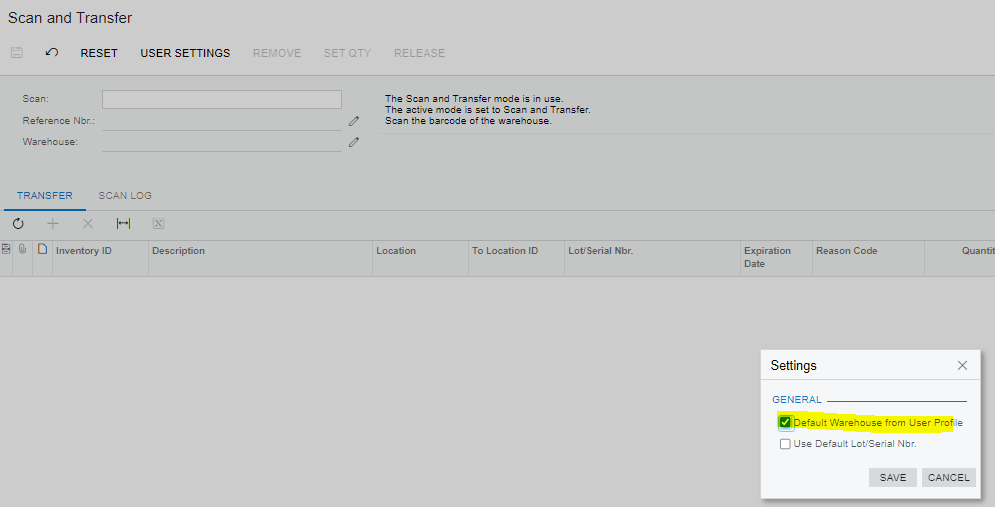
Or playing around with this Setting:
 

Let me know if that helped


  • Author
  • Freshman I
  • May 16, 2024

Unfortunately, it did not correct the issue.


Chris Hackett
Community Manager
Forum|alt.badge.img
  • Acumatica Community Manager
  • July 1, 2024

Hi @dmillette were you able to find a solution? Thank you!


apanchamia
Acumatica Employee
  • Acumatica Services Team
  • Answer
  • July 2, 2024

You will need to consider having unique LocationCD  across warehouses.


Forum|alt.badge.img+1
  • Semi-Pro II
  • July 8, 2024

You will need to consider having unique LocationCD  across warehouses.

Even though I understand why this is the case from a Software perspective, it is unfortunately very restricting for lots of businesses