

Solved

Salesperson's email in cc when sending SO to customer

  • December 19, 2025
  • 2 replies
  • 33 views

Forum|alt.badge.img

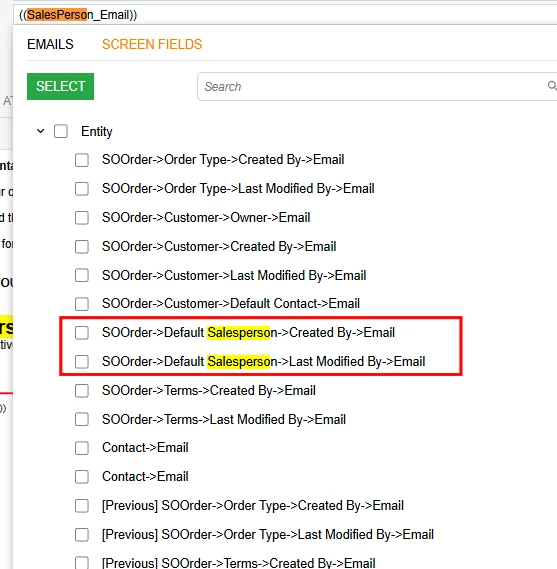
When sending SO to customer, how do I add the salesperson’s email in CC in my notification template? I’ve tried the below which doesn’t work. Appreciate if someone can help please.
 

Best answer by nickcerri32

@MarkD If you look at the Salespersons (AR205000) screen, you’ll notice there’s no field to establish a specific email for them.  However, you can link a Salesperson profile to an existing Employee which can be associated with an email address.

What screen are you using in your email template?  The list looks different than what I would expect from the SO301000 screen - Is it a GI you built?  If so, you can pull the SalesPerson DAC into the GI and then associate that DAC with the EPEmployee DAC.  Finally, you can link the EPEmployee DAC to the Contact (there’s a few) DAC that houses the email.

2 replies

nickcerri32
Semi-Pro II
Forum|alt.badge.img+6
  • Semi-Pro II
  • Answer
  • December 19, 2025

@MarkD If you look at the Salespersons (AR205000) screen, you’ll notice there’s no field to establish a specific email for them.  However, you can link a Salesperson profile to an existing Employee which can be associated with an email address.

What screen are you using in your email template?  The list looks different than what I would expect from the SO301000 screen - Is it a GI you built?  If so, you can pull the SalesPerson DAC into the GI and then associate that DAC with the EPEmployee DAC.  Finally, you can link the EPEmployee DAC to the Contact (there’s a few) DAC that houses the email.


Forum|alt.badge.img
  • Author
  • Jr Varsity III
  • December 22, 2025

@nickcerri32 It is a custom built GI that shows what you just said. I’ve managed to link it, I just can’t find the right field. Thanks Nick

