

Answer

Sales Order Type to bypass "Prepare Invoice"

  • January 20, 2025
  • 4 replies
  • 117 views

Forum|alt.badge.img

Good day Community

I have a customer who creates an internal sales order to move stock for exhibition purposes. They do not want to create an invoice but the stock needs to be moved.

Is there a way to close the shipment and ignore the “Prepare Invoice” step?

Is there a way around this please? These shipments remain as confirmed, not complete.

Regards

Barbara
 

Best answer by nhatnghetinh

Hi ​@BarbaraPietersen23 

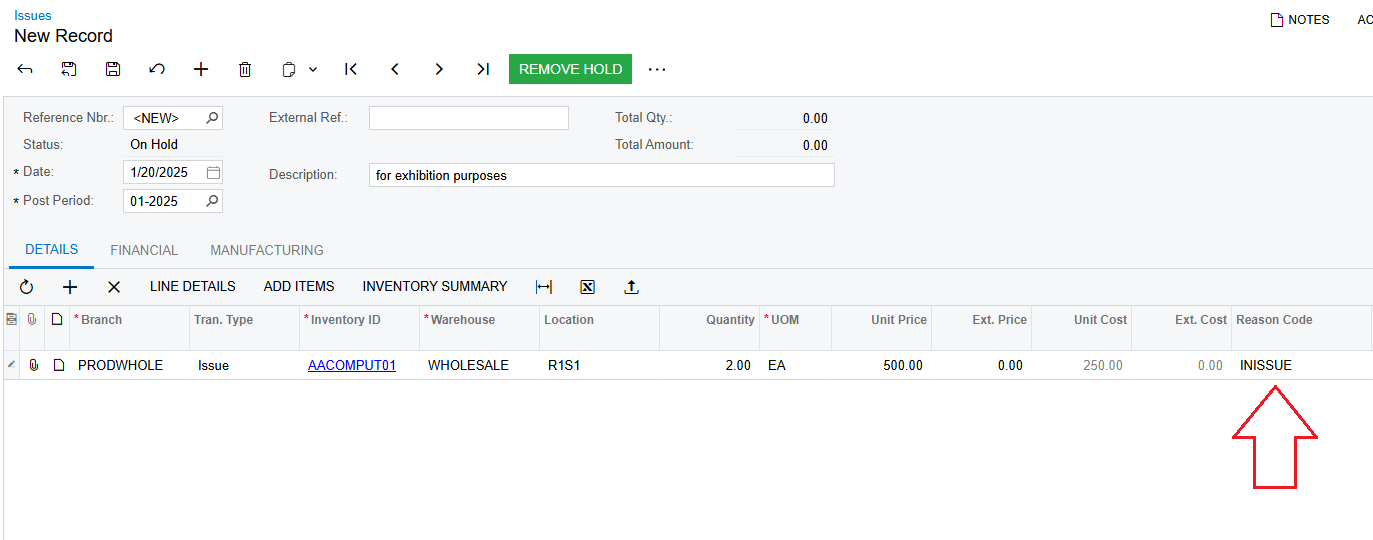
Because you want to skip the "Prepare Invoice" for exhibition purposes, you can do "Issue" and create a "Reason Code" for your usage purposes.


Best Regards,

NNT

4 replies

Forum|alt.badge.img
  • Jr Varsity III
  • January 20, 2025

Hi ​@BarbaraPietersen23 

You have a couple of options on hand. 

  1. You can just create an IN order type. This way you do not need an explicit Shipment process. Just preparing and releasing the invoice should help you to close the Invoice and account for the inventory also.  
  2. You can create the Sales Order but execute the Quick Process action. This way the Shipments are confirmed, but at the same time the Invoice is also prepared and released in the same action 
  3. Just create a TR or transfer type order.  This will help you to account for the inventory being moved and not having to Prepare or Release invoices.    

Let me know if this helps. 

Regards

Sai  


nhatnghetinh
Captain II
Forum|alt.badge.img+11
  • Captain II
  • Answer
  • January 20, 2025

Hi ​@BarbaraPietersen23 

Because you want to skip the "Prepare Invoice" for exhibition purposes, you can do "Issue" and create a "Reason Code" for your usage purposes.


Best Regards,

NNT


Forum|alt.badge.img

Hi All

Thanks for the suggestions. I will approach the client and see what will work for them. The issue is that I don’t want to create an invoice at all but I do want to complete the Shipment.

Transfer won’t work because then the stock will just sit in a different location.

Issue with Reason Code might work - I’ll check.

Regards

Barbara


Forum|alt.badge.img
  • Varsity I
  • January 22, 2025

Removed by moderator as AI generated without disclaimer.

