

Answer

Return For Credit Error

  • November 26, 2024
  • 3 replies
  • 58 views

Forum|alt.badge.img

Can anyone assist with why this error is occurring in our our system? We are two years into implementation with SWK Technologies and are still having basic errors like this pop up as we demo the system. 


An error occurred during processing of the field Location value WARRANTY IN Error: Selected Location is not valid for receipts.
Best answer by yhartman

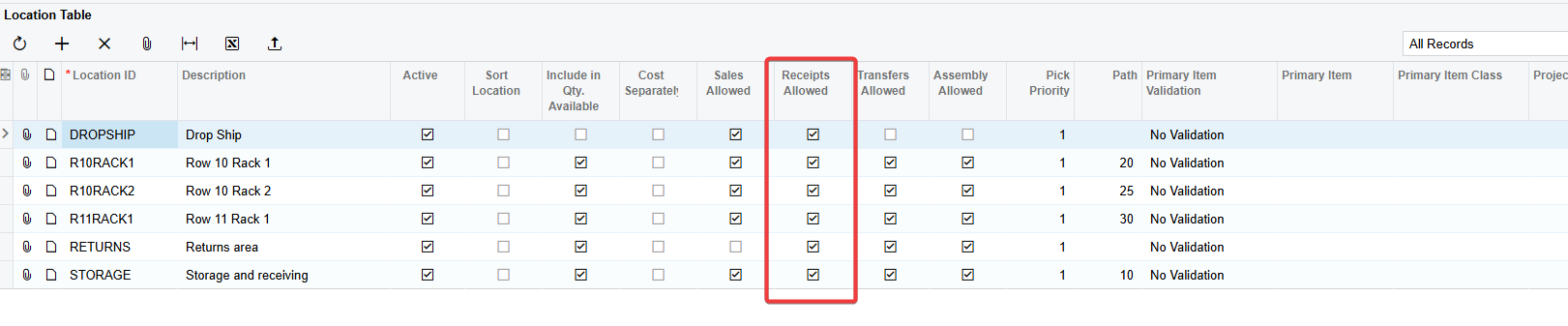
You have to set the location “Warranty” to allow “Receipts.”

Go to Inventory > Warehouses - Select the applicable warehouse. Find the “Warranty” location and select true under the “Receipts Allowed” Column.


3 replies

Forum|alt.badge.img+3
  • Jr Varsity I
  • Answer
  • November 26, 2024

You have to set the location “Warranty” to allow “Receipts.”

Go to Inventory > Warehouses - Select the applicable warehouse. Find the “Warranty” location and select true under the “Receipts Allowed” Column.


Forum|alt.badge.img
  • Author
  • Jr Varsity II
  • November 26, 2024

It is insane, you have responded faster than our vendor partner to solve this error. Thank you!


Laura03
Captain II
Forum|alt.badge.img+19
  • Captain II
  • November 26, 2024

It is insane, you have responded faster than our vendor partner to solve this error. Thank you!

Go Acumatica Community!   Acumatica Users Helping Each Other - 24/7. 😎

