Answer

Order Type Posting Settings vs Posting Class Settings

  • December 31, 2024
  • 4 replies
  • 161 views

kkeating24
Varsity III
Forum|alt.badge.img+1

Hello,

I see a couple posts that reference my issue but they are not clear, and the help is a bit murky too.  I’d like to get some community thoughts.  Here are the 2 threads that hit on my issue: 


What I’m experiencing in 24R2: 

IF the posting class is supposed to be what drives the GL Accounts, the Order Type Posting Setting seems to override posting classes, essentially making the posting class not viable, because there is no way to “NOT” select a value for this drop down:


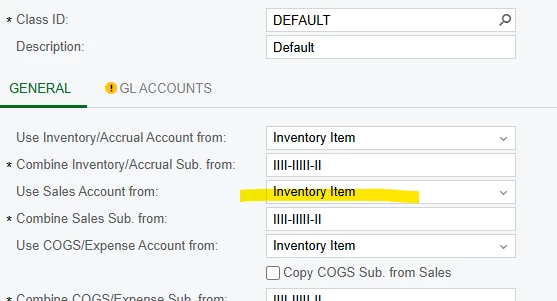
as an example, if I have the standard SO Order Type as ABOVE, this setting is set to use ‘posting class’ for sales account.

If I create an SO add 2 lines

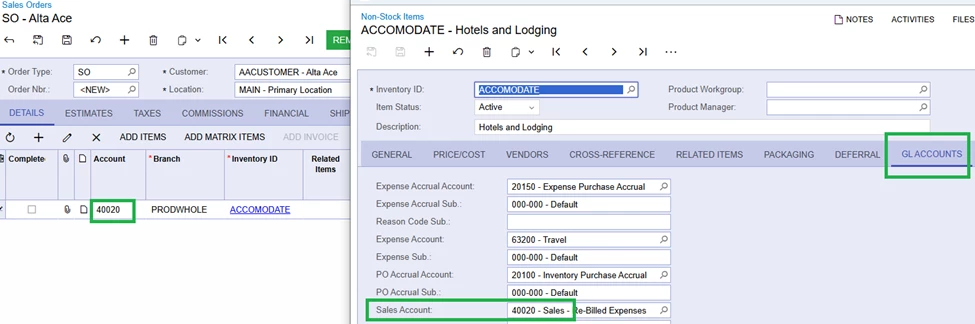
  1. A stock item that has a posting class that uses the “posting class” for sales (therefore the GL account is populated) it will derive the correct Sales Account.   See below - AACOMPUT01
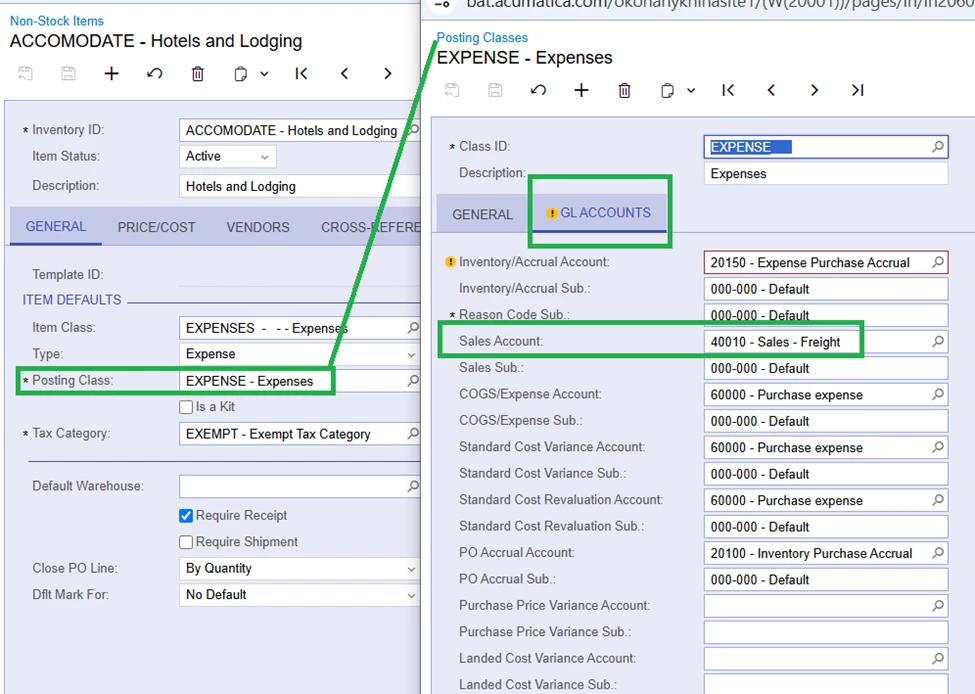
  2. A non-stock item that has a posting class that uses the “inventory item” for sales (therefore the GL Account on the posting class is NULL).   It will NOT place a sales account on the SO. See below - ACCOMODATE
    1. Why wouldn’t this pull from my posting class which says to get it from the INVENTORY ITEM?


SO in this scenario the true Posting Class i setup is not really driving anything, it is the order type posting settings. 

The help function says that you ‘CAN ALSO’ select an account that is an override, but it’s not really an override unless you can turn it OFF, which doesn’t seem possible unless I’m missing something:

 

Best answer by olgakonanykhina22

Hello ​@kkeating24 

The Order Type settings are primary (over Stock Item settings) for determining which GL Account to use for the posting.

When Order Type Use Sales Account from is set to Posting Class, the Sales GL account from the GL Accounts tab for the Posting Class is used.


When the Order Type Use Sales Account from is set to Inventory Item, the Sales GL account setup in the Stock Item is used.


4 replies

  • Freshman I
  • March 14, 2025

I also notice this today. 

Even while directing the Posting Code to use the Inventory Item instead, it is still using the account under the GL Account that’s set up under the Posting Code.

IF I delete that GL Account, I also get the same blank account code in SO.


kkeating24
Varsity III
Forum|alt.badge.img+1
  • Author
  • Varsity III
  • March 14, 2025

Glad to know i’m not alone.  This needs an explanation!


Hello ​@kkeating24 

The Order Type settings are primary (over Stock Item settings) for determining which GL Account to use for the posting.

When Order Type Use Sales Account from is set to Posting Class, the Sales GL account from the GL Accounts tab for the Posting Class is used.


When the Order Type Use Sales Account from is set to Inventory Item, the Sales GL account setup in the Stock Item is used.


kkeating24
Varsity III
Forum|alt.badge.img+1
  • Author
  • Varsity III
  • April 25, 2025

@olgakonanykhina22 Thank you, but i guess it still begs the question, why do we then give an option to choose what to use on the posting class.  Because if i want to generate accounting using the posting class it will get overwritten by the order type.