Solved

Office 365 email server set up error - Authentication failed

  • Jun 22, 2021 11:41 AM UTC
  • 11 replies
  • 3130 views
  • Translate All

stacy16
Varsity I
Forum|alt.badge.img+1

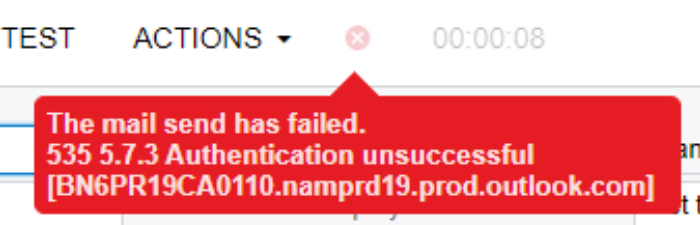
I was able to set up 7 email accounts successfully.. but have 4 more to do and this is the error i keep getting:


The mail send has failed.
535 5.7.3 Authentication unsuccessful [BL0PR0102CA0020.prod.exchangelabs.com]

I use the same exact settings as the ones that did work but it still fails. HELP! 

I am so lost as to why this wont work. 
 

Best answer by stacy16

@shawnhutsko5  - We went and turned off MFA for the Acumatica IP address. I spoke with our IT company about using app passwords but he didn't seem to happy about using those. 


View original

11 replies

stacy16
Varsity I
Forum|alt.badge.img+1
  • Author
  • Varsity I
  • Jun 22, 2021 12:16 PM UTC

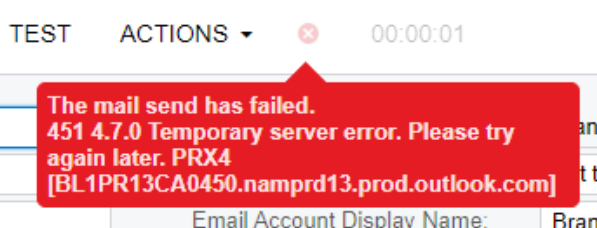
Now i have two email accounts that give me this error…

And the other two that are giving me this error


Translate

Forum|alt.badge.img+5
  • Jr Varsity II
  • Jun 22, 2021 2:51 PM UTC

It’s difficult to say without knowing how you are authenticating(or the configuration you are using) but I would guess that the issue lies on outlook’s side of things and perhaps the credentials/method of authentication doesn’t provide access to all the accounts you are trying to send from. 

Translate

stacy16
Varsity I
Forum|alt.badge.img+1
  • Author
  • Varsity I
  • Jun 22, 2021 2:55 PM UTC


Translate

stacy16
Varsity I
Forum|alt.badge.img+1
  • Author
  • Varsity I
  • Jun 22, 2021 2:56 PM UTC


Translate

Forum|alt.badge.img+5
  • Jr Varsity II
  • Jun 22, 2021 3:13 PM UTC

Are you using the same account for authentication(an account with permission to send as all of the email addresses), or are you using different credentials for each account?

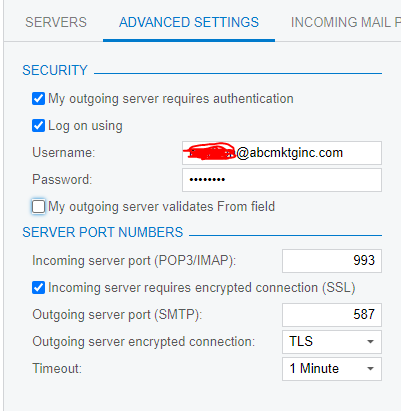
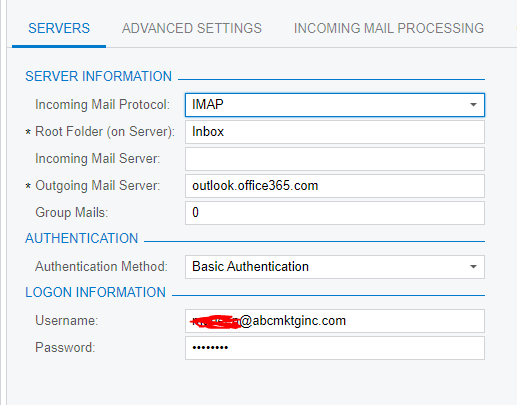
The connection settings look correct, I would recommend looking into the permissions of the credentials you are using on the email account that aren’t working.

It’s also worth double checking that SMTP authentication isn’t disabled on those accounts. Here is a Microsoft article on how to do that.

Translate

stacy16
Varsity I
Forum|alt.badge.img+1
  • Author
  • Varsity I
  • Jun 22, 2021 4:40 PM UTC

We are using different credentials for each account. 

It looks like its a MFA issue. I have someone looking into permissions in Microsoft now. I will keep you posted…


Thanks for the help!  

Translate

stacy16
Varsity I
Forum|alt.badge.img+1
  • Author
  • Varsity I
  • Jun 25, 2021 6:24 PM UTC

IT was an MFA issue.. Acumatica does not support MFA with basic authentication. 

It has been fixed though :)


Thanks for the help @markusray17 !

Translate

@stacy16 What was the fix? We use the O365 app password with Acumatica.

Translate

stacy16
Varsity I
Forum|alt.badge.img+1
  • Author
  • Varsity I
  • Answer
  • Jul 6, 2021 2:25 PM UTC

@shawnhutsko5  - We went and turned off MFA for the Acumatica IP address. I spoke with our IT company about using app passwords but he didn't seem to happy about using those. 


Translate

@stacy16 We turned MFA off for the main Acumatica email account but our employees wanted to send things as themselves too and I found the app password was the only way to keep MFA on with their normal email.

Translate

@shawnhutsko5  - did you have any issues getting app passwords to work for system emails?  Pretty sure I am missing something super basic on the Microsoft side of things - but for the life of me, can’t find what!

Translate