Example :
Inventory ID : B001
How to i create 3 Barcode for B001 - BH, B001 - BOX, B001 - KARTON ?
so, i can scan according the barcode,
if i need 72 BH i can scan
1 - B001 - KARTON and 2 - B001 - BOX
Example :
Inventory ID : B001
How to i create 3 Barcode for B001 - BH, B001 - BOX, B001 - KARTON ?
so, i can scan according the barcode,
if i need 72 BH i can scan
1 - B001 - KARTON and 2 - B001 - BOX
Best answer by FarhanaM60
Yes, this can be handled using multiple barcodes for the same Inventory ID, with different UOMs.
For example:
Barcode Inventory ID UOM Qty
B001-BH B001 BH 1
B001-BOX B001 BOX 12
B001-KARTON B001 KARTON 48
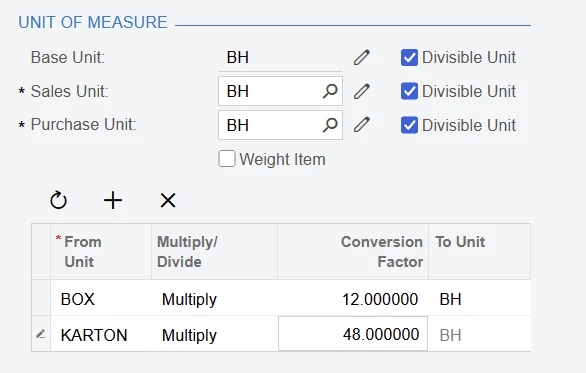
Then configure the UOM conversions for B001:
1 BOX = 12 BH
1 KARTON = 48 BH
So if you scan:
1 × B001-KARTON = 48 BH
2 × B001-BOX = 24 BH
--------------------------------
Total = 72 BH
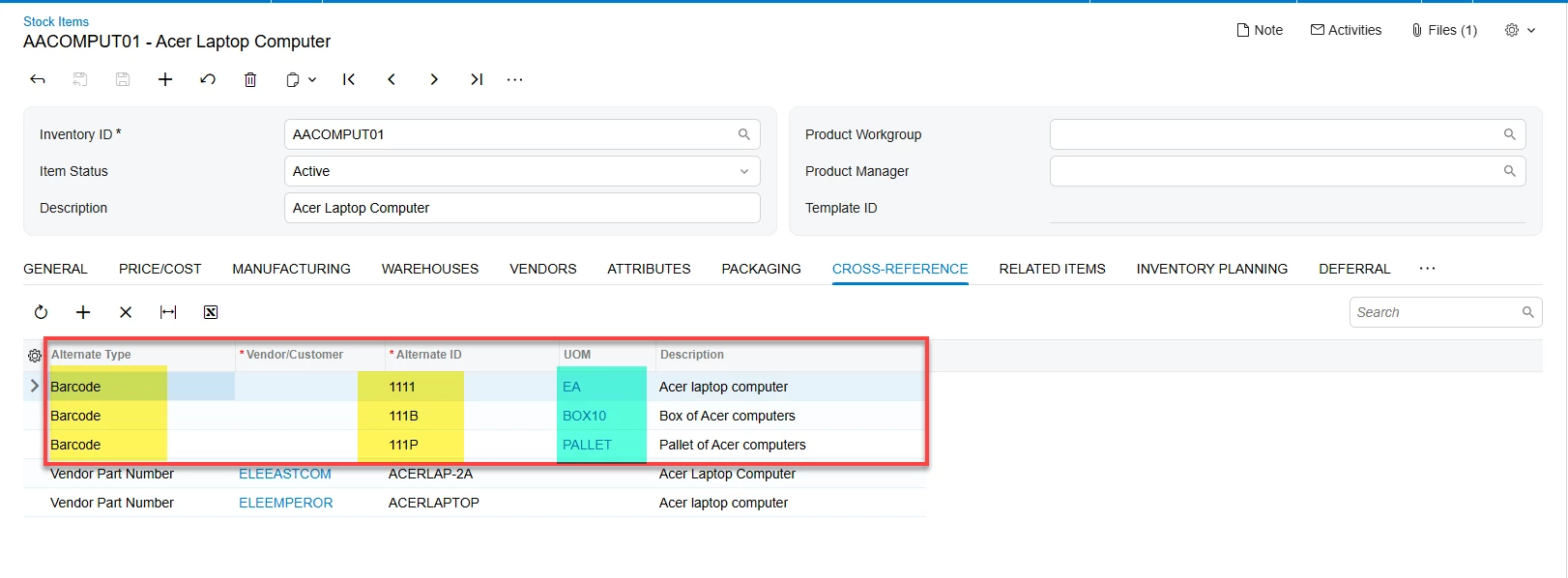
In Acumatica, you can use the Cross-Reference / Alternate ID functionality to associate multiple barcodes with the same Inventory ID and UOM. The important part is that each barcode should be associated with the appropriate UOM.
Enter your E-mail address. We'll send you an e-mail with instructions to reset your password.