Solved

Move all inventory to new warehouse

  • February 9, 2024
  • 8 replies
  • 292 views
  • Translate All

Forum|alt.badge.img

Client has established a new warehouse and needs to move all inventory (many items).  What is the best way to accomplish this?

Should we use the Physical Inventory Count function?  if so, does anyone have an import scenario for this?  

I see the “Physical Inventory Process and Transferring between Locations” post but that does not answer the question for us.

Thanks.


Best answer by AndrewBGL


To save time you can upload a spread sheet with the inventory you want to transfer. Also if your warehouse has locations you can transfer the inventory to the desired Row / Bin Location.

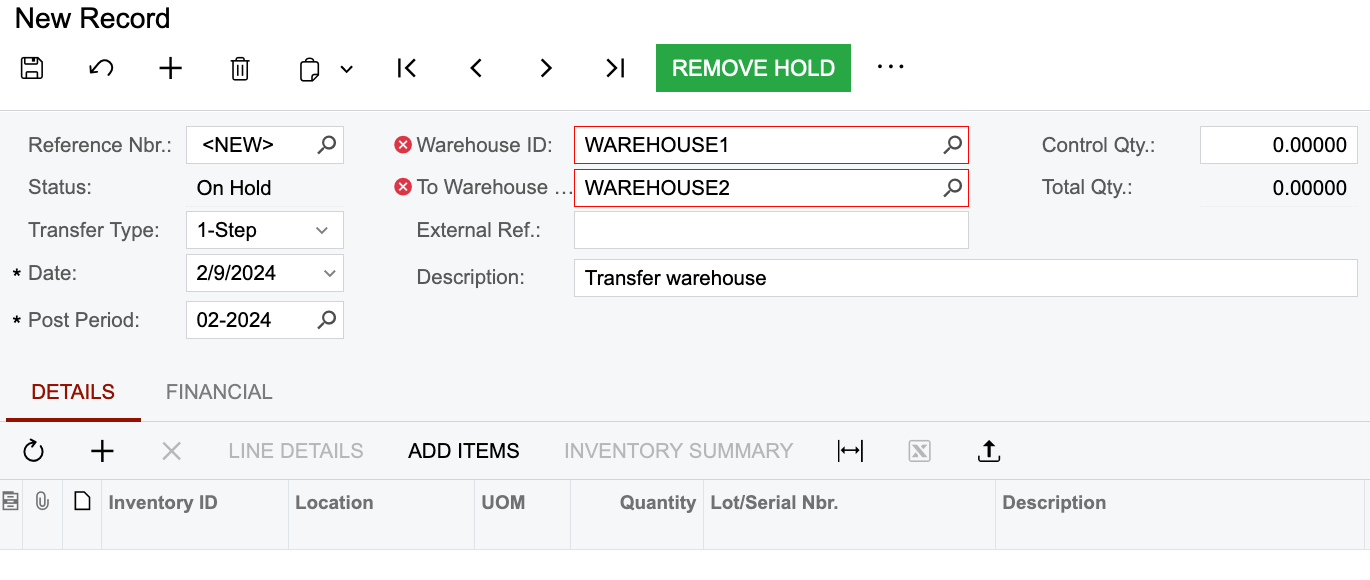
Also you can use a 1-step or 2-step Transfer type if you want the second warehouse manager to count and confirm the inventory that is received.


Let me know if you have any other questions. 

View original

8 replies

AndrewBGL
Pro I
Forum|alt.badge.img

Hello,

I would recommend using a transfer from one ware house to another.

Translate

AndrewBGL
Pro I
Forum|alt.badge.img
  • Pro I
  • Answer
  • February 9, 2024


To save time you can upload a spread sheet with the inventory you want to transfer. Also if your warehouse has locations you can transfer the inventory to the desired Row / Bin Location.

Also you can use a 1-step or 2-step Transfer type if you want the second warehouse manager to count and confirm the inventory that is received.


Let me know if you have any other questions. 

Translate

Forum|alt.badge.img

There could be more to this question, would the client want to keep their stock aging with the move to the new warehouse?

Translate

AndrewBGL
Pro I
Forum|alt.badge.img

There could be more to this question, would the client want to keep their stock aging with the move to the new warehouse?

Hello @frederickodendaal77,

Yes this is a good question.


Translate

AndrewBGL
Pro I
Forum|alt.badge.img

Also since they want to move all stock you can use the Storage Summary page to download an Excel file based on the warehouse. The file will include all Storage ID in case a single SKU is stored in multiple locations across the warehouse. 

You can they edit the excel file and then upload it to inventory transfer page.  

Translate

AndrewBGL
Pro I
Forum|alt.badge.img
Here is a screen shot of the storage summary page. 


Translate

Forum|alt.badge.img
Here is a screen shot of the storage summary page. 


They must just remember to expand by lot/serial so that they can get the serial or lot numbers in the excel export as well

Translate

Forum|alt.badge.img
  • Semi-Pro II
  • February 15, 2024

There could be more to this question, would the client want to keep their stock aging with the move to the new warehouse?

Stock aging is not kept during Transfers as there is a new Transfer Out / In date on both sides. 

If your stock uses some form of dating as part of the lot/serial it will mantain that lot/serial number though.

Translate