



How can I see Inventory on hand, reserved, and available in a grid view? I am sure someone is doing this already. Are you creating a GI or am I just missing where to go and get this. I would like all of my inventory to populate in a grid view. I dont want to look at one item at a time I would like to populate the full inventory list and then filter and sort. Stock items screen lacks inventory information I am needing.
Solved
Inventory on hand, reserved, and available
Best answer by kyle90
I’d agree that out of the box reports are really lacking on visibility of inventory stock status - I have to imagine most of us are building something very specific to the business needs, but would’ve appreciated a better starting point when we went live
Luckily, the data on this one is pretty accessible - Take a look at a GI with InventoryItem left joined to INSiteStatus based on inventoryID and you should be able to build up what you’re after fairly quick.
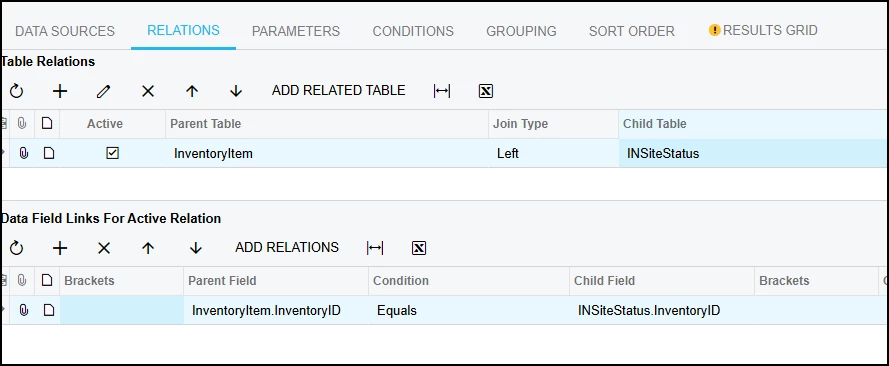
From there you can start adding unique paramaters, conditions, side panels etc or join additional data and get something way better than any stock report was going to provide!


Enter your E-mail address. We'll send you an e-mail with instructions to reset your password.