Installing Acumatica Demo and Service Unavailable 503 Error

  • January 13, 2022
  • 6 replies
  • 841 views

I am trying to create a demo to mess around with so we can be as educated as possible before we start using Acumcatica live. I have downloaded the installer from this site and installed it according to the installation guide and I inserted the “Sales Demo” data to mess with. When I go to pull up the website it first says that it refused the connection and then I get a 503 Error. I open up my IIS manager and that application pool has stopped. I also look in the event viewer for a clue and I get 5 warnings.

The first 3 state the following:

“A process serving application pool 'Acumatica' suffered a fatal communication error with the Windows Process Activation Service. The process id was '24456'. The data field contains the error number.”

The second 2 state:

“A process serving application pool 'Acumatica' terminated unexpectedly. The process id was '23804'. The process exit code was '0xc0000005'.”

Then an error:

Application pool 'Acumatica' is being automatically disabled due to a series of failures in the process(es) serving that application pool.

I am not sure what I did/doing wrong! If someone could please give me a little direction.

Thank you very much!

6 replies

Naveen Boga
Captain II
Forum|alt.badge.img+19
  • Captain II
  • January 14, 2022

@jstuck23  Below article is explained about the installation of Acumatica setup, hope you have followed. Can you please reverify

https://www.acumatica.com/blog/quick-start-acumatica-developer-guide/


Forum|alt.badge.img+12
  • Acumatica Support Team
  • January 14, 2022

Hi @jstuck23 

Please provide your server configuration. Ensure it meets system requirement mentioned on our installation guide (the server part in particular).

https://help-2021r2.acumatica.com/(W(4))/Help?ScreenId=ShowWiki&pageid=a8d5d39d-513a-4f93-b484-a95eb33103a1

Let us know if all components comply recommended setup.

Regards,


  • Author
  • Freshman I
  • January 19, 2022

I am within in all of the requirements with the exception of that I am installing it on Window 11 Pro  @vkumar 

Yes that is the way I have installed Acumatica several times @Naveen B 

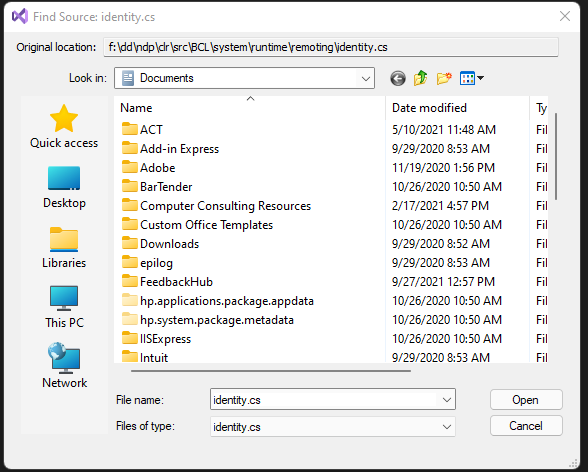
So something new. I have opened the site up in Visual Studio Community Edition and I get the following message:


It is looking for an identity.cs file and it can’t find it anywhere in the Acumatica installation folder or the C:/. I am not sure what in the world is going on here but I would appreciate any more help that anyone can provide! 


Chris Hackett
Community Manager
Forum|alt.badge.img
  • Acumatica Community Manager
  • January 26, 2022

Hi @jstuck23 were you able to figure this out? Thanks!


  • Author
  • Freshman I
  • January 26, 2022

@Chris Hackett No, I just gave up. It was not worth the time and hassle. Thank you for following checking.


Forum|alt.badge.img+3
  • Captain II
  • November 27, 2022

@jstuck23  I too encountered the same error. Upon analysing it came to my view the the IIS Application Pool was stopped. Now after restarting it, my instance got running.