Solved

HEIC File Type Mobile Upload

  • May 5, 2023
  • 4 replies
  • 263 views

Forum|alt.badge.img+1

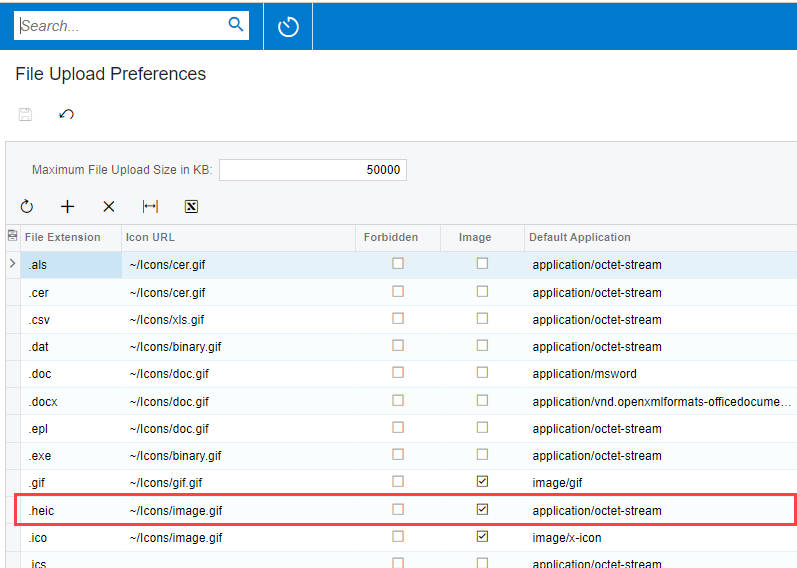
We’re running 22R1 and having an issue with users being able to upload images of HEIC file type. We’ve added this file type to the file upload preferences screen and selected the check box for “image”. However, when we try to upload this file type from the mobile app, it says that this file type is not allowed. Anyone have any ideas on what is going on here?

Best answer by meganfriesen37

You can add this option on the File Upload Preferences screen as well as control the size of imported files.  The HEIC file type is a newer photo type coming from iPhones.


4 replies

Forum|alt.badge.img+1
  • Author
  • Jr Varsity II
  • 33 replies
  • May 17, 2023

Anyone have any ideas on how to upload an HEIC file from a mobile device? Is this not supported in Acumatica?


meganfriesen37
Captain II
Forum|alt.badge.img+12
  • Captain II
  • 710 replies
  • Answer
  • May 17, 2023

You can add this option on the File Upload Preferences screen as well as control the size of imported files.  The HEIC file type is a newer photo type coming from iPhones.



APistorius
Jr Varsity II
Forum|alt.badge.img+1
  • Jr Varsity II
  • 32 replies
  • March 8, 2024

Has anyone been able to get HEIC files to render as images in a PDF report built through report designer?


ACunningham33
Freshman I
Forum|alt.badge.img+1
  • Freshman I
  • 9 replies
  • April 10, 2024

Thank you @meganfriesen37 ! We just started bank feeds for expense receipt creation and we were having an issue when going in to add a photo from our iphones, it wasn’t recognizing the HEIC format as an acceptable format, but I followed that screen shot above and now it’s perfect!