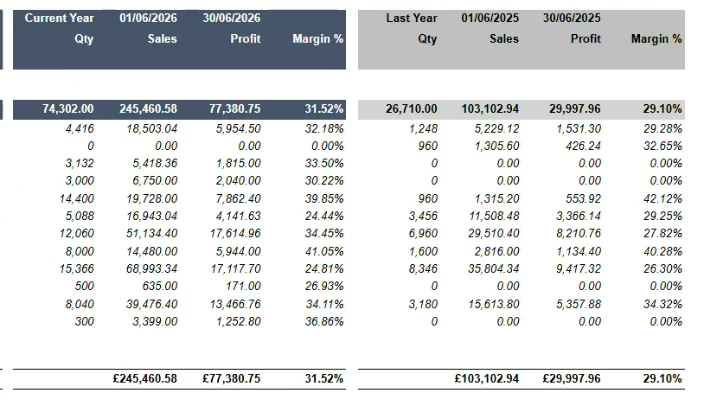
Really struggling with this one. Customer uses Crystal reports for a year on year analysis so can do full sql etc. I’m trying to reproduce this below in a GI and this is for a specific customer
Where is becomes difficult is that when they go live there is no last year data although we will have a legacy dac and that is challenge when there is no option to do union, has anyone else achieved this ?
Best answer by craig2
Hi @KeithEvans25 ,
There’s probably a couple of approaches to this, but here’s one idea. I used SOOrder, you may want to use ARInvoice instead. And in the Parameter creation you may want to set the “End Date” defaults to a hard-coded 6/30/2026, but then it’s something to be tweaked next year. This current setup should work for a YTD comparison.
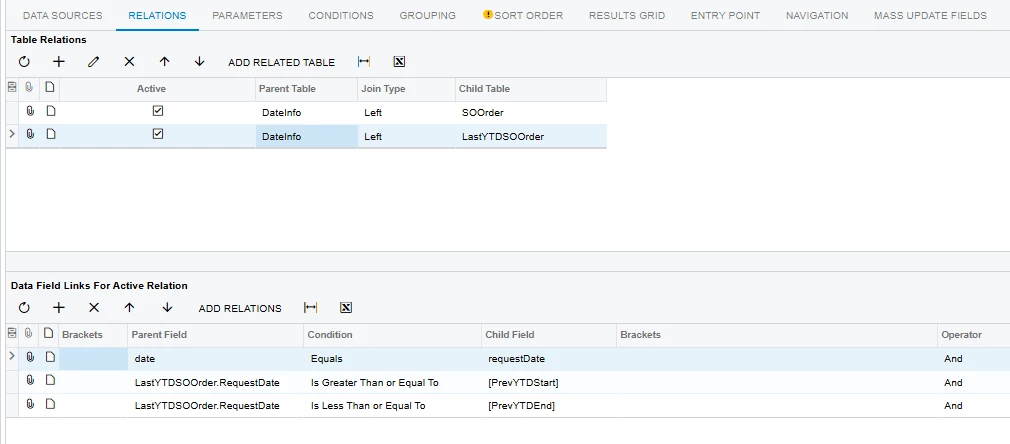
I use DateInfo as your base table, then your SOOrder/ARInvoice table, and then another with an Alias. If you want to pull your legacy DAC data in, you should be able to do a third Join there, using the same Relation strategy as the “PrevYTD” connection.
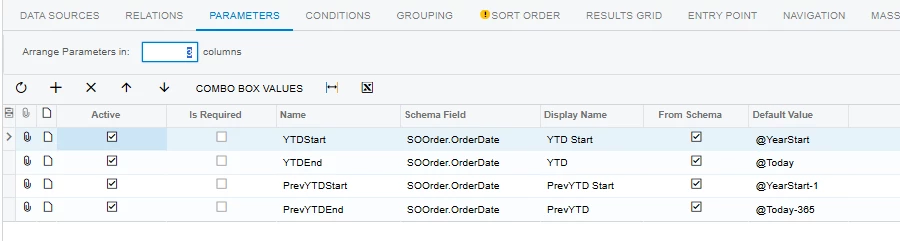
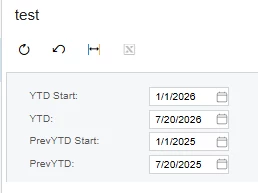
Before you do your Relations you’ll want to do your Parameters first. Here’s a quick version of how I set it up, though this is the default for a YTD/PrevYTD comparison. If you truly wanted it to immediately default to the end of June, you’ll need to set up some kind of DateAdd() formula instead.
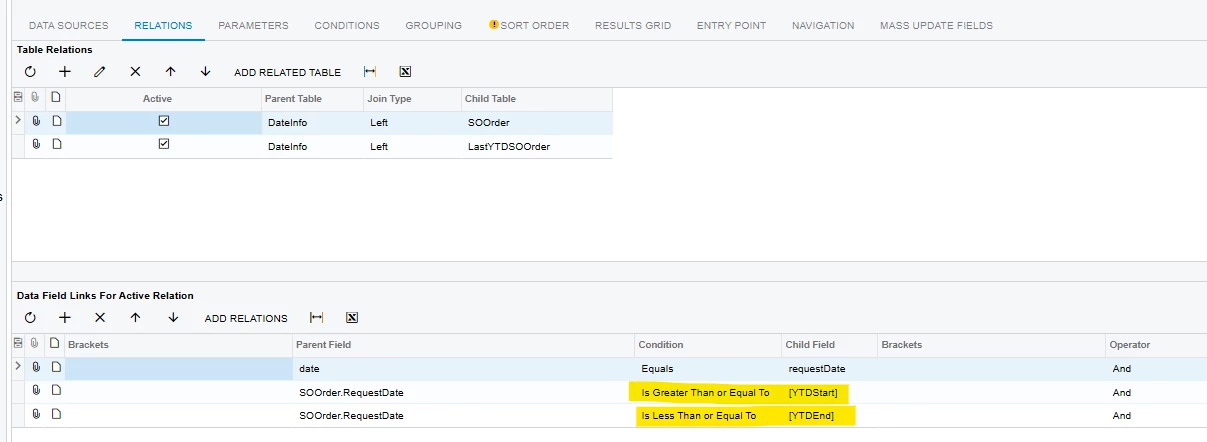
Now, on your Relations, you can reference the Parameters to get your data slices:
Again, if you have a custom Legacy DAC, you’ll want to add that as a third Relation. Assuming there’s no overlap, the GI should transition cleanly in future years from your Legacy to just the “Last” alias table you set up.
Anyway, from here, you should be able Group by your Customer ID. Again, that could get tricky depending on how your Legacy DAC ID’s customers. Assuming everything can play well together though, after Grouping just add your fields/columns from your Current and Last tables with Sum Aggregates.
Hopefully that at least gets you on the right track, best of luck!
There’s probably a couple of approaches to this, but here’s one idea. I used SOOrder, you may want to use ARInvoice instead. And in the Parameter creation you may want to set the “End Date” defaults to a hard-coded 6/30/2026, but then it’s something to be tweaked next year. This current setup should work for a YTD comparison.
I use DateInfo as your base table, then your SOOrder/ARInvoice table, and then another with an Alias. If you want to pull your legacy DAC data in, you should be able to do a third Join there, using the same Relation strategy as the “PrevYTD” connection.
Before you do your Relations you’ll want to do your Parameters first. Here’s a quick version of how I set it up, though this is the default for a YTD/PrevYTD comparison. If you truly wanted it to immediately default to the end of June, you’ll need to set up some kind of DateAdd() formula instead.
Now, on your Relations, you can reference the Parameters to get your data slices:
Again, if you have a custom Legacy DAC, you’ll want to add that as a third Relation. Assuming there’s no overlap, the GI should transition cleanly in future years from your Legacy to just the “Last” alias table you set up.
Anyway, from here, you should be able Group by your Customer ID. Again, that could get tricky depending on how your Legacy DAC ID’s customers. Assuming everything can play well together though, after Grouping just add your fields/columns from your Current and Last tables with Sum Aggregates.
Hopefully that at least gets you on the right track, best of luck!