
Question

EasyPost DHL Ship Via Codes changed?

  • Nov 14, 2024 2:43 PM UTC
  • 4 replies
  • 231 views
  • Translate All

Forum|alt.badge.img

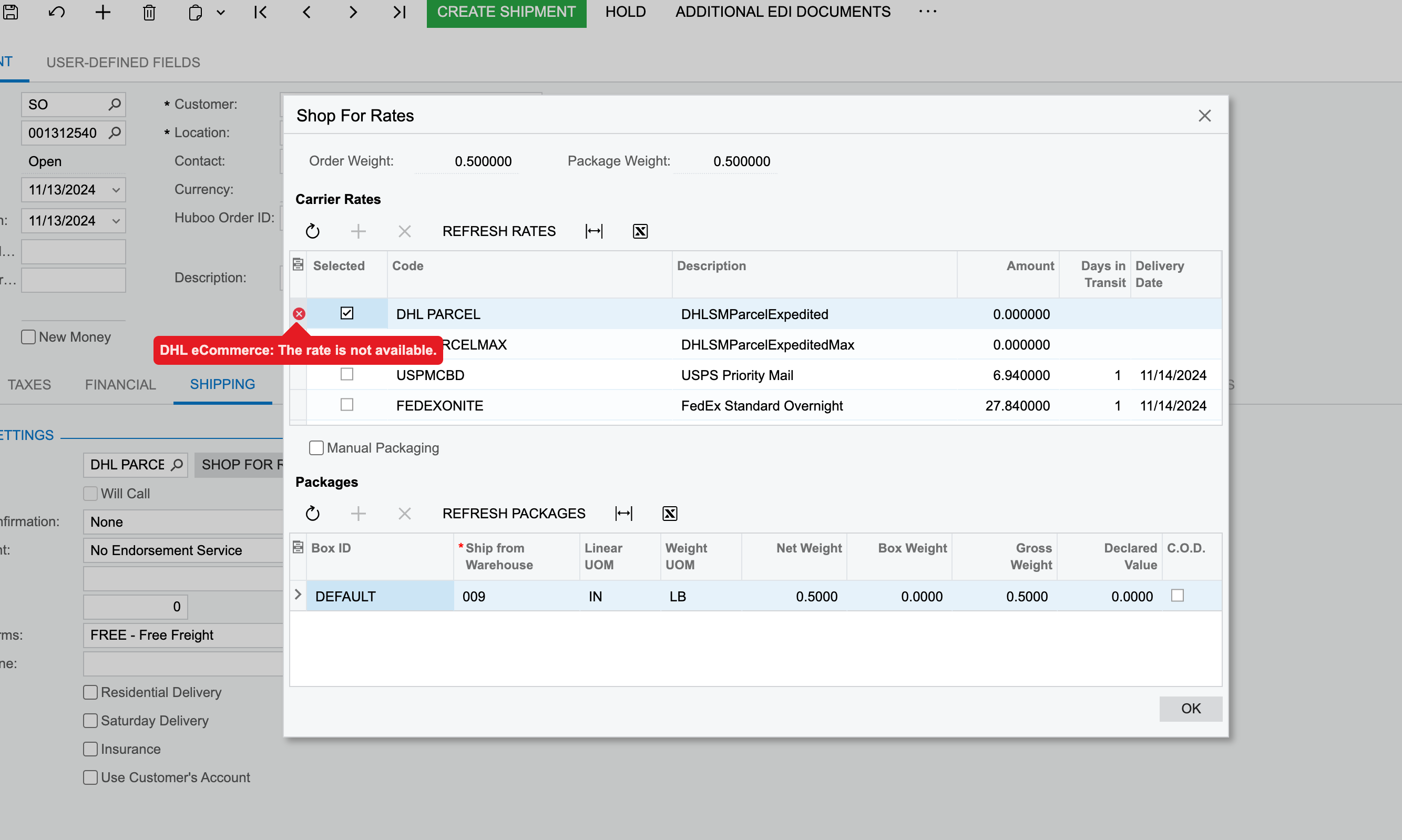
We use DHL Ecommerce through EasyPost, and have had no issues for a year, but a few days ago DHL started to not return any rates.

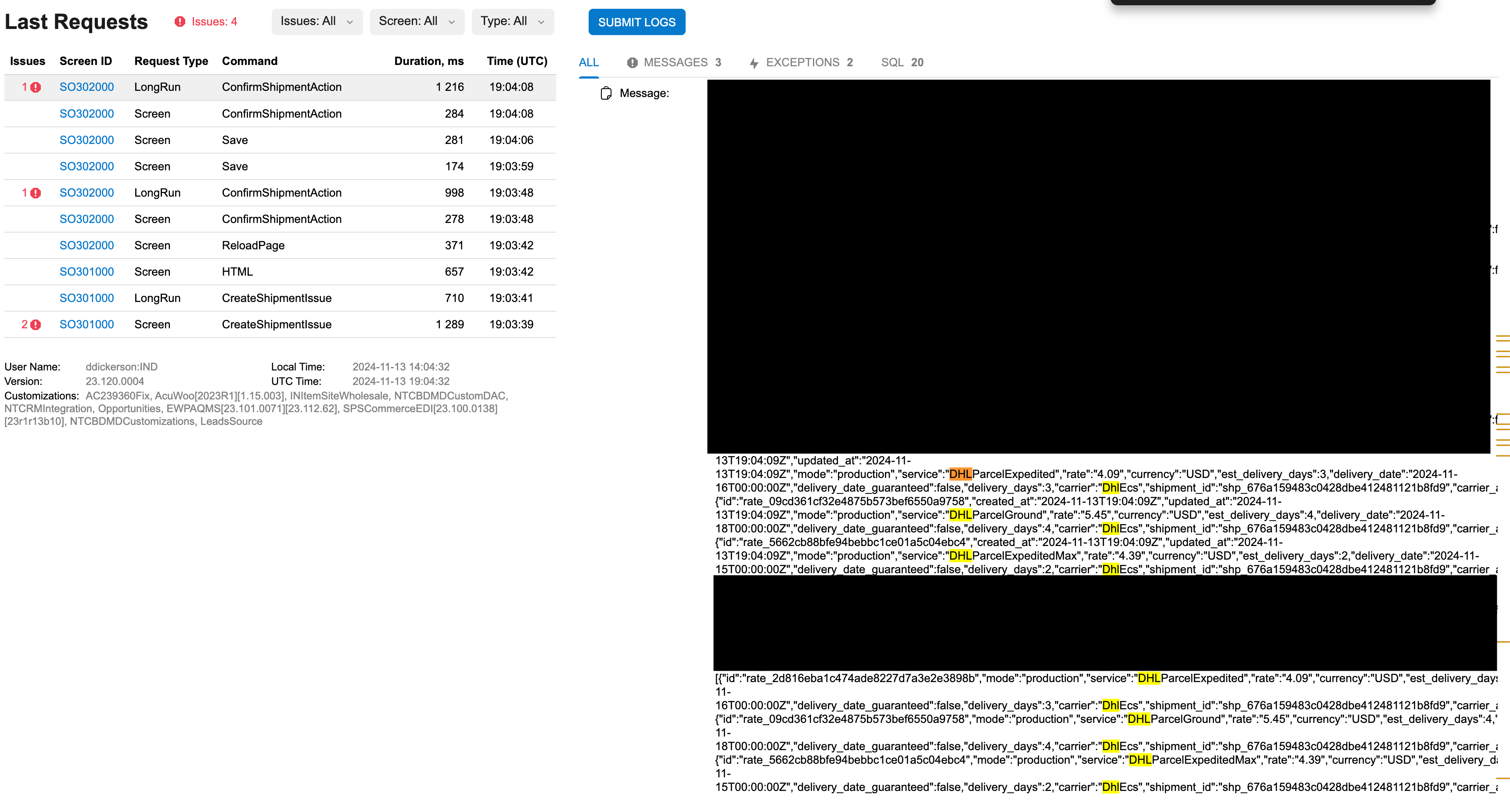
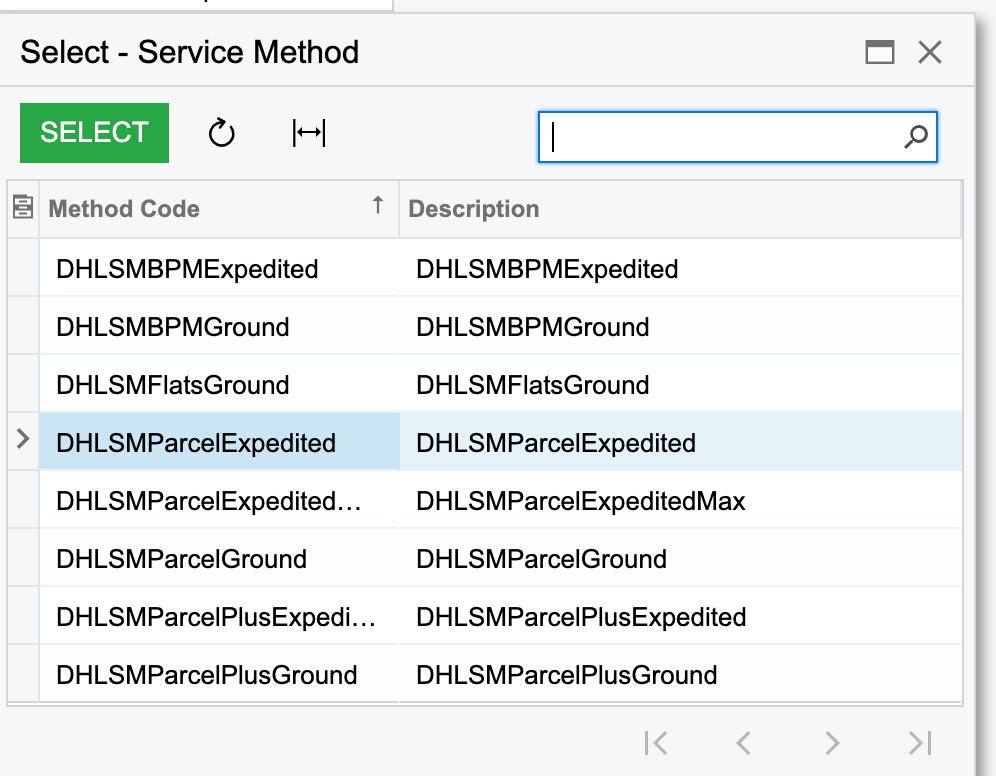
I noticed all the selectable codes now have SM in them, but in the trace for the error, the SM is not there, nor is it in the codes on the EasyPost site itself. 

Nothing was changed on our end before the errors started to happen. 

The codes look like this now. 

DHLSMParcelExpedited vs DHLParcelExpedited 

DHLSMParcelGround vs DHLParcelGround


I’ve reached out to DHL, EP, and Acumatica and not had any luck. Any suggestions for what I can do?
 

4 replies

Mary06
Freshman II
  • Freshman II
  • Nov 14, 2024 3:30 PM UTC

Hi, 

I see a few steps you could try:

1. If possible, add the "SM" prefix versions of the codes (e.g., DHLSMParcelExpedited instead of DHLParcelExpedited) directly in Acumatica’s shipping settings. This might allow Acumatica to recognize the updated service codes.

2. Ensure your Acumatica and EasyPost integrations are up-to-date, as recent patches may include fixes for this type of compatibility issue. Sometimes, carrier integrations get updated on either the platform or third-party provider side, requiring you to refresh or sync new data.

3. Try defining custom rate codes using EasyPost’s developer tools, mapping the new "SM" codes to the old ones. This can help bridge the difference between what DHL is providing and what EasyPost expects.

I think these steps should help

Translate

Forum|alt.badge.img
  • Author
  • Jr Varsity III
  • Nov 14, 2024 5:00 PM UTC

Hi, 

I see a few steps you could try:

1. If possible, add the "SM" prefix versions of the codes (e.g., DHLSMParcelExpedited instead of DHLParcelExpedited) directly in Acumatica’s shipping settings. This might allow Acumatica to recognize the updated service codes.

2. Ensure your Acumatica and EasyPost integrations are up-to-date, as recent patches may include fixes for this type of compatibility issue. Sometimes, carrier integrations get updated on either the platform or third-party provider side, requiring you to refresh or sync new data.

3. Try defining custom rate codes using EasyPost’s developer tools, mapping the new "SM" codes to the old ones. This can help bridge the difference between what DHL is providing and what EasyPost expects.

I think these steps should help

Thank you for your response Mary, 

  1. I’ve tried to do this and the rate will not show up in the “Shop For Rates” pop-up, and if I just force it I get another error stating “carrier service returned error. dhl ecommerce:value cannot be null. parameter name: method.
  2. As far as I can tell, everything is up to date. I’ve spoke with EasyPost developers and they have reiterated they get live rates from DHL, and it would not be an issue with their service. 
Translate

  • Freshman I
  • Nov 15, 2024 10:32 PM UTC

Hi ​@ddickerson 

We faced a similar issue with Accumatica in the past, but we found a solution with the eZintegrations platform. With eZintegrations, you can ensure that DHL service codes are correctly mapped and, if necessary, update or remap older codes. The platform also makes it easy to dynamically retrieve updated service codes from EasyPost, minimizing the chances of discrepancies in the future.

Lastly please verify if DHL or EasyPost has recently made updates to their APIs, particularly with the introduction of the new "SM" codes for service types. These updates could directly impact rate retrieval.

Translate

Chris Hackett
Community Manager
Forum|alt.badge.img
  • Acumatica Community Manager
  • Jan 22, 2025 1:17 AM UTC

Hi ​@Rachel02 were you able to find a solution? Thank you!

Translate