

Solved

Cannot revoke access to "Prepare Invoice" button/action for custom role (Access Rights issue)

  • October 2, 2026
  • 7 replies
  • 88 views
  • Translate All

Hi community,

I am trying to remove the "Prepare Invoice" (Prepare Invoice / SO302000) button/action on the Shipments screen for a specific role called "Planner - MRP".

However, I am running into an issue when setting the permissions in both Access Rights by Role (SM201025) and Access Rights by Screen (SM201020):

  1. In Access Rights by Role (SM201025): When I select the Prepare Invoice action under Shipments and change Access Rights to Revoked (Rechazado), it automatically reverts back to Inherited (Heredado). The "Applied to Nesting" (Aplicado al Anidado) checkbox is checked and greyed out/read-only, so I cannot uncheck it to break inheritance.

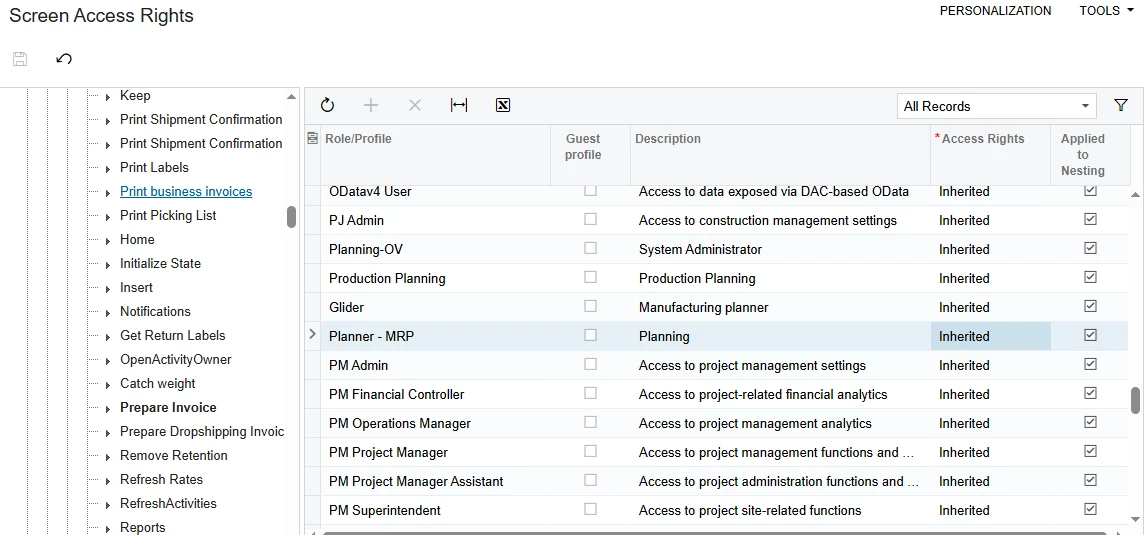
  2. In Access Rights by Screen (SM201020): Navigating directly to the Prepare Invoice node in the tree and selecting the Planner - MRP role shows Inherited, but the dropdown is locked or automatically reverts, and the "Applied to Nesting" box remains checked without allowing edits.

Environment Details:

  • Screen: Shipments (SO302000)

  • Action/Button: Prepare Invoice (Prepare Invoice)

  • Target Role: Planner - MRP

Has anyone encountered this issue where an action's inheritance cannot be overridden at the role or screen level? Is there a parent node, workflow condition, or Automation Definition that forces this action to remain inherited?

Any insights or recommended workarounds would be greatly appreciated!


Best answer by Eric Ratté

Hi, to change inherited for something else, you must change the upper-level first. So, in your example, you must first set the access right of the screen to Delete and then you will be able to set the access right to the action to Revoked.

View original

7 replies

Eric Ratté
Jr Varsity I
Forum|alt.badge.img+4
  • Jr Varsity I
  • Answer
  • October 2, 2026

Hi, to change inherited for something else, you must change the upper-level first. So, in your example, you must first set the access right of the screen to Delete and then you will be able to set the access right to the action to Revoked.

Translate

  • Author
  • Freshman I
  • October 2, 2026

​@Eric Ratté  Thanks, you're right: I was able to do it. Have a good day.

Translate

mohammadnawaz51
Varsity I
Forum|alt.badge.img+8

​@Ariyair Here is the sample Path for setting access rights.


Translate

  • Author
  • Freshman I
  • October 2, 2026

​@Eric Ratté Thanks, you're right: I was able to do it. Have a good day.

Translate

Forum|alt.badge.img
  • Freshman I
  • October 19, 2026

​@Eric Ratté we had the same request, and this worked for us as well. We’re somewhat confused why we have to set the screen to Delete just to revoke the Prepare Invoice action for the role.

Do you have any knowledge of that hierarchy/process you can easily share? Thanks in advance..

Translate

Eric Ratté
Jr Varsity I
Forum|alt.badge.img+4

Hi,

I understood but didn’t know how to explain technically, I asked AI Assistant and here what it says:


Access Rights Hierarchy

Access levels in Acumatica are hierarchical (from lowest to highest):


The Inheritance Principle

Site → Workspace → Screen → Action Button

         ↓            ↓           ↓

      Inherited    Inherited   Inherited

When a screen is in "Inherited" mode:

  • Rights are inherited from the parent level
  • You cannot customize the rights of child elements (actions)
  • The system "locks" the configuration


"Delete" is the maximum ceiling level.

By setting the screen to "Delete", you:

  1. Break the inheritance → The screen now has its own explicit rights
  2. Establish the maximum ceiling → Child actions can have any level equal or lower
  3. Unlock customization → You can now revoke individual actions
Translate

Forum|alt.badge.img
  • Freshman I
  • October 19, 2026

Hi,

I understood but didn’t know how to explain technically, I asked AI Assistant and here what it says:


Access Rights Hierarchy

Access levels in Acumatica are hierarchical (from lowest to highest):


The Inheritance Principle

Site → Workspace → Screen → Action Button

         ↓            ↓           ↓

      Inherited    Inherited   Inherited

When a screen is in "Inherited" mode:

  • Rights are inherited from the parent level
  • You cannot customize the rights of child elements (actions)
  • The system "locks" the configuration


"Delete" is the maximum ceiling level.

By setting the screen to "Delete", you:

  1. Break the inheritance → The screen now has its own explicit rights
  2. Establish the maximum ceiling → Child actions can have any level equal or lower
  3. Unlock customization → You can now revoke individual actions

Thanks! appreciate your  help

Translate

