Question

Cannot edit sale return in SO module

  • Oct 20, 2026 8:44 AM UTC
  • 7 replies
  • 87 views
  • Translate All

Forum|alt.badge.img
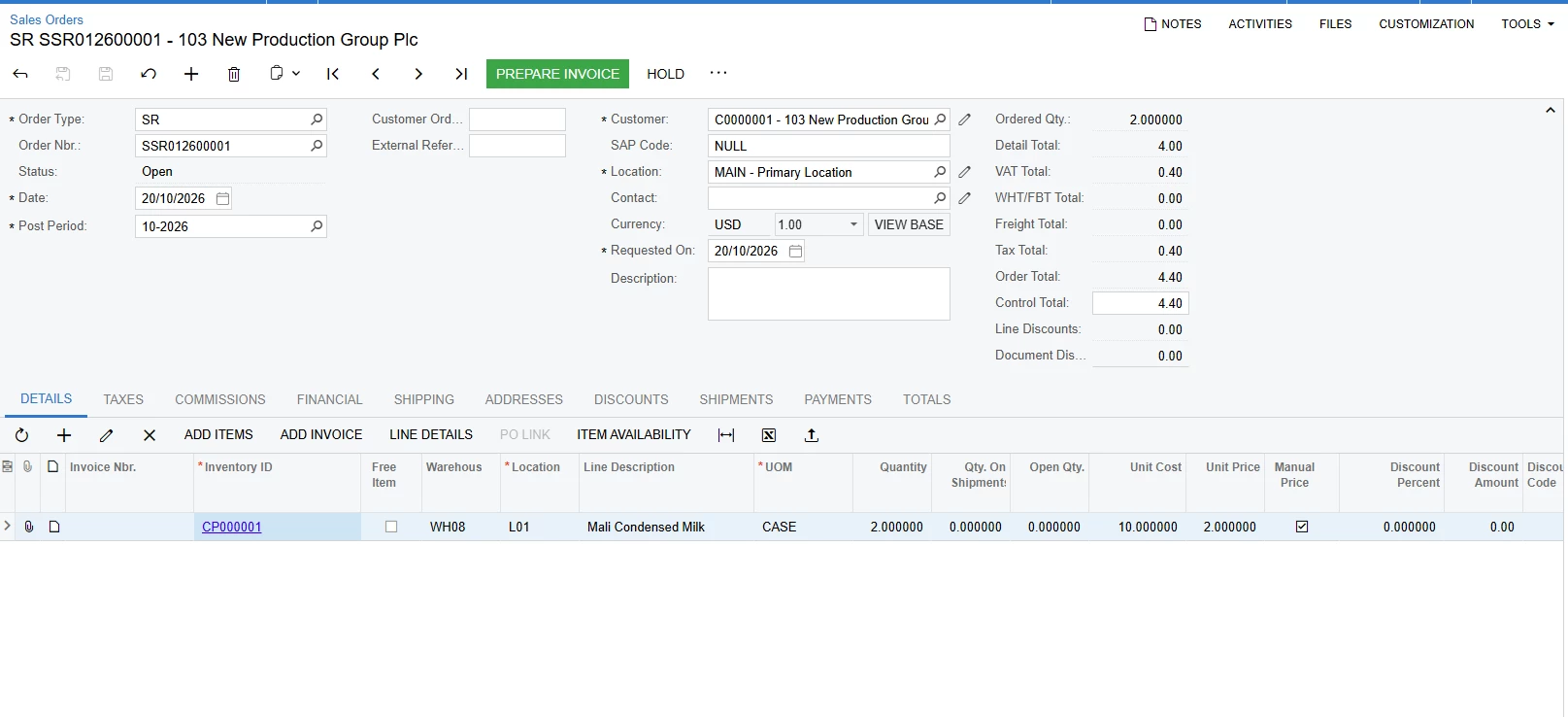
  1. I create sale return and prepare invoice it’s automatically generate credit memo (this is ok)
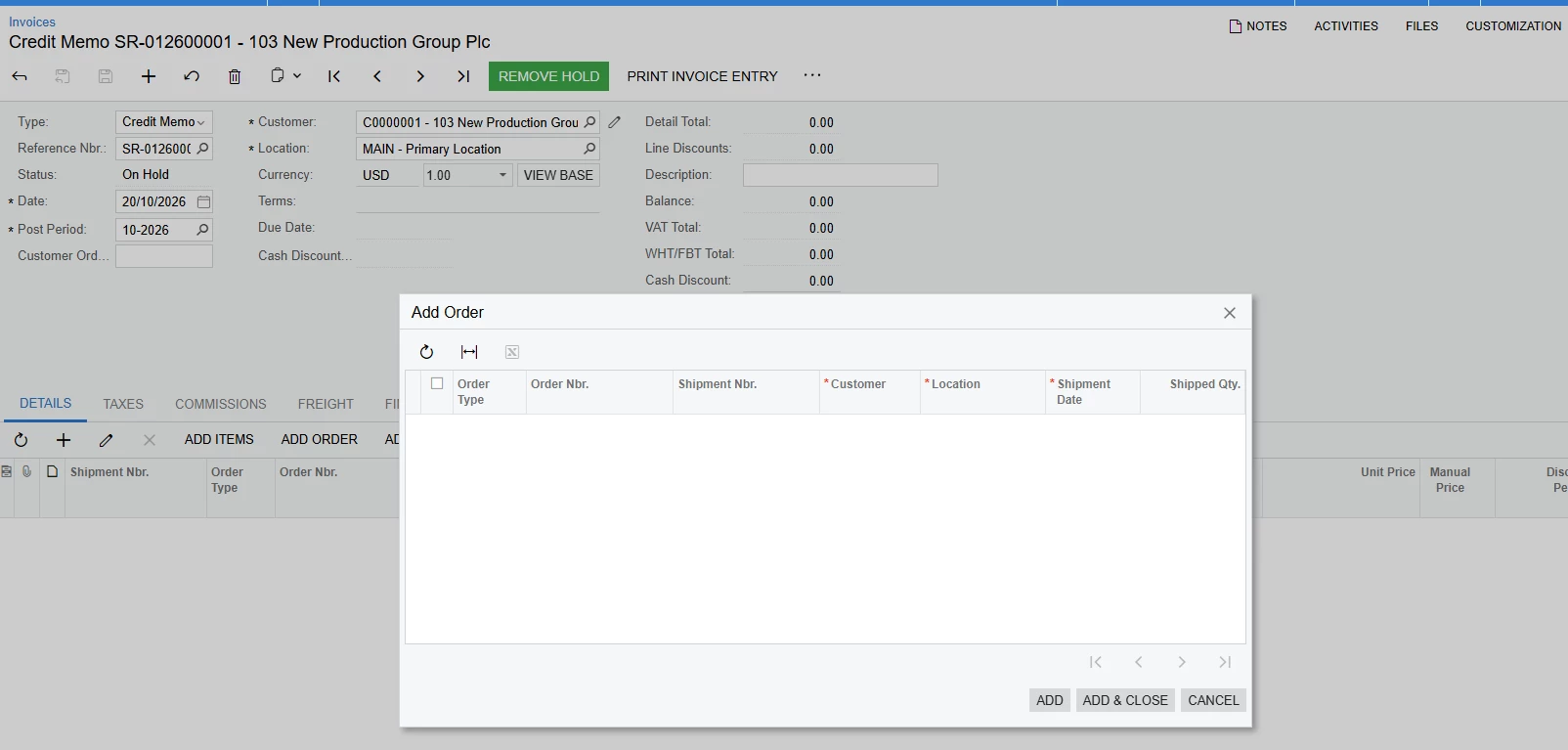
  2. I edit credit memo by deleting items details tab
  3. go back to sale return in so and update items
  4. in credit memo I click add sale order to add my sale return but I cannot find it. How to make it work.
     

7 replies

Forum|alt.badge.img+4
  • Captain II
  • Oct 20, 2026 10:38 AM UTC

Acumatica's standard workflow creates a Credit Memo from the return order using Prepare Invoice. The Credit Memo contains links to the related sales order and shipment, so deleting its detail lines does not necessarily make the source order available again.

1. Check the Sales Return status
- Open the Sales Return in Sales Orders (SO301000).
- Check its status and whether it has already been invoiced or completed.
- Check whether the updated item lines are saved.
2. Check the Credit Memo
- Open Invoices (SO303000).
- Check whether the Credit Memo is still on hold or has already been released.
- Check whether the original Sales Return is still linked to it.
3. Try the appropriate recovery
- If the Credit Memo is still on hold, save it and check whether the original order remains linked.
- If it has already been released, don't try to reuse it by simply adding the Sales Return again. You may need to create a new return/credit document, depending on the document status and processing history.

Translate

Forum|alt.badge.img+1

Hi ​@vannakheng,

Could you clarify what changes you made to the Sales Return after deleting the lines from the Credit Memo?

For example:

  • Did you add new lines to the Sales Return?
  • Did you modify the quantity, inventory item, warehouse, or price on existing lines?
  • Was the Sales Return saved after the changes were made?

Understanding the specific changes will help determine whether the document is still linked to the existing Credit Memo and whether the behavior you're seeing is expected.

Translate

Steve Milner
Varsity III
Forum|alt.badge.img+7
  • Varsity III
  • Oct 20, 2026 6:45 PM UTC

@vannakheng Add Order can't find it because that list doesn't show orders on their own. It shows orders that have a shipment or receipt that hasn't been invoiced yet. A return you invoiced straight from the order, with no receipt, never shows up there.

Go back to the return on Sales Orders (SO301000) and click Prepare Invoice again. That builds a new credit memo from the return as it is now, with your updated items.

I ran your steps on 2026 R1 with a CM order type. Prepare Invoice made the credit memo. I deleted its line and saved, and the return went back to Open, which is why you were able to edit it. I changed the quantity from 1 to 2, and Add Order on the old credit memo came up empty, same as yours. Prepare Invoice on the return then made a new credit memo for 2.

The old credit memo stays behind with no lines and a zero balance.

Translate

Forum|alt.badge.img
  • Author
  • Freshman II
  • Oct 21, 2026 4:42 AM UTC

Hi ​@vannakheng,

Could you clarify what changes you made to the Sales Return after deleting the lines from the Credit Memo?

For example:

  • Did you add new lines to the Sales Return?
  • Did you modify the quantity, inventory item, warehouse, or price on existing lines?
  • Was the Sales Return saved after the changes were made?

Understanding the specific changes will help determine whether the document is still linked to the existing Credit Memo and whether the behavior you're seeing is expected.

I just modify the quantity 

Translate

Forum|alt.badge.img
  • Author
  • Freshman II
  • Oct 21, 2026 4:45 AM UTC

@vannakheng Add Order can't find it because that list doesn't show orders on their own. It shows orders that have a shipment or receipt that hasn't been invoiced yet. A return you invoiced straight from the order, with no receipt, never shows up there.

Go back to the return on Sales Orders (SO301000) and click Prepare Invoice again. That builds a new credit memo from the return as it is now, with your updated items.

I ran your steps on 2026 R1 with a CM order type. Prepare Invoice made the credit memo. I deleted its line and saved, and the return went back to Open, which is why you were able to edit it. I changed the quantity from 1 to 2, and Add Order on the old credit memo came up empty, same as yours. Prepare Invoice on the return then made a new credit memo for 2.

The old credit memo stays behind with no lines and a zero balance.

Yes, we can do that, but my credit memo number auto generate, and I don’t want to lose number ref

Translate

Steve Milner
Varsity III
Forum|alt.badge.img+7
  • Varsity III
  • Oct 21, 2026 7:27 PM UTC

@vannakheng With auto numbering, you can't keep that number. I tested your case on 2026 R1. Add Order and Add SO Line on the old credit memo both came up empty for the return, and Prepare Invoice always creates a new credit memo with the next number. The old number stays on the empty credit memo.

The quantity on a credit memo line that came from the return is locked too, so it can't be changed in place on the credit memo.

Translate

Forum|alt.badge.img
  • Author
  • Freshman II
  • Nov 10, 2026 6:42 AM UTC

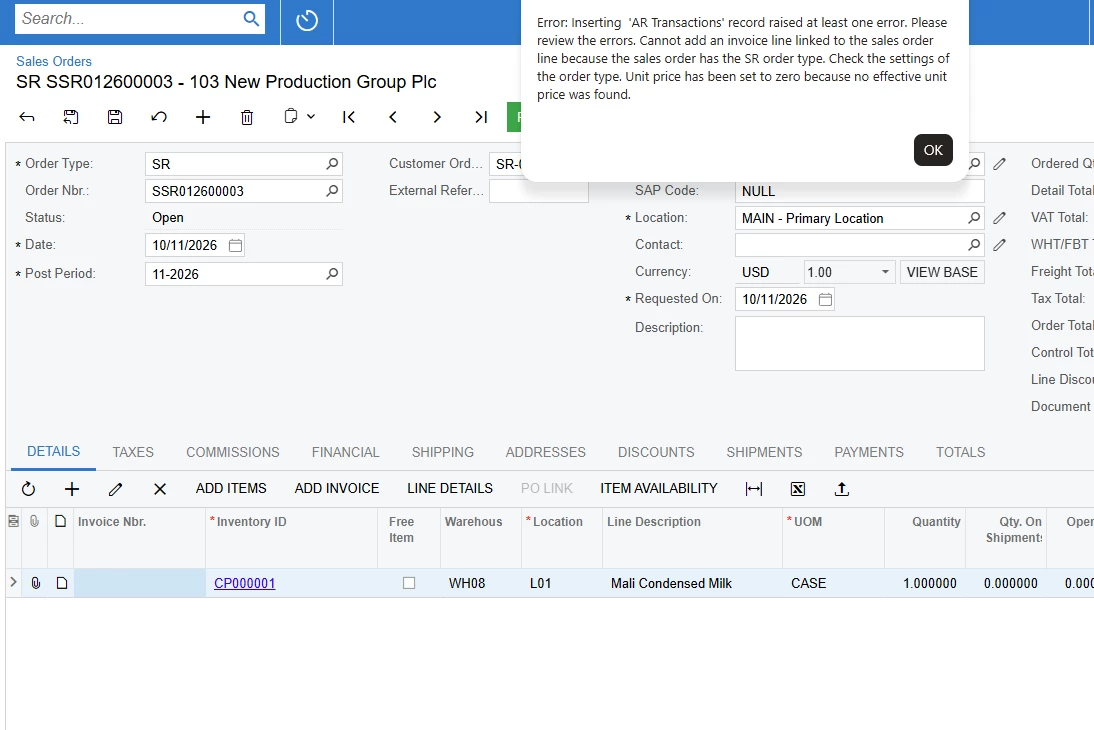
Now I customized the sale return but show me this error. Do you guy help ?

public PXAction<SOOrder> RestoreInvoiceLink;

[PXButton(CommitChanges = true)]
[PXUIField(
    DisplayName = "Restore Invoice Link",
    MapEnableRights = PXCacheRights.Update,
    MapViewRights = PXCacheRights.Select
)]
protected virtual IEnumerable restoreInvoiceLink(PXAdapter adapter)
{
    SOOrder order = Base.Document.Current;

    if (order == null)
        // Acuminator disable once PX1050 HardcodedStringInLocalizationMethod [Justification]
        throw new PXException("No Sales Order selected.");

    if (order.Status == SOOrderStatus.Completed ||
        order.Cancelled == true)
    {
        // Acuminator disable once PX1050 HardcodedStringInLocalizationMethod [Justification]
        throw new PXException(
            "This Sales Return cannot be restored."
        );
    }

    // Find the original shipment/invoice relationship.
    SOOrderShipment link =
        PXSelect<SOOrderShipment,
            Where<
                SOOrderShipment.orderType,
                Equal<Required<SOOrderShipment.orderType>>,
            And<
                SOOrderShipment.orderNbr,
                Equal<Required<SOOrderShipment.orderNbr>>>>>
        .Select(Base, order.OrderType, order.OrderNbr);

    if (link == null)
    {
        // Create missing SOOrderShipment relationship
        SOOrderShipment newLink = new SOOrderShipment
        {
            OrderType = order.OrderType,
            OrderNbr = order.OrderNbr,

            // These values must come from the original
            // shipment and Credit Memo relationship.
            ShipmentType = "I",
            ShipmentNbr = "<NEW>",
            CustomerID = order.CustomerID,
            CustomerLocationID = order.CustomerLocationID,
            ShipDate = order.ShipDate,
            ShipmentQty = order.OrderQty,
            ShipAddressID = order.ShipAddressID,
            ShipContactID = order.ShipContactID,
            Confirmed = true,
            Operation = "R",
            LineTotal = order.LineTotal,
            InvoiceNbr = order.CustomerOrderNbr,
            CreateINDoc = true,
            CreateARDoc = true,

            InvoiceType = ARDocType.CreditMemo
        };

        Base.Caches<SOOrderShipment>().Insert(newLink);
        Base.Save.Press();

        SOInvoiceEntry ie = PXGraph.CreateInstance<SOInvoiceEntry>();

        ARInvoice invoice = ARInvoice.PK.Find(
            ie,
            ARDocType.CreditMemo,
            order.CustomerOrderNbr
        );

        if (invoice == null)
            // Acuminator disable once PX1050 HardcodedStringInLocalizationMethod [Justification]
            throw new PXException("Original Credit Memo not found.");

        ie.Document.Current = invoice;
        // add arline here
        var lines = PXSelect<SOLine,Where<SOLine.orderType,Equal<Required<SOLine.orderType>>,And<SOLine.orderNbr,Equal<Required<SOLine.orderNbr>>>>>
                    .Select(Base, order.OrderType, order.OrderNbr)
                    .RowCast<SOLine>()
                    .ToList();
        foreach (SOLine line in lines)
        {
            ARTran tran = new ARTran
            {
                SOOrderType = line.OrderType,
                SOOrderNbr = line.OrderNbr,
                OrigInvoiceType = line.InvoiceType, 
                OrigInvoiceNbr = line.InvoiceNbr,
                InventoryID = line.InventoryID,
                SiteID = line.SiteID,
                LocationID = line.LocationID,
                TranDesc = line.TranDesc,
                Qty = line.OrderQty,
                UOM = line.UOM,
                SOOrderLineNbr = line.LineNbr,

                CuryUnitPrice = line.CuryUnitPrice,
                CuryExtPrice = line.CuryExtPrice,

                TaxCategoryID = line.TaxCategoryID,

                AccountID = line.SalesAcctID,
                SubID = line.SalesSubID,
                BranchID = line.BranchID,
            };
            ARTran inserted = ie.Transactions.Insert(tran);

            if (inserted != null)
            {
                inserted.CuryUnitPrice = line.CuryUnitPrice;
                inserted.CuryExtPrice = line.CuryExtPrice;
                ie.Transactions.Update(inserted);
            }

            //ie.Transactions.Insert(tran);
        }

        ie.Actions.PressSave();
    }

    return adapter.Get();
}

Translate