Answer

Adding allocation to stock items GI

  • April 23, 2024
  • 6 replies
  • 138 views

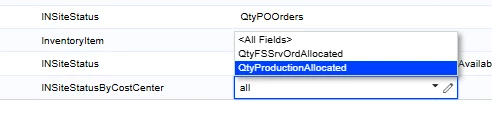
Hi, I need some assistance on editing my Stock Item GI to track the # of FG that are currently allocated.

I was able to add these in the image below but I can’t seem to get a table to work.


Best answer by plambert


I believe you are looking for the “SO Shipping” value. Ordered quantities increase SO Backordered (or SO Booked depending on order type) until they are allocated, then SO Shipping when allocated, and then SO Shipped once on a confirmed shipment.
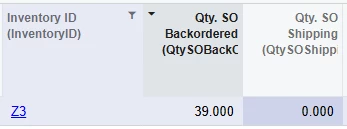
Before Allocation
Allocation on the Sales Order
After Allocation

There does not appear to be a value to track picked inventory values before this shipment is confirmed. Inventory increases SO Shipping with and without a created shipment.

6 replies

Forum|alt.badge.img
  • Freshman I
  • May 29, 2025

Hello Acumatica

does anyone have an answer to the above question? because I have the same issue. we need to see which stock items are on sales orders and allocated


  • Jr Varsity II
  • May 30, 2025

We setup a new GI to track this using the tables PX.Objects.IN.InventoryItem and PX.Objects.IN.INSiteStatus

Relation

(Parent Table) Inventory Item | Left Join | (Child Table) InSiteStatus

InventoryID equals InventoryID


Forum|alt.badge.img+1

Starting 23R2, the INSiteStatus DAC was replaced by the INSiteStatusByCostCenter DAC, so if the instance is on 23R2 or higher, this new table may need to be used.


Forum|alt.badge.img
  • Freshman I
  • June 4, 2025

hello ​@MinushaWeerasuriya76 I can only see two allocated fields but neither of these are the straight allocated qty. any further clues?


plambert
Semi-Pro I
Forum|alt.badge.img+2
  • Semi-Pro I
  • Answer
  • June 10, 2025


I believe you are looking for the “SO Shipping” value. Ordered quantities increase SO Backordered (or SO Booked depending on order type) until they are allocated, then SO Shipping when allocated, and then SO Shipped once on a confirmed shipment.
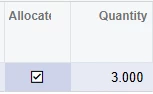
Before Allocation
Allocation on the Sales Order
After Allocation

There does not appear to be a value to track picked inventory values before this shipment is confirmed. Inventory increases SO Shipping with and without a created shipment.


Forum|alt.badge.img
  • Freshman I
  • June 16, 2025


I believe you are looking for the “SO Shipping” value. Ordered quantities increase SO Backordered (or SO Booked depending on order type) until they are allocated, then SO Shipping when allocated, and then SO Shipped once on a confirmed shipment.
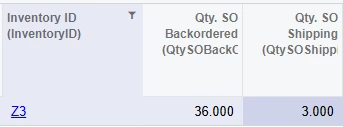
Before Allocation
Allocation on the Sales Order
After Allocation

There does not appear to be a value to track picked inventory values before this shipment is confirmed. Inventory increases SO Shipping with and without a created shipment.

Very helpful ​@plambert  this explains it very clearly. thank you