Solved

Add Customer PO Number to Shipping Label

  • Oct 22, 2024 6:45 PM UTC
  • 6 replies
  • 270 views
  • Translate All

nshah90
Jr Varsity III
Forum|alt.badge.img

Is there an OOTB way to pass the customer po number to the shipping label - UPS or FEDEX?


Feels like there should be a mapping somewhere but I feel like I am missing it.  

Best answer by vanessaafonso02

Based on the Carrier integration, information entered in the Custom Ref fields on the packages tab will translate to Transaction Numbers. 

Example: PO#12345 will convert to Purchase No: 12345 for EasyPost UPS labels.  

IK#321EST will convert to Invoice No: 321TEST for EasyPost UPS labels. 

It will change for FedEx and other integrations.  Additional information is available on the Developer portals for EasyPost, ShipEngine, etc. 

We do not have a configurable option to automatically populate such information in the Custom Ref Fields. 

View original

6 replies

Forum|alt.badge.img+2
  • Jr Varsity III
  • Oct 22, 2024 11:02 PM UTC

In the Packages tab of the Shipment, there are 2 fields that can be used for data like a Customer PO Number:


Translate

Forum|alt.badge.img
  • Jr Varsity III
  • Oct 23, 2024 4:57 AM UTC

@nshah90  As per my knowledge we don’t have OOTB feature. It requires a customization to add the Customer PO Number in the Shipping Label.

Translate

vanessaafonso02
Acumatica Employee
Forum|alt.badge.img+1
  • Acumatica Support Team
  • Answer
  • Oct 24, 2024 3:30 PM UTC

Based on the Carrier integration, information entered in the Custom Ref fields on the packages tab will translate to Transaction Numbers. 

Example: PO#12345 will convert to Purchase No: 12345 for EasyPost UPS labels.  

IK#321EST will convert to Invoice No: 321TEST for EasyPost UPS labels. 

It will change for FedEx and other integrations.  Additional information is available on the Developer portals for EasyPost, ShipEngine, etc. 

We do not have a configurable option to automatically populate such information in the Custom Ref Fields. 

Translate

S1AW
Freshman II
Forum|alt.badge.img
  • Freshman II
  • Sep 4, 2025 6:35 PM UTC

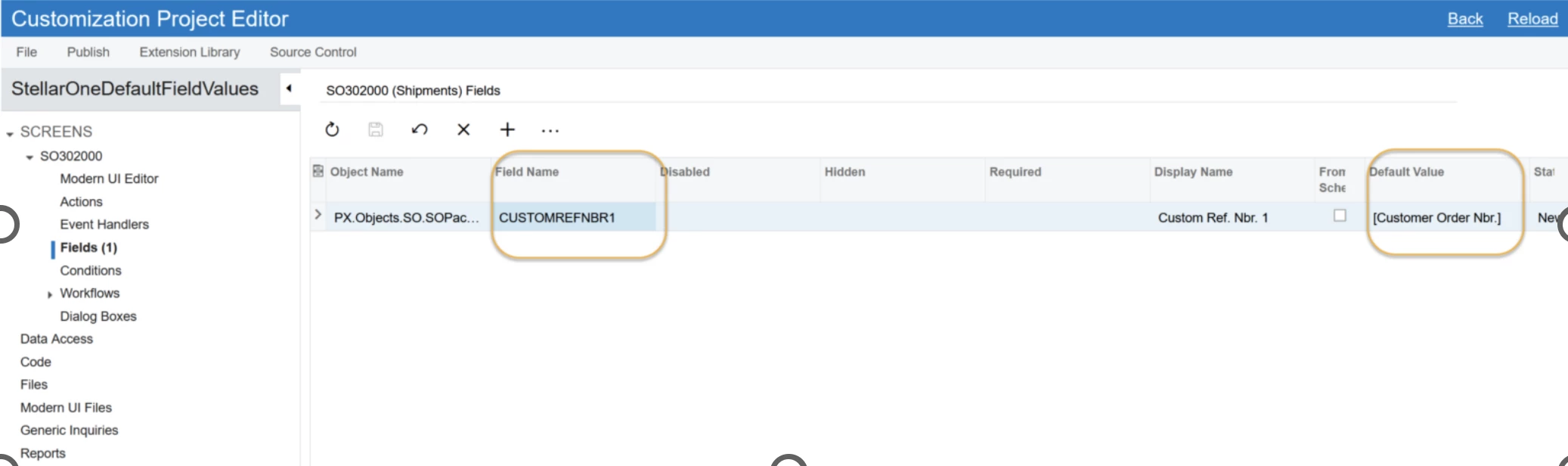
Just sharing that a limited number of fields can be mapped to  Custom Ref. Nbr 1 and  Custom Ref. Nbr 2 with this no-code solution.

It is possible to create a customization project focused on the fields on the Packages screen, and in those fields, you can set a default value from a limited set of fields. Using this approach I was able to have those fields’ values default to Customer Order Number and Shipping Number.  Just sharing in case this helps others. 


Translate

nshah90
Jr Varsity III
Forum|alt.badge.img
  • Author
  • Jr Varsity III
  • Sep 4, 2025 9:46 PM UTC

Thank you ​@S1AW 

Translate

Forum|alt.badge.img+1

As an update to this, the customization doesn’t work if you use Pick, Pack and Ship.  


What we ended up doing is modify the Carrier Labels report and just add the Customer PO # field under the shipping label image.  Not pretty but effective and works across all possible methods for confirming the shipment versus customization.  

Translate