

Question

What permission I need to publish Customisation on multiple Tenants?

  • July 15, 2026
  • 8 replies
  • 74 views

Jupiter
Freshman II
Forum|alt.badge.img

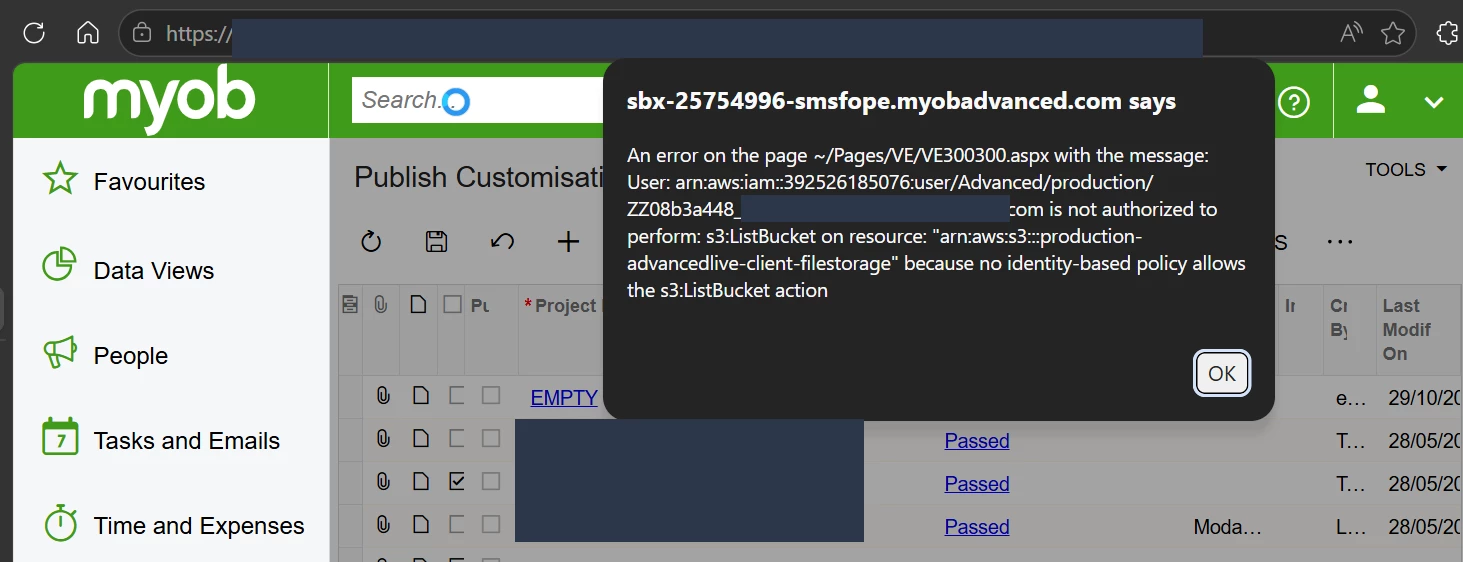
Trying to re-publish customisation as I am missing endpoint in copied Tenants.  Was hoping the missing endpoints will get created during the republish of customisation.  I am getting the following error.  Any idea what access level I need for my user.
 

8 replies

jinin
Pro I
Forum|alt.badge.img+12
  • Pro I
  • July 15, 2026

Hi ​@Jupiter ,

This is a known issue that can occur after copying a tenant. Republishing the existing customization package may fail with the error.

As a workaround, re-import the customization package into the copied tenant and then publish it again. This recreates the required resources, including the endpoints, and the publish should complete successfully.


Forum|alt.badge.img

Trying to re-publish customisation as I am missing endpoint in copied Tenants.  Was hoping the missing endpoints will get created during the republish of customisation.  I am getting the following error.  Any idea what access level I need for my user.

 

@Jupiter 

Hi,
I have encountered a similar issue before.

Based on the screenshot, this does not appear to be an Acumatica user access rights issue. You can try the following approaches:

1. Verify the AWS S3 permissions

The error indicates that the AWS IAM user or role configured for the instance does not have permission to perform the s3:ListBucket operation on the S3 bucket used for customization storage.

If you're managing the infrastructure yourself, ask your system or cloud administrator to review the IAM policy and ensure it includes the required S3 permissions (such as s3:ListBucket and the necessary object read/write permissions).

If this is a MYOB Acumatica SaaS environment, customers typically do not manage the AWS IAM policies. In that case, I recommend raising a support ticket with MYOB Support, as they will need to review and correct the underlying AWS configuration.

2. Republish the customizations

Another approach that has worked in some cases is to unpublish all customization projects and then publish them again. If the issue is related to the customization state rather than the AWS configuration, this may resolve it.


Jupiter
Freshman II
Forum|alt.badge.img
  • Author
  • Freshman II
  • July 15, 2026

Hi ​@Jupiter ,

This is a known issue that can occur after copying a tenant. Republishing the existing customization package may fail with the error.

As a workaround, re-import the customization package into the copied tenant and then publish it again. This recreates the required resources, including the endpoints, and the publish should complete successfully.

Thanks ​@jinin , I tried to export the customisation but it only exports the first customisation and in our case we have 20+.  Is there a way to bulk export the customisation?


Trying to re-publish customisation as I am missing endpoint in copied Tenants.  Was hoping the missing endpoints will get created during the republish of customisation.  I am getting the following error.  Any idea what access level I need for my user.


@Jupiter 

Hi,
I have encountered a similar issue before.

Based on the screenshot, this does not appear to be an Acumatica user access rights issue. You can try the following approaches:

1. Verify the AWS S3 permissions

The error indicates that the AWS IAM user or role configured for the instance does not have permission to perform the s3:ListBucket operation on the S3 bucket used for customization storage.

If you're managing the infrastructure yourself, ask your system or cloud administrator to review the IAM policy and ensure it includes the required S3 permissions (such as s3:ListBucket and the necessary object read/write permissions).

If this is a MYOB Acumatica SaaS environment, customers typically do not manage the AWS IAM policies. In that case, I recommend raising a support ticket with MYOB Support, as they will need to review and correct the underlying AWS configuration.

2. Republish the customizations

Another approach that has worked in some cases is to unpublish all customization projects and then publish them again. If the issue is related to the customization state rather than the AWS configuration, this may resolve it.


Thanks ​@Srinivas Kota , how can I tell if our instance is MYOB Acumatica SaaS?  All I can see is Build 2023.118.502.1612 [23.118.0016] 


Jupiter
Freshman II
Forum|alt.badge.img
  • Author
  • Freshman II
  • July 15, 2026

Hi ​@Jupiter ,

This is a known issue that can occur after copying a tenant. Republishing the existing customization package may fail with the error.

As a workaround, re-import the customization package into the copied tenant and then publish it again. This recreates the required resources, including the endpoints, and the publish should complete successfully.

Thanks ​@jinin , is there a way to export multiple customisation at once?  I tried to export but it only exports the top one and we have over 20+.  Appreciate your help.


Jupiter
Freshman II
Forum|alt.badge.img
  • Author
  • Freshman II
  • July 15, 2026

Trying to re-publish customisation as I am missing endpoint in copied Tenants.  Was hoping the missing endpoints will get created during the republish of customisation.  I am getting the following error.  Any idea what access level I need for my user.


@Jupiter 

Hi,
I have encountered a similar issue before.

Based on the screenshot, this does not appear to be an Acumatica user access rights issue. You can try the following approaches:

1. Verify the AWS S3 permissions

The error indicates that the AWS IAM user or role configured for the instance does not have permission to perform the s3:ListBucket operation on the S3 bucket used for customization storage.

If you're managing the infrastructure yourself, ask your system or cloud administrator to review the IAM policy and ensure it includes the required S3 permissions (such as s3:ListBucket and the necessary object read/write permissions).

If this is a MYOB Acumatica SaaS environment, customers typically do not manage the AWS IAM policies. In that case, I recommend raising a support ticket with MYOB Support, as they will need to review and correct the underlying AWS configuration.

2. Republish the customizations

Another approach that has worked in some cases is to unpublish all customization projects and then publish them again. If the issue is related to the customization state rather than the AWS configuration, this may resolve it.


Thanks ​@Srinivas Kota is there way to tell if we are using MYOB Accumatica SaaS?  All I can see is Build 2023.118.502.1612 [23.118.0016] .  Appreciate your response.


jinin
Pro I
Forum|alt.badge.img+12
  • Pro I
  • July 15, 2026

Hi ​@Jupiter ,

No, Acumatica doesn't support exporting multiple customization projects at once. Each customization project must be exported individually.


KrunalDoshi
Semi-Pro II
Forum|alt.badge.img+6
  • Semi-Pro II
  • August 14, 2026

Hi ​@Jupiter,

It looks like the snapshot you restored may have been created without Files and Attachments. The error is referencing the Velixo customization screen.

However, based on the error, this does not appear to be related to a customization or access/permission issue.

I would recommend the following steps:

  1. Unpublish all customizations, if any are currently published.
  2. Delete the existing customization packages.
  3. Re-upload the required customization packages.
  4. Publish the customizations using Publish with Cleanup.

You should then be able to publish all the required customizations without any issues.

As a best practice, I would also recommend publishing the customizations from your LIVE/Production tenant to the multiple tenants to ensure that the same customization packages are used across environments.

Hopefully, this resolves the issue. Please let me know how it goes.


Naveen Boga
Captain II
Forum|alt.badge.img+20
  • Captain II
  • August 14, 2026

@Jupiter  As @jinin mentioned, this is a known issue. To resolve it, you will need to take the customization packages from the Production instance and re-import them into this instance. Once the packages are imported, please publish them to ensure that all the required customizations are properly applied.

Please note that the CUSTOMIZER role permission must be assigned to your user account in order to import and publish the customization packages.



