

Solved

Move changes from Customization Project to new

  • July 6, 2022
  • 5 replies
  • 250 views

Forum|alt.badge.img+2

Hi,

I need to create customization project that will include all functionality from existing 2 for more convenient way for deploying project

Does Acumatica support merge of 2 existing customization projects or adding changes from one project to another ? There is no difference in what way it could be done, I just need to gather all custom logic to one package. 

Acumatica version 2021R2

thanks in advance 
Best answer by markusray17

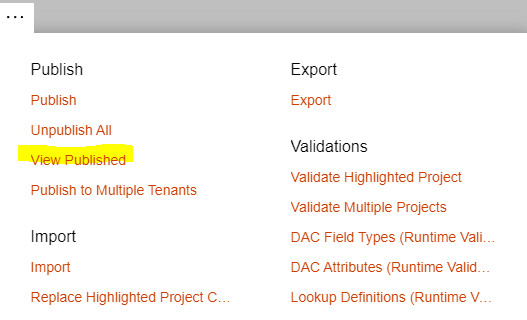
If the projects you wish to merge are the only projects published to can download the merged customization by clicking the “View Published” action and then “Download Package”. You can also save a project to a folder and manually merge item then load it into a new project. 


5 replies

Forum|alt.badge.img+5
  • Jr Varsity II
  • Answer
  • July 6, 2022

If the projects you wish to merge are the only projects published to can download the merged customization by clicking the “View Published” action and then “Download Package”. You can also save a project to a folder and manually merge item then load it into a new project. 


Forum|alt.badge.img+2
  • Author
  • Varsity I
  • July 6, 2022

@markusray17 

Thank you for provided info


Forum|alt.badge.img+2
  • Author
  • Varsity I
  • July 6, 2022

If the projects you wish to merge are the only projects published to can download the merged customization by clicking the “View Published” action and then “Download Package”. You can also save a project to a folder and manually merge item then load it into a new project. 


@markusray17 

I am sorry, I selected my comment as the best answer instead of yours

If admin remove best answer in this topic I will select your comment


Chris Hackett
Community Manager
Forum|alt.badge.img
  • Acumatica Community Manager
  • July 6, 2022

@Ivan - fixed😀


Forum|alt.badge.img+2
  • Author
  • Varsity I
  • July 7, 2022

@Ivan - fixed😀

@Chris Hackett  Thanks

