Solved

How to get Branch and Company IDs via SOAP API

  • Nov 23, 2021 10:56 PM UTC
  • 9 replies
  • 749 views
  • Translate All

Forum|alt.badge.img

Is there any glossary of complete customer object fields? I’m using SOAP API and some of the fields aren’t coming with the getSchema object and I have to find them by searching through Acumatica question/answers but I don’t know where they are listed properly??


So far I found:

LastModifiedDateTime

CreatedDateTime

Now looking for Branch and Company IDs but don’t know the exact field names.. any help?

Best answer by Naveen Boga

Hi @adilaleem  Could you please let me know, what version of Acumatica you are using?

If you are using higher version of Acumatica and lower version of DotNet framework you will get these kind of issues.

If you are using Acumatica version 21 R1, 21 R2 or 22 R1, then you should use the DotNet framework 4.8 version.

Let me know if this helps you.

View original

9 replies

jinin
Pro I
Forum|alt.badge.img+12
  • Pro I
  • Nov 24, 2021 5:56 PM UTC

Hi @adilaleem 

Its not possible to get the BranchID and CompanyID through the API call. But we can get the current company ID and BranchID using the below code.

  int? companyId = PXInstanceHelper.CurrentCompany;
 string branchID = AccessInfo.branchID;


Translate

Forum|alt.badge.img
  • Author
  • Jr Varsity III
  • Nov 29, 2021 5:56 PM UTC

Hi @adilaleem 

Its not possible to get the BranchID and CompanyID through the API call. But we can get the current company ID and BranchID using the below code.

  int? companyId = PXInstanceHelper.CurrentCompany;
 string branchID = AccessInfo.branchID;


Thanks Jinin. How to get PXInstanceHelper? what reference or library should I use?

Translate

jinin
Pro I
Forum|alt.badge.img+12
  • Pro I
  • Nov 29, 2021 5:59 PM UTC

Hi @adilaleem 

please use  PX.Data.Update as reference. 

Translate

Forum|alt.badge.img
  • Author
  • Jr Varsity III
  • Nov 29, 2021 6:03 PM UTC

Hi @adilaleem 

please use  PX.Data.Update as reference. 

Is there something I need to install?

Translate

jinin
Pro I
Forum|alt.badge.img+12
  • Pro I
  • Nov 29, 2021 6:14 PM UTC

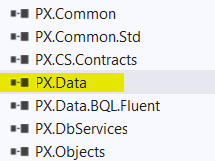
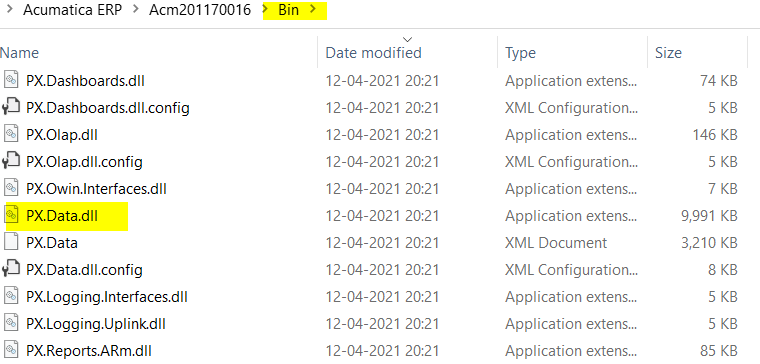
Yes @adilaleem  , we need to add Px.Data dll 
 

We can add the dll reference from the Acumatica instance Bin Folder.


Translate

Forum|alt.badge.img
  • Author
  • Jr Varsity III
  • Nov 29, 2021 8:03 PM UTC

Thanks Jinin.. but I don’t want to install anything. There must be a way to get Company and Branch info through webservices/APIs? if anyone else knows please help? @Chris Hackett any idea?

Translate

Chris Hackett
Community Manager
Forum|alt.badge.img
  • Acumatica Community Manager
  • Nov 29, 2021 8:35 PM UTC

Hi @adilaleem unfortunately I am more community manager than product expert at this time. I rely on the experts like @jinin to help others out with the product questions. :grin:

Translate

Forum|alt.badge.img
  • Author
  • Jr Varsity III
  • Nov 29, 2021 10:34 PM UTC

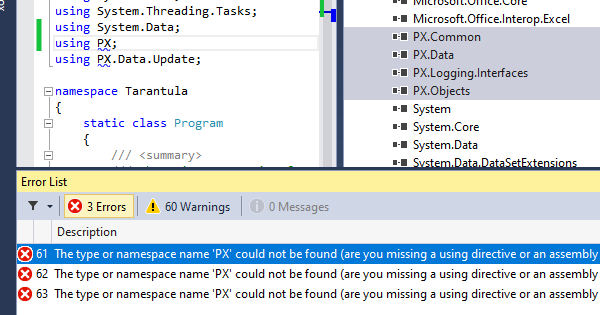
Also when I tried get it from DLL, project is throwing an error and not recognizing PX?? I have tried it with different Frameworks like 4, 4.5, 4.5.1, 4.5.2 and 4.5.7 but none of them working? I noticed that I also have a different path for the PX dlls at compare to yours: C:\Program Files\Acumatica ERP\AcumaticaERP\Bin\

Translate

Naveen Boga
Captain II
Forum|alt.badge.img+20
  • Captain II
  • Answer
  • Nov 30, 2021 2:49 AM UTC

Hi @adilaleem  Could you please let me know, what version of Acumatica you are using?

If you are using higher version of Acumatica and lower version of DotNet framework you will get these kind of issues.

If you are using Acumatica version 21 R1, 21 R2 or 22 R1, then you should use the DotNet framework 4.8 version.

Let me know if this helps you.

Translate