Solved

How to delete the existing vendors & add new & default vendors in Acumatica via Import scenario?

  • Nov 13, 2026 5:46 AM UTC
  • 2 replies
  • 18 views
  • Translate All

Forum|alt.badge.img

Hello all,

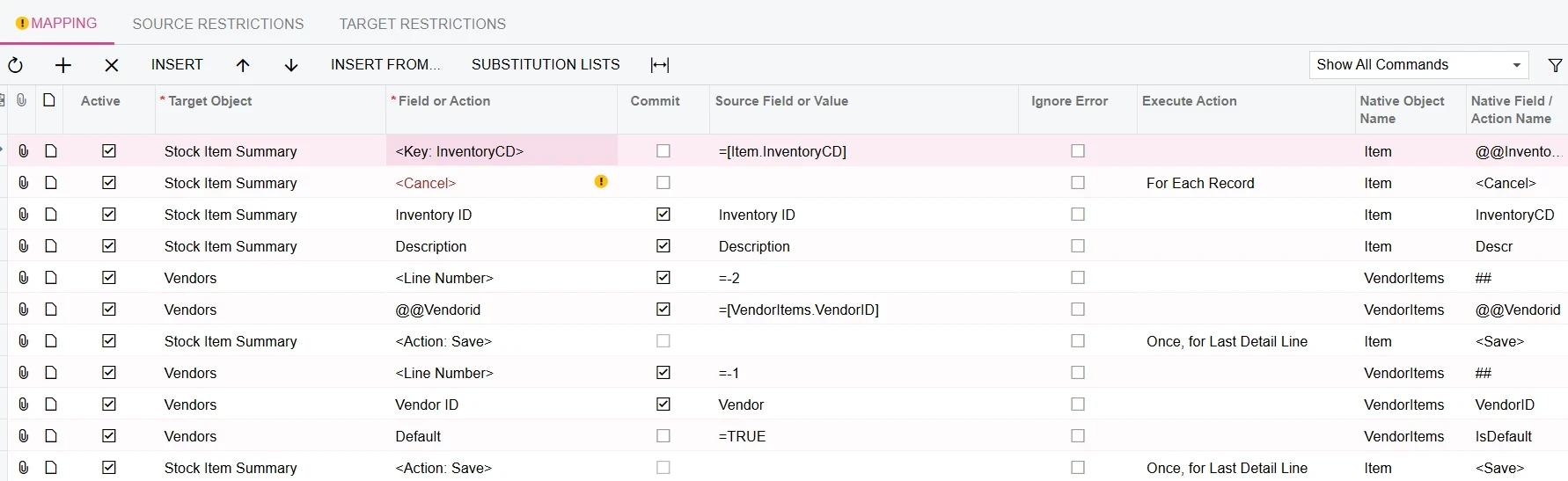
I have been struggling to create an import scenario where I’d like to delete the existing vendor records from the Non Stock items screen & add a new vendor & set it up as a default.

Best answer by haarshita51

Hi ​@Harry ,

The below might be helpful to you:


View original

2 replies

Forum|alt.badge.img+5
  • Varsity III
  • Answer
  • Nov 13, 2026 6:12 AM UTC

Hi ​@Harry ,

The below might be helpful to you:


Translate

Forum|alt.badge.img+8
  • Jr Varsity III
  • Nov 13, 2026 6:29 AM UTC

Hi ​@Harry ,

an import scenario can’t delete “all vendor rows”. It can only find a vendor row by its key and delete that one row. So your source data needs one row for each existing vendor you want to remove.

Recommended approach: two scenarios run in order

Build the delete list. Make a Generic Inquiry on the vendor–item table (POVendorInventory, joined to InventoryItem for the Inventory ID). Filter it to the non-stock items you’re changing. Return Inventory ID, Vendor ID and Location, and export the result to Excel. That file is the data source for Scenario 1.

Scenario 1 – Delete old vendors (one source row per item + vendor)

Target Object Field/Action Name Commit Source
Item Summary Inventory ID ✔ [InventoryID]
Vendors (VendorItems) <Key: Vendor>   [VendorID]
Vendors (VendorItems) <Key: Location>   [Location] (if you use locations)
Vendors (VendorItems) Delete (the row action) ✔ (blank)
Item Summary Save ✔ (blank)

The <Key: …> lines tell the scenario to find an existing row instead of inserting a new one. Without them, the Delete action runs on a new blank row and nothing gets removed. That’s the most common reason this doesn’t work.

Scenario 2 – Add the new default vendor (one source row per item)

Target Object Field/Action Name Commit Source
Item Summary Inventory ID ✔ [InventoryID]
Vendors (VendorItems) Vendor ✔ [NewVendorID]
Vendors (VendorItems) Location ✔ [NewLocation] (optional)
Vendors (VendorItems) Default   =True
Vendors (VendorItems) (other fields, e.g. Vendor Inventory ID, Lead Time)   …
Item Summary Save ✔ (blank)

Turning on Default for one row clears the flag on the other rows automatically, so you don’t need to switch the old vendors off first.

  • Consider running Scenario 2 first. If you add and default the new vendor before deleting, every item keeps a default vendor the whole time. It also avoids errors from items or processes that expect one.


Hope above helps !!

Translate