Solved

How do we resolve Price List sync error?

  • Apr 3, 2025 12:32 PM UTC
  • 6 replies
  • 183 views
  • Translate All

jessicapruitt
Freshman II

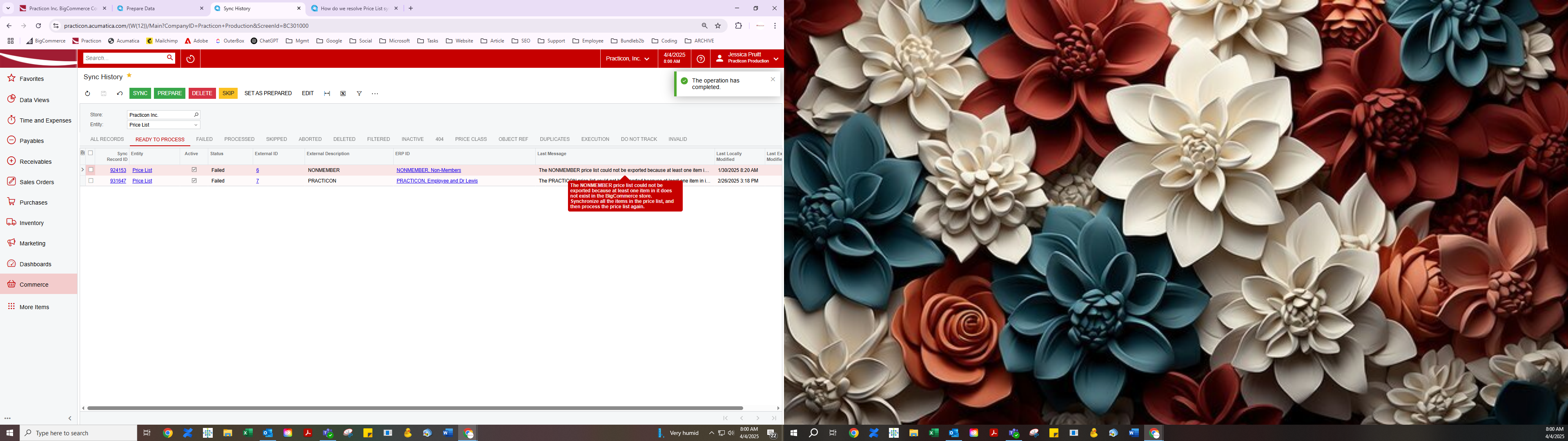
Last Read Message: The NONMEMBER price list could not be exported because at least one item in it does not exist in the BigCommerce store. Synchronize all the items in the price list, and then process the price list again.

We have 4 Price Lists, and all are reading the same error.

Price Lists: PREMIER, NONMEMBER, PRACTICON, WHOLESALE

We have no sync errors on the finished products. The only thing I can think of, is new products not yet ready to be installed in BigCommerce are on the Price Lists, so that may be stopping it. Is anyone familiar with this?


Best answer by jessicapruitt

We finally resolved the error. We had to remove all Base Price List records from each Price List if the finished product was not on BigCommerce. We had to resolve deleted and aborted Base Price List records from the sync. Cleared all finished product syncs-- no failures, aborted, and prepared.

View original

6 replies

hkabiri
Acumatica Moderator
Forum|alt.badge.img+8
  • Acumatica Support Team
  • Apr 3, 2025 3:09 PM UTC

​@jessicapruitt There is a good chance items linked to the price lists are not synced correctly between the two  (Acumatica and BigCommerce)

Translate

dcomerford
Captain II
Forum|alt.badge.img+16
  • Captain II
  • Apr 4, 2025 11:06 AM UTC

​@jessicapruitt Does it tell you the item causing it? If not you will need to export the items in the price list in to excel and export the Items and there Export to External System setting and ensure they are all ticked on. You could do this in a GI as sounds like you have an item that is either failing to sync or is not set up to be synced to BigCommerce

Translate

jessicapruitt
Freshman II
  • Author
  • Freshman II
  • Apr 4, 2025 12:02 PM UTC

​@dcomerford , no the error is as read:  The NONMEMBER price list could not be exported because at least one item in it does not exist in the BigCommerce store. Synchronize all the items in the price list, and then process the price list again. 

See screenshot below. The PREMIER list is in Aborted with the same error.

We think new products that are not yet installed in BigCommerce, but may be on the Price Lists may be causing the issue. If so, I need to warn our Product Management team to not assign prices till the product is ready to go to the website.


Translate

jessicapruitt
Freshman II
  • Author
  • Freshman II
  • Apr 4, 2025 12:06 PM UTC

​@hkabiri I made sure all stock, nonstock, and templates are clear of syncs or errors. 


This is from the Prepare page, and I ran the Prepare to check for more updates.


Translate

jessicapruitt
Freshman II
  • Author
  • Freshman II
  • Answer
  • Apr 9, 2025 2:22 PM UTC

We finally resolved the error. We had to remove all Base Price List records from each Price List if the finished product was not on BigCommerce. We had to resolve deleted and aborted Base Price List records from the sync. Cleared all finished product syncs-- no failures, aborted, and prepared.

Translate

Chris Hackett
Community Manager
Forum|alt.badge.img
  • Acumatica Community Manager
  • Apr 9, 2025 10:34 PM UTC

Thank you for sharing your solution with the community ​@jessicapruitt!

Translate