Question

Why am I getting this error in tsconfig.json?

  • August 11, 2026
  • 6 replies
  • 48 views

marcorojas82
Freshman I


I'd like to know why I'm getting this error, since I've only run the following commands:
*npm run getmodules
*npm run build-dev

and when I tried to compile my screen with the following command:

npm run build-dev --- --env customFolder=development screenIds=AR303020, it showed an error in the tsconfig.json file.
Can you guide me on how to fix this? Thanks in advance.
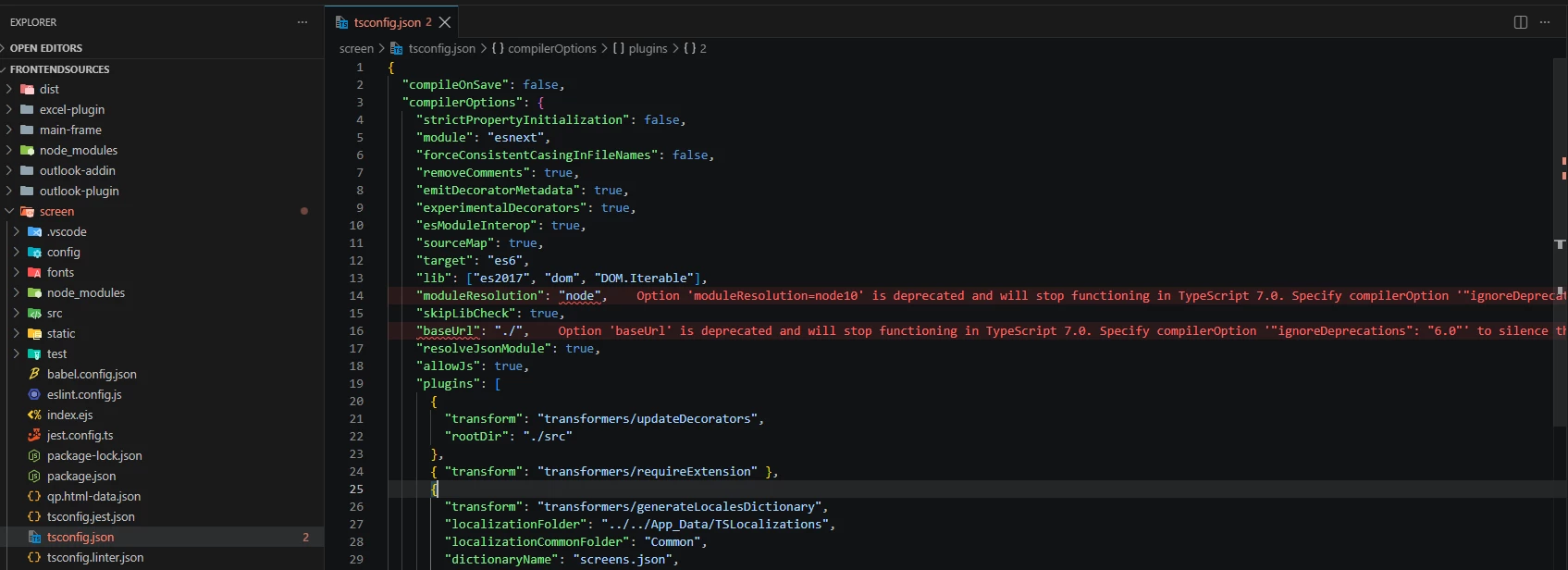
 

This is my version of ts

 

6 replies

Forum|alt.badge.img+3
  • Captain II
  • August 11, 2026

The screenshot shows TypeScript 5.5.2. The messages in tsconfig.json are deprecation warnings, mainly for moduleResolution: "node" and baseUrl.

You don't need to change tsconfig.json for now. Please run:

npm run build-dev -- --env customFolder=development screenIds=AR303020


Forum|alt.badge.img+3
  • Captain I
  • August 11, 2026

@marcorojas82 Could you please confirm under which path you executed the following command?

npm run build-dev -- --env customFolder=development screenIds=AR303020

It should be executed from the screen folder, for

example:C:\AcumaticaERP\26R1SND55\FrontendSources\screen>


KrunalDoshi
Varsity III
Forum|alt.badge.img+6
  • Varsity III
  • August 11, 2026

Hi ​@marcorojas82,

You can include generated 

"ignoreDeprecations": "6.0"

in your tsconfig.json.


marcorojas82
Freshman I
  • Author
  • Freshman I
  • August 11, 2026

The screenshot shows TypeScript 5.5.2. The messages in tsconfig.json are deprecation warnings, mainly for moduleResolution: "node" and baseUrl.

You don't need to change tsconfig.json for now. Please run:

npm run build-dev -- --env customFolder=development screenIds=AR303020


When I run that command, the changes aren't reflected on the screen. I think it's due to an error being generated by the tsconfig.json file, or I'm doing something wrong.


marcorojas82
Freshman I
  • Author
  • Freshman I
  • August 11, 2026

Hi ​@marcorojas82,

You can include generated 

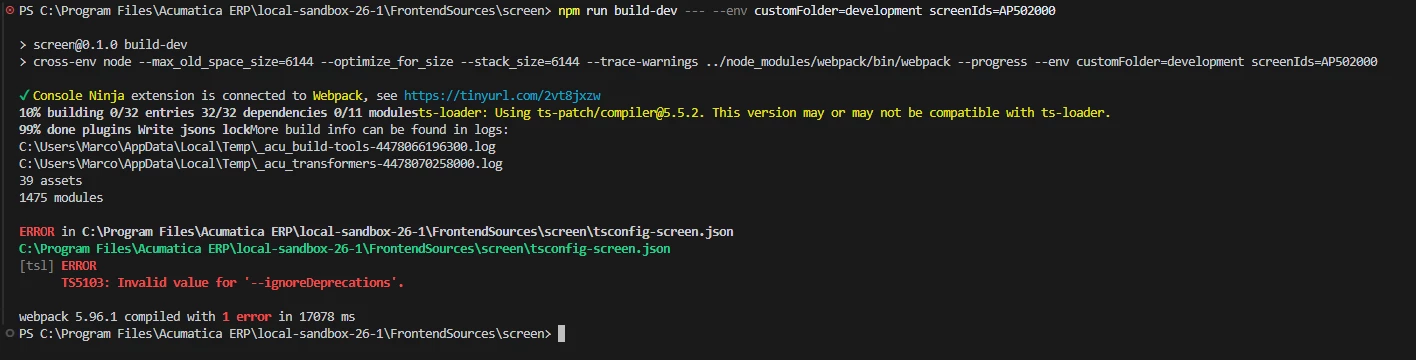
"ignoreDeprecations": "6.0"

in your tsconfig.json.


If I add that command, I get this error when executing this statement: npm run build-dev -- --env customFolder=development screenIds=AP502000


Forum|alt.badge.img

@marcorojas82 
Hi,

I hope your Node.js need to update, make sure your Node.js version has to be 22.18.0.