

Answer

While scanning moves show qty already moved

  • March 11, 2022
  • 2 replies
  • 123 views

Forum|alt.badge.img

Our production team users scanners to move production on the shop floor.

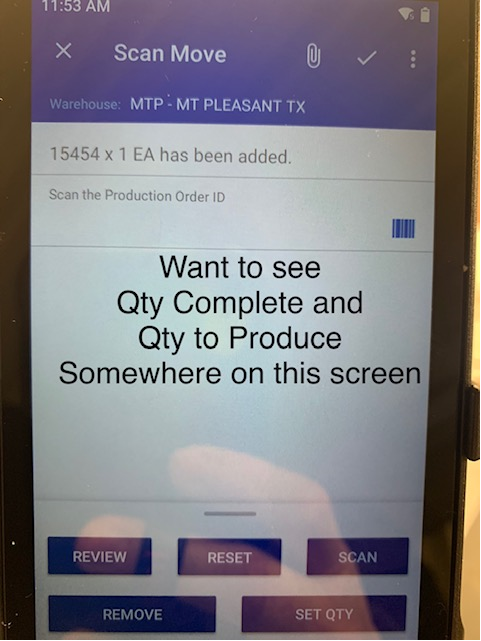
Scan Move is the only feature enabled on the scanners at this time. This feature doesn’t show the user the quantity ordered or quantity remaining. Is there a way to include this information on the scanner when the user is moving a production order? 

My goal is to eliminate reporting the wrong quantity, but still allow over issue because this does happen.

Does anyone have any suggestions to help me with this?
 

Best answer by Cesar Betances

If you have these fields ( the quantity ordered or quantity remaining ) on the Scan Move UI (web) screen, then you could look at the WSDL schema of that screen and modify the Mobile screen to add/map those fields.

Please note that if you don’t have those fields ( the quantity ordered or quantity remaining ) on the Web Screen, then you must add/customize the screen first before checking the WSDL Schema and modifying the mobile screen.

2 replies

Forum|alt.badge.img+2
  • Acumatica Moderator
  • Answer
  • March 16, 2022

If you have these fields ( the quantity ordered or quantity remaining ) on the Scan Move UI (web) screen, then you could look at the WSDL schema of that screen and modify the Mobile screen to add/map those fields.

Please note that if you don’t have those fields ( the quantity ordered or quantity remaining ) on the Web Screen, then you must add/customize the screen first before checking the WSDL Schema and modifying the mobile screen.


Forum|alt.badge.img
  • Author
  • Freshman I
  • April 5, 2022

Thanks @Cesar Betances!

I ended up reaching out to our Acumatica partner to help with this.
