



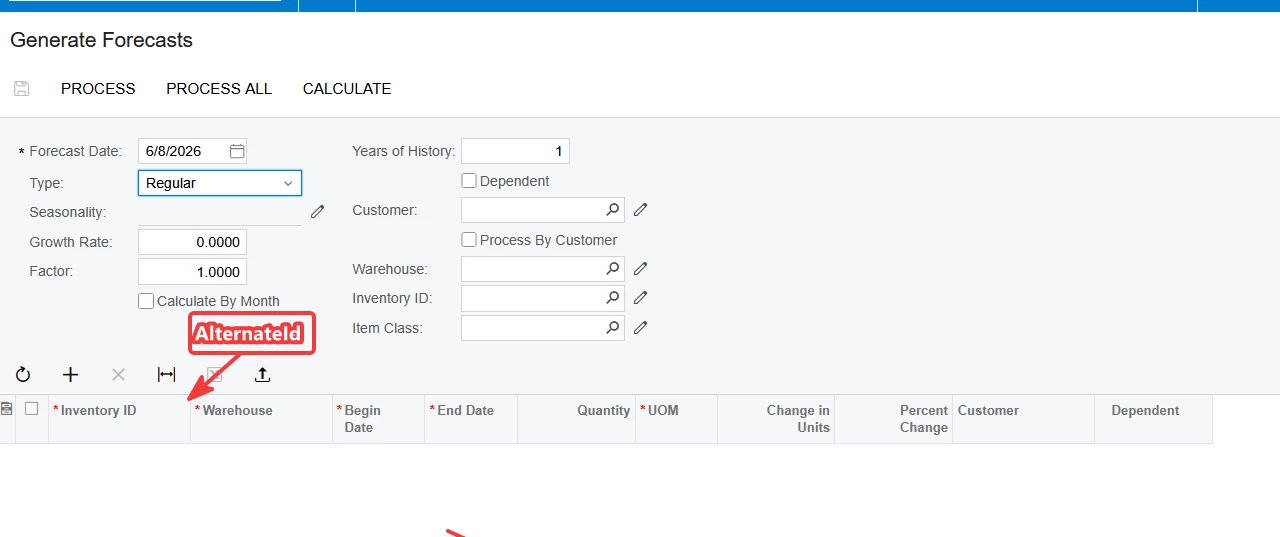
For example, in Generate Forecasts, AM502000, I need to bring in a cross reference to display since our reports all use cross refs for internal work. I’m comfortable enough with the no-code to bring in fields in “Add Data Fields”, but I’m stuck on this. From what I can gather, I’d be doing a graph extension, but I’m lost on the rest.
Could someone either point me in the right direction for examples I can pull from, or can you tell me the process?
Thanks much in advance. The ability to have a cross reference displayed will be game changing on many of our screens.
Solved
What's the process for bringing in an outside field to a customized GI?
Best answer by darylbowman
I’ll be continuing education to get to where simpler customization can get done in-house
In that case, you’re at the right place, and I’m sure someone will spend more time getting you a sufficient answer, but to get started, you’ll need to decide how you’re going to handle Items with multiple cross-references / Alternate IDs since it is a one-to-many relationship.
You’ll need to create a DAC extension on PX.Objects.AM.AMForecastStaging and add a new field like AlternateID from PX.Objects.IN.INItemXRef (but call it something like UsrItemAlternateID):
[PXDBString(50, IsUnicode = true, IsKey = true, InputMask = "")]
[PXDefault()]
[PXUIField(DisplayName = "Alternate ID")]
public virtual String AlternateID { get; set; }
public abstract class alternateID : PX.Data.BQL.BqlString.Field<alternateID> { }
Then you’ll probably need to create a graph extension on PX.Objects.AM.GenerateForecastProcess to actually compute and set the value into your new field (including deciding how to handle multiple cross-references). I would probably recommend using a RowSelecting event handler on AMForecastStaging to run the logic.
Good luck!



Login to the community
No account yet? Create an account
Social Login
Login with your Acumatica accountEnter your E-mail address. We'll send you an e-mail with instructions to reset your password.