Solved

User Adjustable Parameters in GI Side Panel Dashboards

  • September 18, 2026
  • 6 replies
  • 40 views

martinxfe
Jr Varsity II
Forum|alt.badge.img

I’ve got a custom GI that pulls together a bunch of metrics on customers, and I’ve added a dashboard to visually display data related to the customer invoices to the side panel. Naturally, I’d like if selecting a different customer in the GI would update the dashboard to show data filtered for that customer, and I was able to do this successfully with linked GI/Dash parameters. 

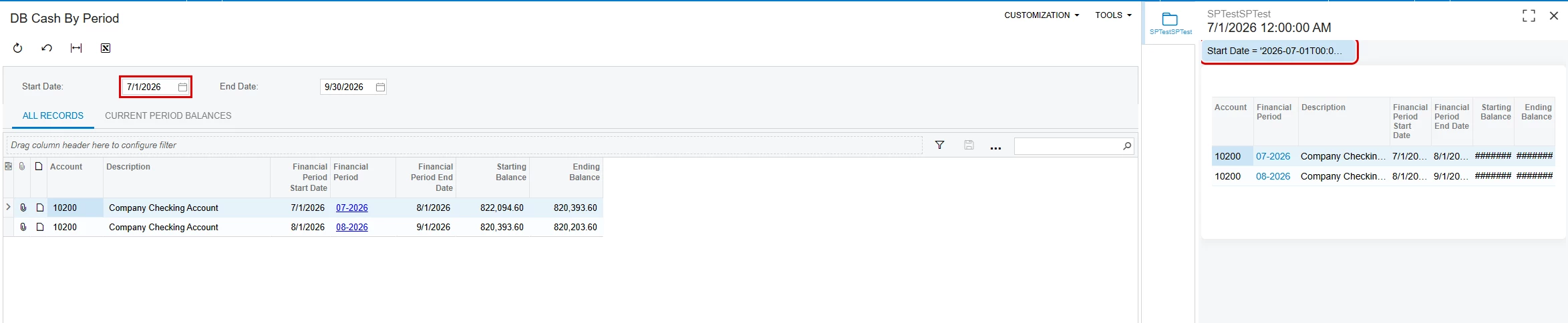
My issue is that I also want to be able to adjust the date range for the dashboard data on the fly. For instance, let’s say I’m assessing a customers credit, and I have a graph of account balance by date in my side panel, and I want to deep dive on the last 3 month. I want to plug in a date range in my side panel dash and have all my graphs update to just the last 3 months invoice data. But no matter what I do, the parameters on the dashboard are read only.

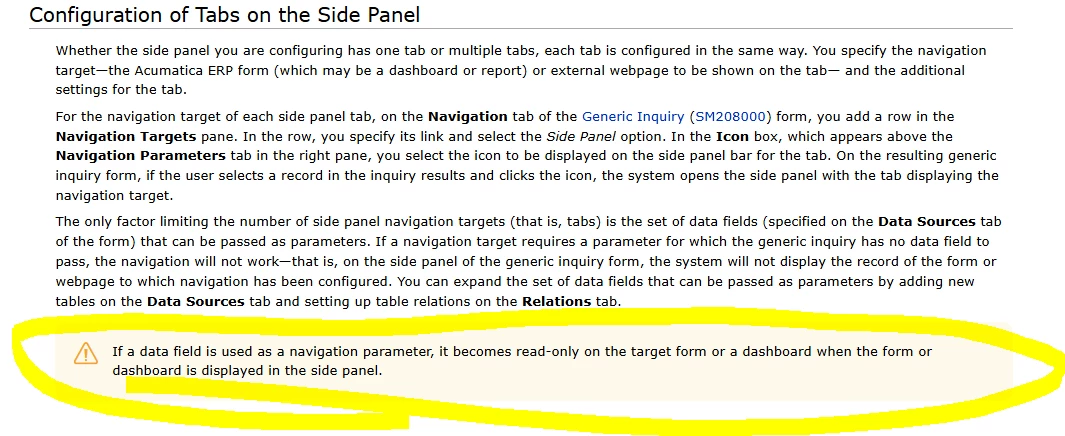
What’s more aggravating is that this all works fine when the dashboard is opened in its own page. There just seems to be something applying read only status to every parameter on the side panel regardless of GI/Dash links being present, and I can’t find anything on how to make them editable. All the docs seems to suggest if there isn’t a GI/Dash link, then the parameters won’t be read only, but I’ve tried a number of different permissions, publications, link combinations, and they’re always read only. 

Any input welcome and appreciated. 
Best answer by Steve Milner

@martinxfe Daryl's right that you can't unlock them. I went through the Modern UI source on 2026 R1. The dashboard page sets its whole parameter bar to read-only whenever it's loaded in a side panel. Placement is the entire test. Your navigation links, roles and publication never enter into it, which is why deleting the links changed nothing. The help article only warns about mapped fields, so the doc mismatch is worth adding to the Modern UI Issues thread.

There is a way to get what you're after, though. Put the date parameters on the GI instead. Add From and To parameters to your customer GI. On the Navigation tab, map the dashboard's date parameters the same way you mapped customer, but type the GI parameter as the source, like =@StartDate. Then in each widget's properties, under Dashboard Parameters Mapping, map the dashboard parameter to the widget inquiry's own date parameter (it's listed with "(Parameter)" after the name). Mapped that way, only the value passes through and the widget GI's conditions do the filtering, so a range works.

I built this on a 2026 R1 demo tenant. Changing the date on the GI refreshed the side panel and the widget data right away. The dashboard's bar still shows as locked, but the user drives the dates from the GI header.

6 replies

darylbowman
Captain II
Forum|alt.badge.img+17

Hey brother 😀

The side panel params being disabled is a Modern UI thing.

Just to confirm, you’ve tried not mapping the date params in the navigation link?


martinxfe
Jr Varsity II
Forum|alt.badge.img
  • Author
  • Jr Varsity II
  • September 18, 2026

Hey man, I had a suspicion you’d be the first to respond. 😆

Yeah, I tried linking customer and not date, then deleting nav links all together. It always showed up read only in the side panel version of the dashboard despite...


But I guess I’m putting together that help.acumatica.com is going the way of Windows 10… 


Well. suppose I’ll contribute this to the Modern UI Issues | Community unless there's a better way of accomplishing this that you know of. 


darylbowman
Captain II
Forum|alt.badge.img+17

unless there's a better way of accomplishing this that you know of. 

I’ve had limited success re-enabling them. Nothing worth your time 😏


Steve Milner
Varsity III
Forum|alt.badge.img+2
  • Varsity III
  • Answer
  • September 18, 2026

@martinxfe Daryl's right that you can't unlock them. I went through the Modern UI source on 2026 R1. The dashboard page sets its whole parameter bar to read-only whenever it's loaded in a side panel. Placement is the entire test. Your navigation links, roles and publication never enter into it, which is why deleting the links changed nothing. The help article only warns about mapped fields, so the doc mismatch is worth adding to the Modern UI Issues thread.

There is a way to get what you're after, though. Put the date parameters on the GI instead. Add From and To parameters to your customer GI. On the Navigation tab, map the dashboard's date parameters the same way you mapped customer, but type the GI parameter as the source, like =@StartDate. Then in each widget's properties, under Dashboard Parameters Mapping, map the dashboard parameter to the widget inquiry's own date parameter (it's listed with "(Parameter)" after the name). Mapped that way, only the value passes through and the widget GI's conditions do the filtering, so a range works.

I built this on a 2026 R1 demo tenant. Changing the date on the GI refreshed the side panel and the widget data right away. The dashboard's bar still shows as locked, but the user drives the dates from the GI header.


darylbowman
Captain II
Forum|alt.badge.img+17

but the user drives the dates from the GI header.

I thought of this too, but figured you wouldn’t want the GI data changing under you. What I didn’t consider is that you wouldn’t need to map them into the GI conditions 😎


martinxfe
Jr Varsity II
Forum|alt.badge.img
  • Author
  • Jr Varsity II
  • September 18, 2026

@Steve Milner What a racket, but hey that’ll do the job. Greatly appreciated!