Answer

Use side panels to display Drawing log and Photo Log

  • May 23, 2022
  • 6 replies
  • 237 views

We are trying to add a collection of side panels to the Projects Screen.

I am able to connect four of the 6 that have been requested, but the other two are causing an issue.

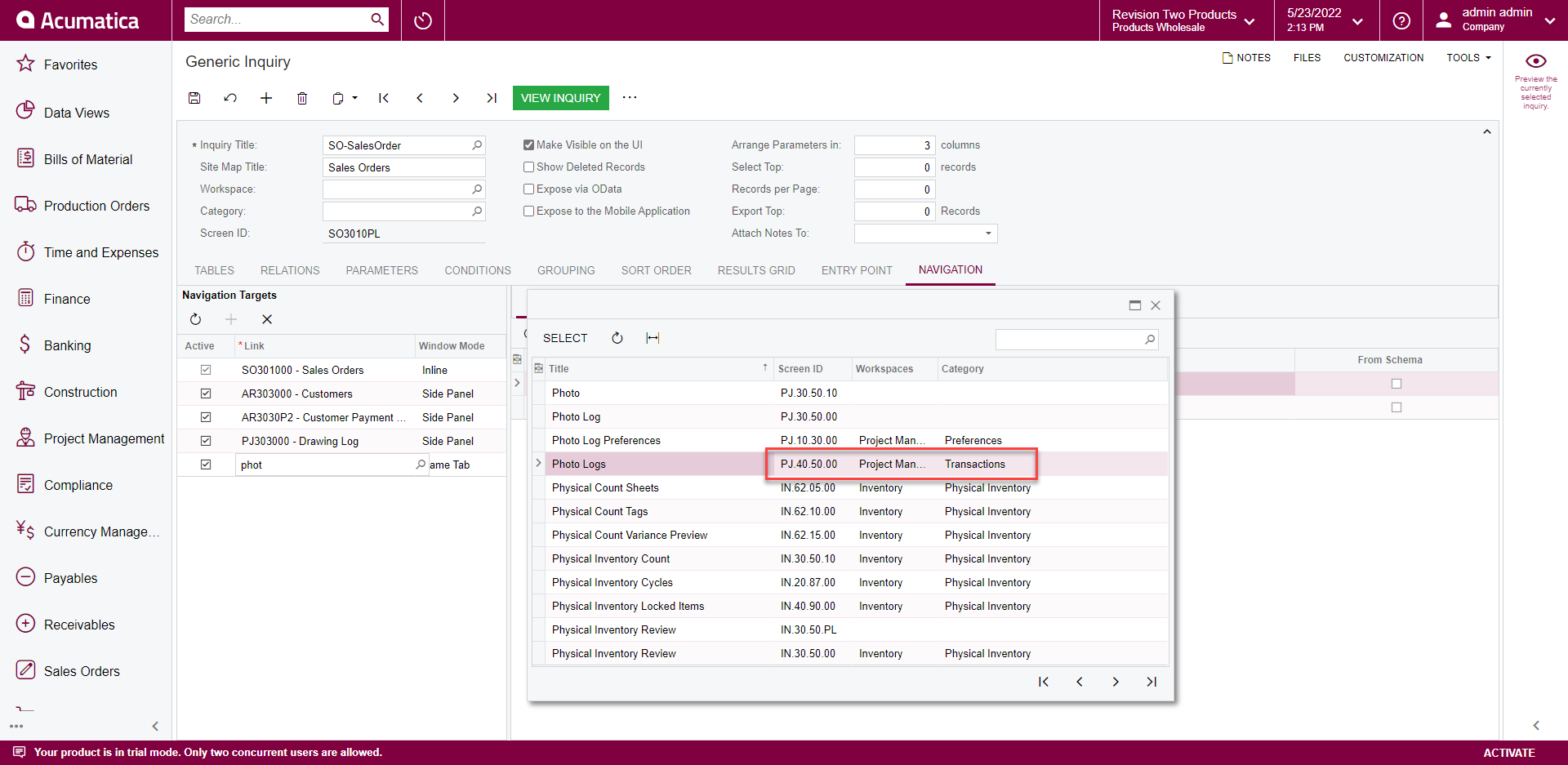
The screen are not available for selection when setting up the side panel.


I noticed the Drawing log and Photo Logs screen numbering indicated they are ‘Inquiry” type forms.


Any suggestions would be greatly appreciated.

 

Best answer by dales50

Starting in 2020R1 Side Panels were added to Data Entry screens

https://www.calszone.com/2020/08/acumatica-2020-r1-feature-of-the-day-add-side-panels-to-data-screens-to-speed-data-entry/


6 replies

Kandy Beatty
Captain II
Forum|alt.badge.img+17

Hi @dcarl51 

Try ensuring that you have the screen ID that is used for transactions.


  • Author
  • Freshman I
  • May 23, 2022

Hi @kbeatty21

thanks. They are available when modifying the Projects picklist GI , but we are trying to put the side panel on the Projects Processing screen not on the GI.

I can see the objects when trying to modify the GI for the picklist, but they are not available when setting up the side panels on the form in Customization project.

DCC


Kandy Beatty
Captain II
Forum|alt.badge.img+17

Hi @dcarl51 

Side Panels are only currently done from screens that are GI’s. You can not add them to processing screens. 


dales50
Semi-Pro III
  • Answer
  • May 24, 2022

  • Author
  • Freshman I
  • June 9, 2022

Hi Everyone,

I logged a support case and they found a “work around”.

Instead of selecting from the object list I simply typed in the corresponding screen ID and it worked.

I was told this is not the intended behavior of the interface and it might stop working in the future, but for now the client is happy.


Michaelh
Pro I
Forum|alt.badge.img+2
  • Pro I
  • October 7, 2022

Had to use the above method of directly entering the Screen ID to add in VENDOR PRICES as a side panel to STOCK ITEMS. Still no idea how to get the item vendor table to send over the vendor name as a parameter, but this is still better than not having it attached at all. Thank you for sharing your knowledge everyone!