Solved

Upload button in SmartPanel not opening file upload dialog in Acumatica Modern UI

  • April 27, 2026
  • 4 replies
  • 67 views

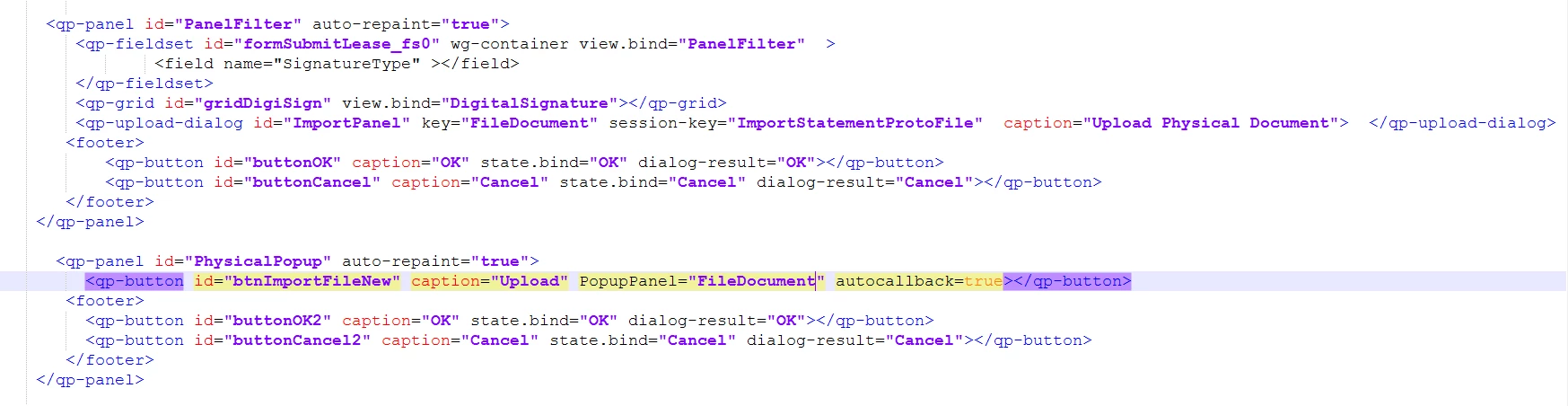
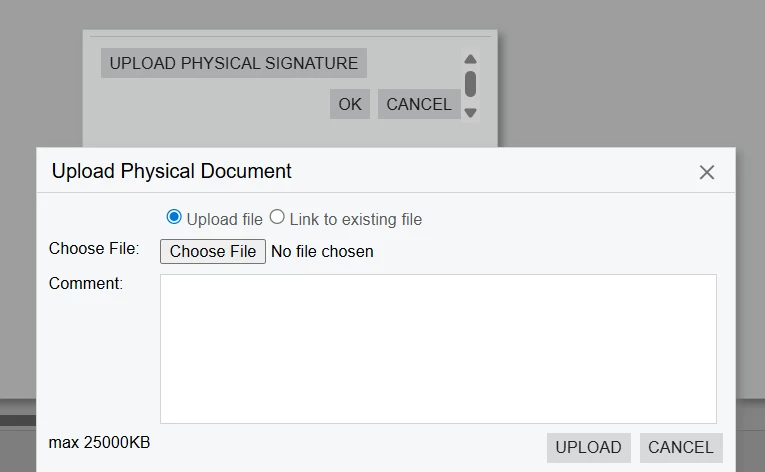
I am working in Acumatica Modern UI customization and I have a Smart Panel with an Upload button.  When the user clicks the Upload button, a file upload dialog (<qp-upload-dialog>) should appear.

Here is the code I currently have:


When I click the Upload button, the file upload dialog does not appear in  Modern UI.  But it was working as expected in Classic UI.


Thanks in advance for your time and support.

Best answer by RohitRattan88

@nimmip43 

You must have an action associated with upload button as described in the documentation:

To display the dialog box, you need to invoke the dialog box in the graph code (in an action delegate) by doing the following:

  1. Calling the Ask or AskExt method of the view or the DialogManager class
  2. Specifying the dialog box properties in the method parameters.

ref: Upload Dialog Box: Configuration of an Upload Dialog Box

Hello ​@nimmip43 You can refer this post :
Link

This link should help you guide in the right direction


4 replies

Forum|alt.badge.img+3

Hello ​@nimmip43 You can refer this post :
Link

You have to implement it in html file.

I hope it helps.


Dipak Nilkanth
Pro III
Forum|alt.badge.img+14

Hi ​@nimmip43,

You need to bind the action to your upload dialog in the HTML file and also map the same action in the TS (TypeScript) file.
HTML :

<qp-upload-dialog
id="CstUploadDialog"
key="Document"
session-key="ProjectList_UploadPackage"
action="actionName">
</qp-upload-dialog>
TS :
export class screenID extends PXScreen {

Header = createSingle(HeaderDAC);
Details = createCollection(DetailDAC);

@actionConfig({})
CstUploadDialog!: PXActionState;
}

Hope, it helps!


RohitRattan88
Acumatica Moderator
Forum|alt.badge.img+4
  • Acumatica Moderator
  • Answer
  • April 27, 2026

@nimmip43 

You must have an action associated with upload button as described in the documentation:

To display the dialog box, you need to invoke the dialog box in the graph code (in an action delegate) by doing the following:

  1. Calling the Ask or AskExt method of the view or the DialogManager class
  2. Specifying the dialog box properties in the method parameters.

ref: Upload Dialog Box: Configuration of an Upload Dialog Box

Hello ​@nimmip43 You can refer this post :
Link

This link should help you guide in the right direction


  • Author
  • Freshman I
  • April 28, 2026

Hi ​@RohitRattan88 , ​@Abhishek Niikam 


I was able to resolve the problem by referring to the helpful links that was provided . Thank you for pointing me in the right direction.