

Solved

Unable to Add New Tab in Estimates Screen (Modern UI)

  • April 23, 2026
  • 1 reply
  • 31 views

Forum|alt.badge.img+1

In the Estimates screen of Acumatica ERP, I am trying to add a new tab in the Modern UI as per the requirements, but it is not working. Could you please suggest what might be missing?

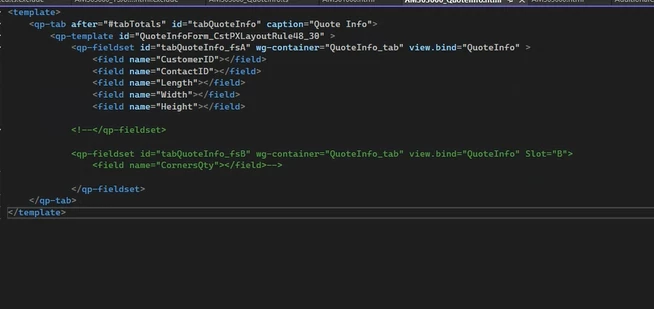
HTML:


<template>
    <qp-tab after="#tabTotals" id="tabQuoteInfo" caption="Quote Info">
        <qp-template id="QuoteInfoForm_CstPXLayoutRule48_30" >
            <qp-fieldset id="tabQuoteInfo_fsA" wg-container="QuoteInfo_tab" view.bind="QuoteInfo" >
                <field name="CustomerID"></field>
                <field name="ContactID"></field>
                <field name="Length"></field>
                <field name="Width"></field>
                <field name="Height"></field>
                                     </qp-fieldset>
    </qp-tab>
</template>


TS


import {
    PXView, PXFieldState, PXFieldOptions, linkCommand, gridConfig, graphInfo, columnConfig,
    GridColumnShowHideMode, GridColumnType, TextAlign, GridPreset, GridFilterBarVisibility, GridFastFilterVisibility, createSingle, createCollection
} from "client-controls";

import { AM303000 } from "src/screens/AM/AM303000/AM303000";
//import { QuoteCalculation } from "src/screens/AM/AM303000/AM303000";


export interface AM303000_QuoteInfo extends AM303000 { }

//export class AM303000_QuoteInfo { }

export class QuoteInfo extends PXView {

    CustomerID: PXFieldState;
    ContactID: PXFieldState;

    Length: PXFieldState;
    Width: PXFieldState;
    Height: PXFieldState;

    CornersQty: PXFieldState;
    RuleSlotsQty: PXFieldState;
    MultiCutsQty: PXFieldState;
    BoltHolesQty: PXFieldState;
    ThreadedHolesQty: PXFieldState;
    FlatsQty: PXFieldState;
    PinsQty: PXFieldState;

    NotApplicable1: PXFieldState;
    NotApplicable2: PXFieldState;
    NotApplicable3: PXFieldState;

    Slide2: PXFieldState;
    Slide4: PXFieldState;

    Shape: PXFieldState;
    Round: PXFieldState;
    QuarterToFiveSixteenth: PXFieldState;

    WasherCut: PXFieldState;
    SideOutlet: PXFieldState;
    SpecialHeight: PXFieldState;
    WireStart: PXFieldState;
    FiveSixteenthToHalf: PXFieldState;

    Multiplier: PXFieldState;
    SubTotal: PXFieldState;
    Quantity: PXFieldState;
    Factor: PXFieldState;
    TotalFactor: PXFieldState;

    ProgramDifficult: PXFieldState;
    ProgramSimple: PXFieldState;
    ProgramNone: PXFieldState;

    HeatTreat: PXFieldState;

    More25: PXFieldState;
    More100: PXFieldState;
    More200: PXFieldState;

    PunchQty1: PXFieldState;
    PunchPrice1: PXFieldState;
    PunchTotal1: PXFieldState;

    PunchQty2: PXFieldState;
    PunchPrice2: PXFieldState;
    PunchTotal2: PXFieldState;

    PunchQty3: PXFieldState;
    PunchPrice3: PXFieldState;
    PunchTotal3: PXFieldState;
}
It is showing modern UI Editor level i dont know why it is not showing up in the screen

Best answer by FarhanaM60

Hi Team,

This issue has been resolved.

The problem was caused by a missing binding in the TypeScript file. I had not added the createSingle mapping for the view, which is required for the tab to render in the Modern UI in Acumatica ERP.


After adding the following line in the interface, the tab started appearing as expected:

QuoteInfo = createSingle(QuoteInfo);

import {
    PXView, PXFieldState, PXFieldOptions, linkCommand, gridConfig, graphInfo, columnConfig,
    GridColumnShowHideMode, GridColumnType, TextAlign, GridPreset, GridFilterBarVisibility, GridFastFilterVisibility, createSingle, createCollection
} from "client-controls";

import { AM303000 } from "src/screens/AM/AM303000/AM303000";
//import { QuoteCalculation } from "src/screens/AM/AM303000/AM303000";


export interface AM303000_QuoteInfo extends AM303000 {

QuoteInfo = createSingle(QuoteInfo);

}

//export class AM303000_QuoteInfo { }

export class QuoteInfo extends PXView {

    CustomerID: PXFieldState;
    ContactID: PXFieldState;

}

Now the issue is resolved by myself Thank you

1 reply

Forum|alt.badge.img+1
  • Author
  • Varsity II
  • Answer
  • April 23, 2026

Hi Team,

This issue has been resolved.

The problem was caused by a missing binding in the TypeScript file. I had not added the createSingle mapping for the view, which is required for the tab to render in the Modern UI in Acumatica ERP.


After adding the following line in the interface, the tab started appearing as expected:

QuoteInfo = createSingle(QuoteInfo);

import {
    PXView, PXFieldState, PXFieldOptions, linkCommand, gridConfig, graphInfo, columnConfig,
    GridColumnShowHideMode, GridColumnType, TextAlign, GridPreset, GridFilterBarVisibility, GridFastFilterVisibility, createSingle, createCollection
} from "client-controls";

import { AM303000 } from "src/screens/AM/AM303000/AM303000";
//import { QuoteCalculation } from "src/screens/AM/AM303000/AM303000";


export interface AM303000_QuoteInfo extends AM303000 {

QuoteInfo = createSingle(QuoteInfo);

}

//export class AM303000_QuoteInfo { }

export class QuoteInfo extends PXView {

    CustomerID: PXFieldState;
    ContactID: PXFieldState;

}

Now the issue is resolved by myself Thank you