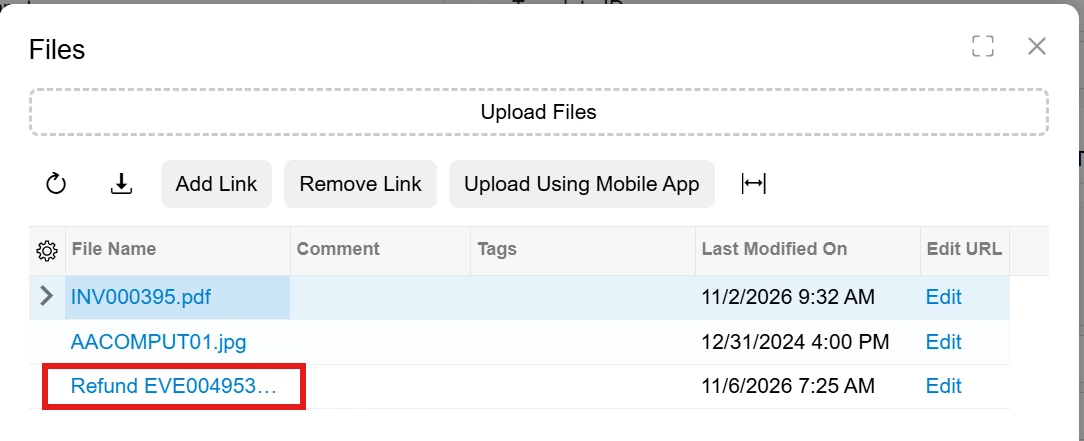


I have a customer that allows a portal user to upload files to inventory items listed in the SSP classic UI. Yes, that seems a bit unusual, but it is what the customer wishes to do.
In classic UI, it was easy. I just added FilesIndicator="True" to the grid aspx. It took care of everything for me.
I’m trying to accomplish the same behavior in the SSP MUI in 26R1. The catalog is no longer a grid. So I am trying to open the Files dialog using an action.
I added a custom button with an action to the Catalog item in the SSP MUI
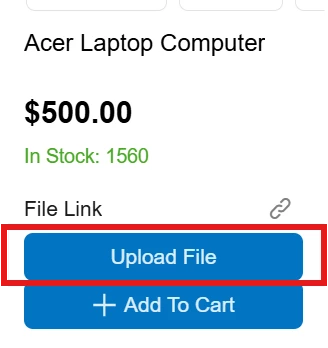
This button triggers my action, but I don’t think this is the necessarily the answer.
In the Acumatica documentation, they say to do this (https://beacon.acumatica.com/r/UI-Component-Guide/Dialog-Box/Dialog-Box-Files#hiding-the-files-button)
In TypeScript code, define the following method, which opens the Files dialog box.
filesShow() { (this.activeScreenVM?.screenService .getDataComponent(NoteMenuDataComponent.dataComponentName) as NoteMenuDataComponent).filesShow(); }Then, put this in my HTML file extension
<qp-button id="btnFiles" caption="Open Files" click.delegate="filesShow()"> </qp-button>
I tried to do this but I’m no doubt missing knowledge here.
Here is a print screen so you can see the compiler errors:

Here is my code for thoroughness. I have extra unused imports in case I needed them.
import {
	PXFieldState,
	PXView,
	PXActionState,
} from "client-controls";
import { SP504001 } from "src/screens/SP/SP504001/SP504001";
import { CatalogScreen } from "src/screens/SP/sp-base";
import { InventoryItemView } from "src/screens/SP/catalog/view-models";
import { InventoryItem } from "../../../../../screens/IN/IN504000/IN504000";
//import { InventoryItemView } from "src/screens/SP/catalog/view-models";

export interface SP504001_ICSJoePortal_generated extends SP504001 { }
export class SP504001_ICSJoePortal_generated { }

export interface InventoryItemView_ICSJoePortal_generated extends InventoryItemView { }
export class InventoryItemView_ICSJoePortal_generated extends PXView {
	UploadFile: PXActionState;

	filesShow() {
		(this.activeScreenVM?.screenService
			.getDataComponent(NoteMenuDataComponent.dataComponentName) as NoteMenuDataComponent).filesShow();
	}


	//this just displays the file link. Just verifying I have the ability to get the file link
	//UsrFileLink: PXFieldState;
}
You can ignore the UsrFileLink field. That is not the issue.
<template>
    <field remove="#fsCatalog field[name='unboundImage']"></field>

    <field append="#fsCatalog" name="FilteredItems.UsrFileLink" control-type="qp-link-editor"></field>

    <qp-button id="btnUploadFileAction" icon="upload" caption="Upload File" class="sp-add-to-cart" state.bind="FilteredItems.UploadFile" after="#fsCatalog"></qp-button>
</template>
Here is the action. It fires and gets the inventory ID from the adapter, but that is as far as I got.
		public PXAction<SPInventoryItem> UploadFile;
		[PXButton(CommitChanges = true, Tooltip = "Upload File")]
		[PXUIField(DisplayName = "Upload File", MapEnableRights = PXCacheRights.Select, MapViewRights = PXCacheRights.Select)]
		protected virtual IEnumerable uploadFile(PXAdapter adapter)
		{
			SPInventoryItem row = adapter.Get<SPInventoryItem>().FirstOrDefault();

			if (row != null)
			{
				InventoryItem inventory = SelectFrom<InventoryItem>.Where<InventoryItem.inventoryID.IsEqual<@P.AsInt>>
					.View.Select(Base, row.InventoryID);
				if (inventory != null)
				{
					//open panel here?

				}
			}
			return adapter.Get();
		}
Maybe if I can find out how to filesToShow in TS to work, it will make all my dreams come true.
My other thought was that in my custom action, I can use a panel popup somehow. Probably not. I don’t want to have to completely create my own custom panel to do this.
Acumatica support told me I am one of about 4 people doing customizations to the MUI portal, so I am not hopeful… 😉