Question

Trying to add field to screen on Self Service Portal in 26R1 MUI

  • Oct 31, 2026 5:50 PM UTC
  • 5 replies
  • 56 views
  • Translate All

Joe Schmucker
Captain II
Forum|alt.badge.img+3

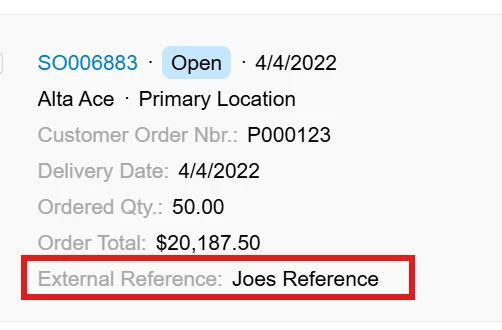
I am trying to add the CustomerRefNbr field to the Orders screen (SP504010) here:
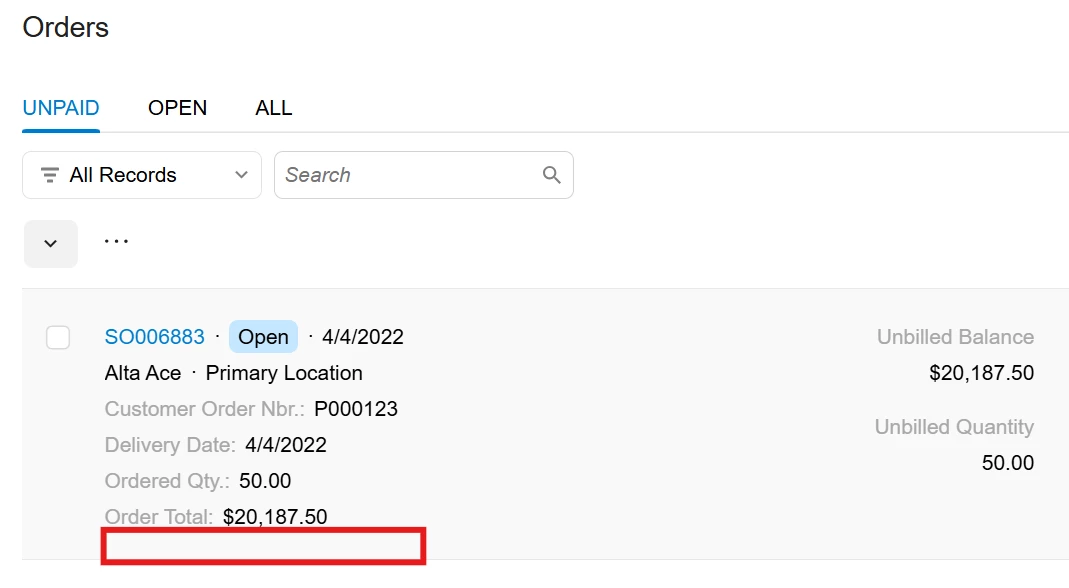
I’ve tried a LOT of different things.  The .ts file compiles without any complaints but the field does not show.  I’m not good at this, so hopefully I’m just making a s-t-u-p-i-d mistake.

I think the source code I am trying to extend is "src/screens/SP/order/view-models"

I think I should be adding the field to the PXView on that file.

Here is my .ts code.  If anyone see’s anything, let me know!

import {
PXFieldState,
PXView,
readOnly,
} from "client-controls";
import { AllOrdersLine, OpenOrdersLine, OrdersLine } from "src/screens/SP/order/view-models";

export interface SP504010_OrdersLine extends OrdersLine { }

export class SP504010_OrdersLine extends PXView {
@readOnly CustomerRefNbr: PXFieldState;
}

export interface SP504010_AllOrdersLine extends AllOrdersLine { }

export class SP504010_AllOrdersLine extends OrdersLine {
}

export class SP504010_OpenOrdersLine extends OpenOrdersLine {
}


 

5 replies

Forum|alt.badge.img+8
  • Jr Varsity III
  • Oct 31, 2026 6:01 PM UTC

Hi ​@Joe Schmucker ,

Can you try below,

In addition make sure field is not hidden-


import { PXFieldState, readOnly } from "client-controls";
import { SP504010 } from "src/screens/SP/SP504010/SP504010";
import { AllOrdersLine, OpenOrdersLine, OrdersLine } from "src/screens/SP/order/view-models";

// Screen extension (required, even though it's empty)
export interface SP504010_CustRef extends SP504010 { }
export class SP504010_CustRef { }

// View extensions: the class does NOT extend anything
export interface SP504010_OrdersLine extends OrdersLine { }
export class SP504010_OrdersLine {
    @readOnly CustomerRefNbr: PXFieldState;
}

export interface SP504010_AllOrdersLine extends AllOrdersLine { }
export class SP504010_AllOrdersLine {
    @readOnly CustomerRefNbr: PXFieldState;
}

export interface SP504010_OpenOrdersLine extends OpenOrdersLine { }

export class SP504010_OpenOrdersLine {
    @readOnly CustomerRefNbr: PXFieldState;
}

Translate

JKurtz29
Semi-Pro I
Forum|alt.badge.img+1
  • Semi-Pro I
  • Oct 31, 2026 6:08 PM UTC

Do you need to create the corresponding .html template file to add the field to the screen?

Something like this to inject the field into the  url="../order/order.html" template that’s being included by the page’s html.

<template>
<field append="#unpaidfsOpenOrderA1" name="CustomerRefNbr"></field>
</template>


Translate

Joe Schmucker
Captain II
Forum|alt.badge.img+3

You guys did it!

I had to use the code from both of you guys.  I wish I could mark BOTH of you as the correct answer.  Both of you provided information that solved the problem.  I will leave it to ​@Chris Hackett to mark one of them.  I would feel guilty just marking one of you.

I made a couple of tweaks to the code to get it all squared away.  Here is the final code.  I am putting it here so that I will find it next year when I have the same question.😁

<template>
<field append="#unpaidfsOpenOrderAX" name="CustomerRefNbr"></field>
<field append="#openfsOpenOrderAX" name="CustomerRefNbr"></field>
<field append="#allfsOpenOrderAX" name="CustomerRefNbr"></field>
</template>
import {
PXFieldState,
readOnly,
} from "client-controls";
import { SP504010 } from "src/screens/SP/SP504010/SP504010";
import { AllOrdersLine, OpenOrdersLine, OrdersLine } from "src/screens/SP/order/view-models";

export interface SP504010_CustRef extends SP504010 { }
export class SP504010_CustRef { }

export interface SP504010_OrdersLine extends OrdersLine { }
export class SP504010_OrdersLine {
@readOnly CustomerRefNbr: PXFieldState;
}

export interface SP504010_AllOrdersLine extends AllOrdersLine { }
export class SP504010_AllOrdersLine {
@readOnly CustomerRefNbr: PXFieldState;
}

export interface SP504010_OpenOrdersLine extends OpenOrdersLine { }
export class SP504010_OpenOrdersLine {
@readOnly CustomerRefNbr: PXFieldState;
}

THANK YOU!!!!

Translate

Joe Schmucker
Captain II
Forum|alt.badge.img+3
  • Author
  • Captain II
  • Nov 2, 2026 4:09 PM UTC

​@JKurtz29 One last question…

I added to the html extension:

<field append="#unpaidfsOpenOrderAX" name="CustomerRefNbr"></field>

I see that the source for this comes from the “included” order.html.

    <qp-fieldset slot="AX" id="{{prefix}}fsOpenOrderAX" view.bind="{{view}}"

How did you know to add “unpaid” as the prefix to the html extension line?  I cannot find where to find that value to add to my html extension.  

NEVERMIND!  Found it in SP504010!

<qp-include url="../order/order.html" view="UnpaidOrders" prefix="unpaid"></qp-include>


Translate

JKurtz29
Semi-Pro I
Forum|alt.badge.img+1
  • Semi-Pro I
  • Nov 2, 2026 4:25 PM UTC

​@JKurtz29 One last question…

I added to the html extension:

<field append="#unpaidfsOpenOrderAX" name="CustomerRefNbr"></field>

I see that the source for this comes from the “included” order.html.

    <qp-fieldset slot="AX" id="{{prefix}}fsOpenOrderAX" view.bind="{{view}}"

How did you know to add “unpaid” as the prefix to the html extension line?  I cannot find where to find that value to add to my html extension.  

NEVERMIND!  Found it in SP504010!

<qp-include url="../order/order.html" view="UnpaidOrders" prefix="unpaid"></qp-include>


Yep, that’s it -- it’s passed in as a named parameter on the include.  Looks like you also figured out that the the other two tabs are done the same way :)

Translate