Solved

SM204505: Customization Projects how do I publish all projects with cleanup

  • September 20, 2026
  • 4 replies
  • 86 views

Forum|alt.badge.img+2

I can publish with cleanup if I go into every single project and select from the menu but is there a way to do it from the Customization projects page?

Best answer by darylbowman

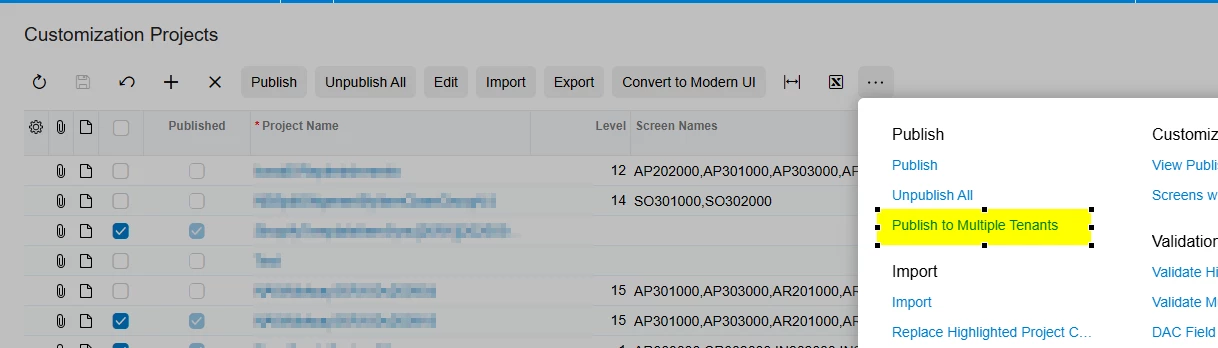
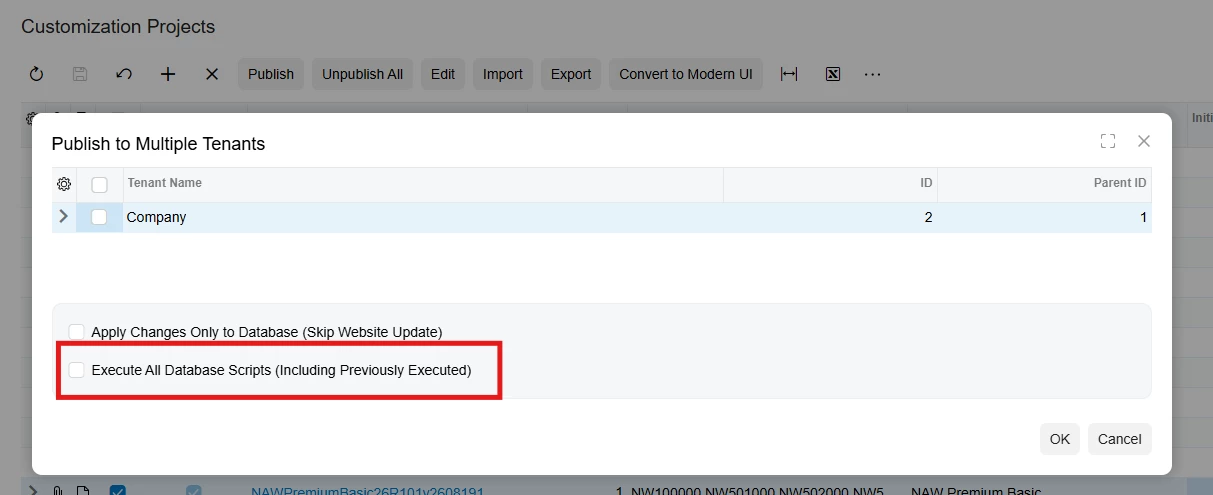
Publish to Multiple Tenants > Check 'Execute all database scripts'

4 replies

darylbowman
Captain II
Forum|alt.badge.img+17
  • Answer
  • September 20, 2026

Publish to Multiple Tenants > Check 'Execute all database scripts'


Forum|alt.badge.img
  • Varsity I
  • September 21, 2026

Hii ​@bpgraves ,
 

On Customization Projects (SM204505), Acumatica supports publishing multiple projects at once:

  1. Open SM204505 – Customization Projects.
  2. Select the checkboxes for all customization projects that you want to remain published.
  3. Click Publish on the form toolbar.
  4. Acumatica unpublishes previously published projects that are not selected, then merges the selected projects into one project and publishes it. 

Forum|alt.badge.img+3
  • Captain II
  • September 21, 2026

​@bpgraves 

From the Customization Projects screen, use Publish to Multiple Tenants and enable Execute All Database Scripts. This option causes the database scripts from the selected customization projects to be executed, including scripts that were previously executed. This can be used when you need the database scripts to be reapplied during a multi-project publish.


  • Freshman I
  • September 21, 2026

publishing your Modern UI/customization package and selecting Multiple Tenants + Execute All DB Scripts