Solved

Shipping Label add data/customize label

  • November 17, 2023
  • 6 replies
  • 292 views
  • Translate All

Is there a way to customize/add data on this shipping label?

Best answer by khalmehcgc

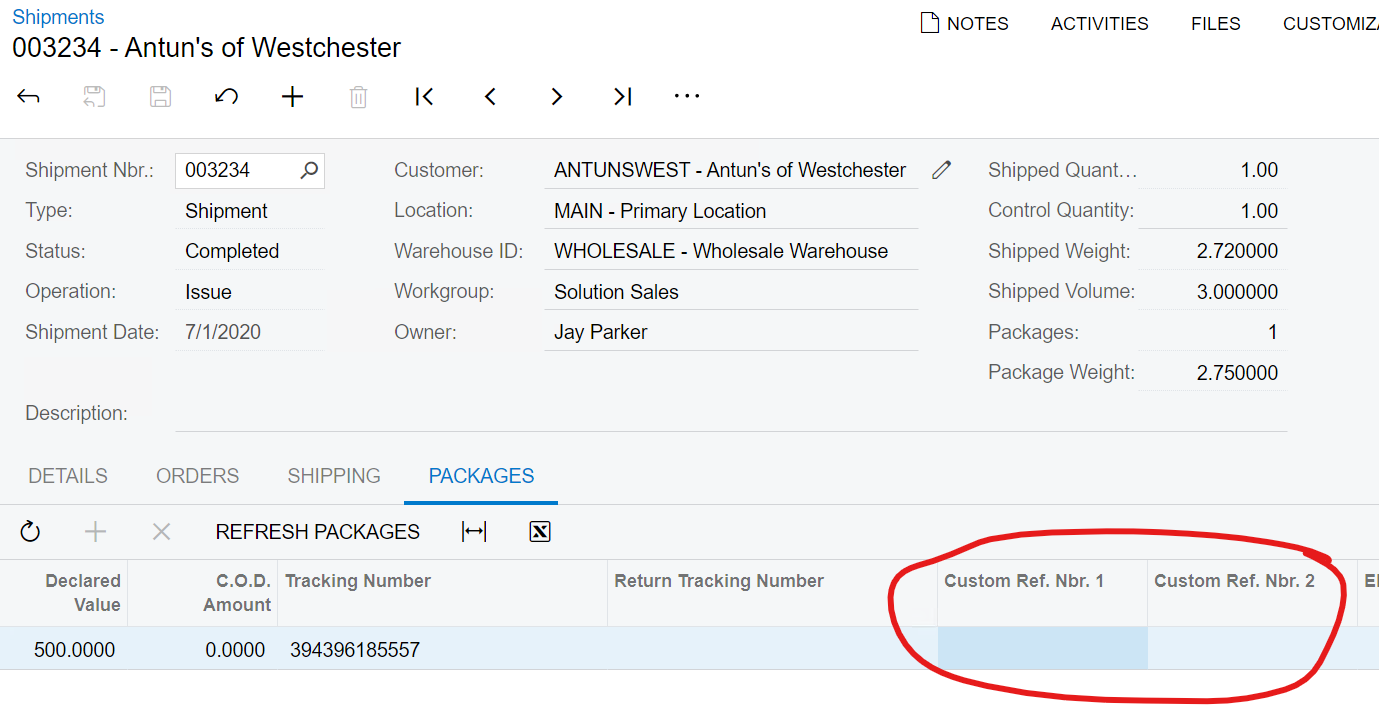
@dalton So it appears that the labels are actually generated via the carrier’s API and then stored as an image on the package record. See the discussion here about using the Custom Ref # fields seen below.  Test this and see if that works for you.


View original

6 replies

  • Author
  • Freshman I
  • November 17, 2023

I wanted to add data on the REF: Field

Translate

Connor Morse
Jr Varsity III
Forum|alt.badge.img+1

Hi @dalton - Just to confirm… you are printing Shipping Labels from within Acumatica, correct? Not an external shipping solution?

Translate

  • Author
  • Freshman I
  • November 17, 2023

Hi @dalton - Just to confirm… you are printing Shipping Labels from within Acumatica, correct? Not an external shipping solution?

@cmorse26 correct. Just wanted to have the SO Order Nbr to be a fixed data that will be printed on that specific field/area

Translate

Forum|alt.badge.img
  • Jr Varsity II
  • November 18, 2023

Hey @dalton, can you provide the report id or url that you’re using to generate the labels. If it’s a standard report, I could add the SO number and provide the report file. 

Translate

Robert Sternberg
Captain II
Forum|alt.badge.img+7

You might consider a report/subreport structure for this to make management easier in the future.  Keep in mind modification to the printed labels warrants re-certification from common carriers that require certification.  

Translate

Forum|alt.badge.img
  • Jr Varsity II
  • Answer
  • November 18, 2023

@dalton So it appears that the labels are actually generated via the carrier’s API and then stored as an image on the package record. See the discussion here about using the Custom Ref # fields seen below.  Test this and see if that works for you.


Translate