

Solved

Report parameter notification template

  • October 22, 2025
  • 4 replies
  • 54 views

Forum|alt.badge.img+2

I have some problem. I have all right. But report parameters not availible.
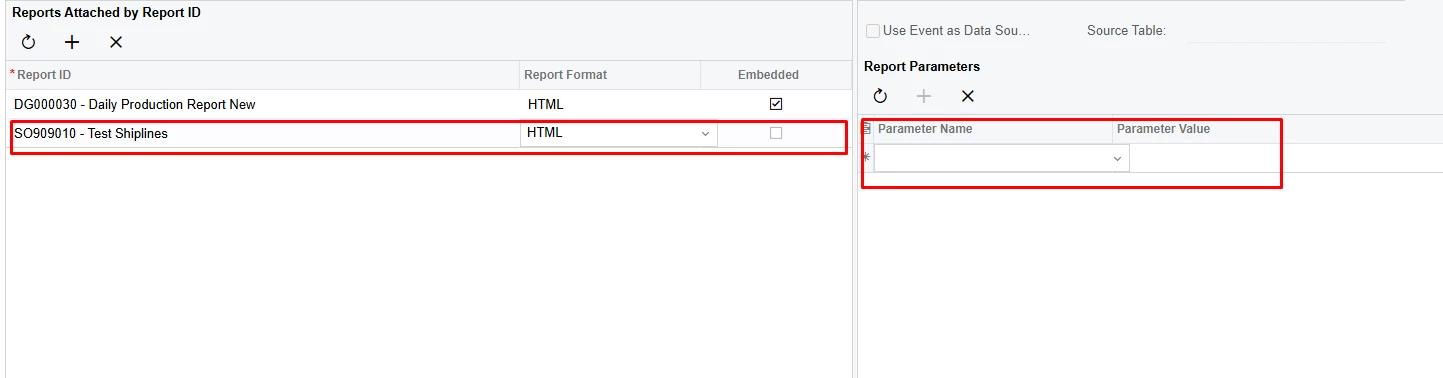
 

in 24R111 version. But in 25r1 its work. With some rights. 
With debug i see this error:
 

1️⃣ PX.Web.UI.PXReportViewer.SetReportSignFlagIfPdfCertificateIsPresent()
    → C:\build\code_repo\NetTools\PX.Web.UI\Controls\Report\ReportViewer.cs:line 1218

2️⃣ PX.Web.UI.Metadata.AspxScreenInfoCollector.Collect(String screenId, String locale)
    → C:\build\code_repo\NetTools\PX.Web.UI\Metadata\AspxScreenInfoCollector.cs:line 153

In trace i have this 
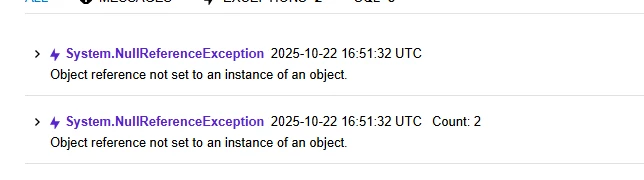
 

its error i have when i refresh report parameters. All report have this error and I can't set parameters
Best answer by bihalivan15

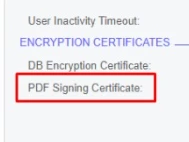
PDF Signing Certificate has expired. When i cleared this field parameters was available. Thanks for all

4 replies

bwhite49
Captain II
Forum|alt.badge.img+12
  • Captain II
  • October 22, 2025

Parameters missing on reports and GIs are usually caused by issues with access rights to the report. Make sure access rights are applied to the report for your user and the admin role.

When you run the report manually from the report screen, is the parameter visible? if not, the issue is in the report probably with the schema field.


Forum|alt.badge.img+2
  • Author
  • Captain I
  • October 22, 2025

Parameters missing on reports and GIs are usually caused by issues with access rights to the report. Make sure access rights are applied to the report for your user and the admin role.

When you run the report manually from the report screen, is the parameter visible? if not, the issue is in the report probably with the schema field.

Parameter is visible, and I have all rights for this report 


Forum|alt.badge.img+2
  • Author
  • Captain I
  • Answer
  • October 23, 2025

PDF Signing Certificate has expired. When i cleared this field parameters was available. Thanks for all


Chris Hackett
Community Manager
Forum|alt.badge.img
  • Acumatica Community Manager
  • October 23, 2025

Thank you for sharing your solution with the community ​@bihalivan15!


