Solved

Remove the Discount % from the Review Order screen in the Self Service Portal

  • Nov 6, 2026 7:07 PM UTC
  • 10 replies
  • 55 views
  • Translate All

Joe Schmucker
Captain II
Forum|alt.badge.img+3

This is a nit-picky request by the customer, but I aim to please.  

In 2026 Modern UI Self Service Portal

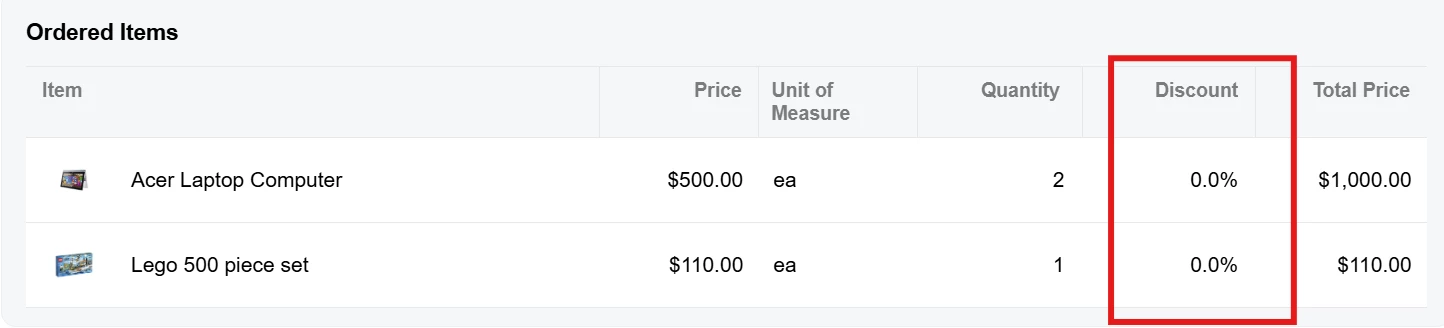
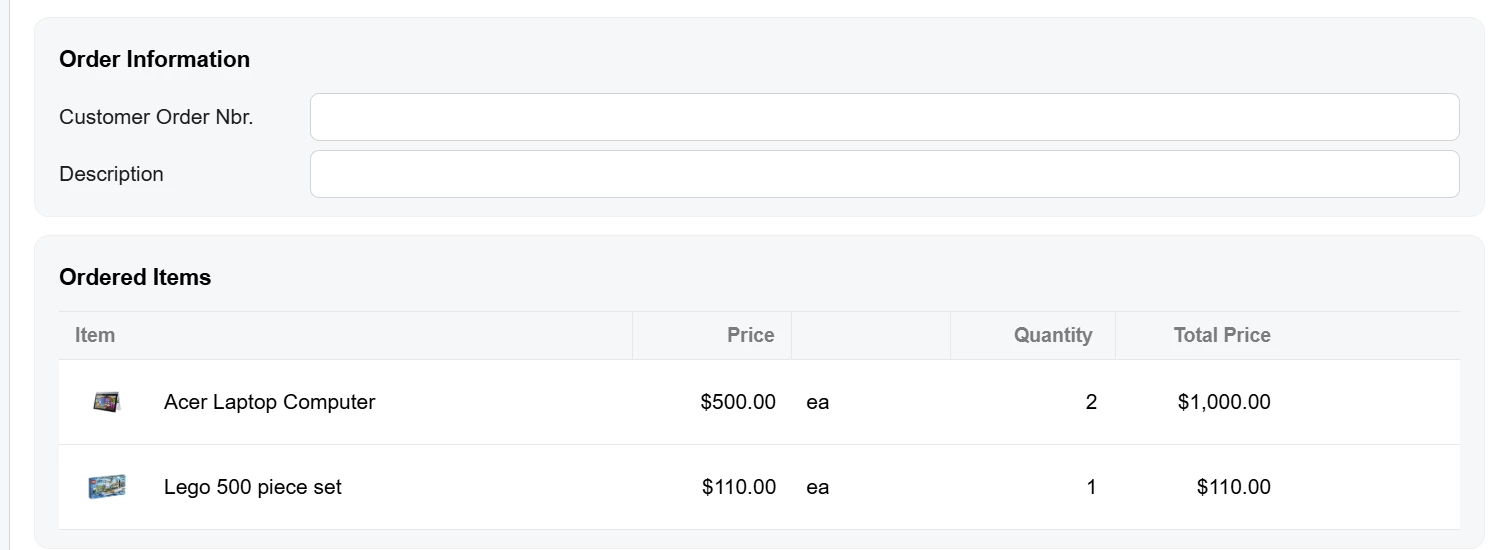
I’m trying to remove the Discount column from the Orders Items section of the Review Order screen SP504004.


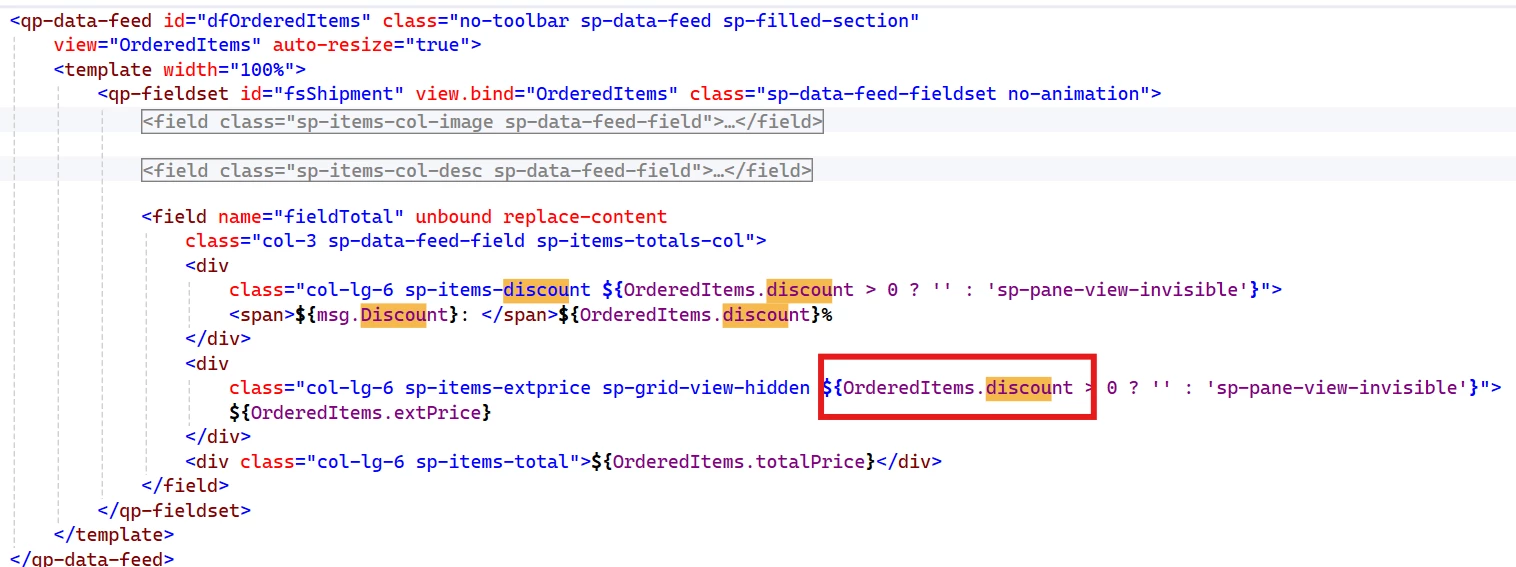
My research leads me to believe this comes from the sp-ordered-items file as shown here in the SP504004.html file.

In that file, there is this:

It looks to me like the discount is not really a field I can remove as it is buried in the fieldTotal field.

Would I be correct in saying that since it is not a field that can be modified, that this request isn’t possible without completely removing the <qp-data-feed section and adding my own?  If that is even possible.


Best answer by Steve Milner

@Joe Schmucker don't give up yet. Hide the original instead of removing it:

<template modify="compose[view-model='../sp-ordered-items']" class="hidden"></template>

modify copies its attributes onto the element the selector finds, and .hidden is display: none !important in sp-common.scss, which SP504004 already loads. The compose is the only piece of the ordered items that exists in SP504004.html. fsOrderedItems and dfOrderedItems only appear in the browser, when the compose loads sp-ordered-items, so renaming your files can't put them in reach. Daryl's fieldset came from another extension's qp-include, which does get merged in, and that's why renaming worked for him.

Hiding beats removing here. Your copy's header and columns are styled by sp-ordered-items.scss, which only loads when the compose runs sp-ordered-items.ts.

We built this on 2026 R1 and the merged screen comes out with <compose class="hidden" view-model="../sp-ordered-items">. You can check yours the same way. The build writes the merged screen to SP504004.html under App_Data\TSCompleteScreens on the site.

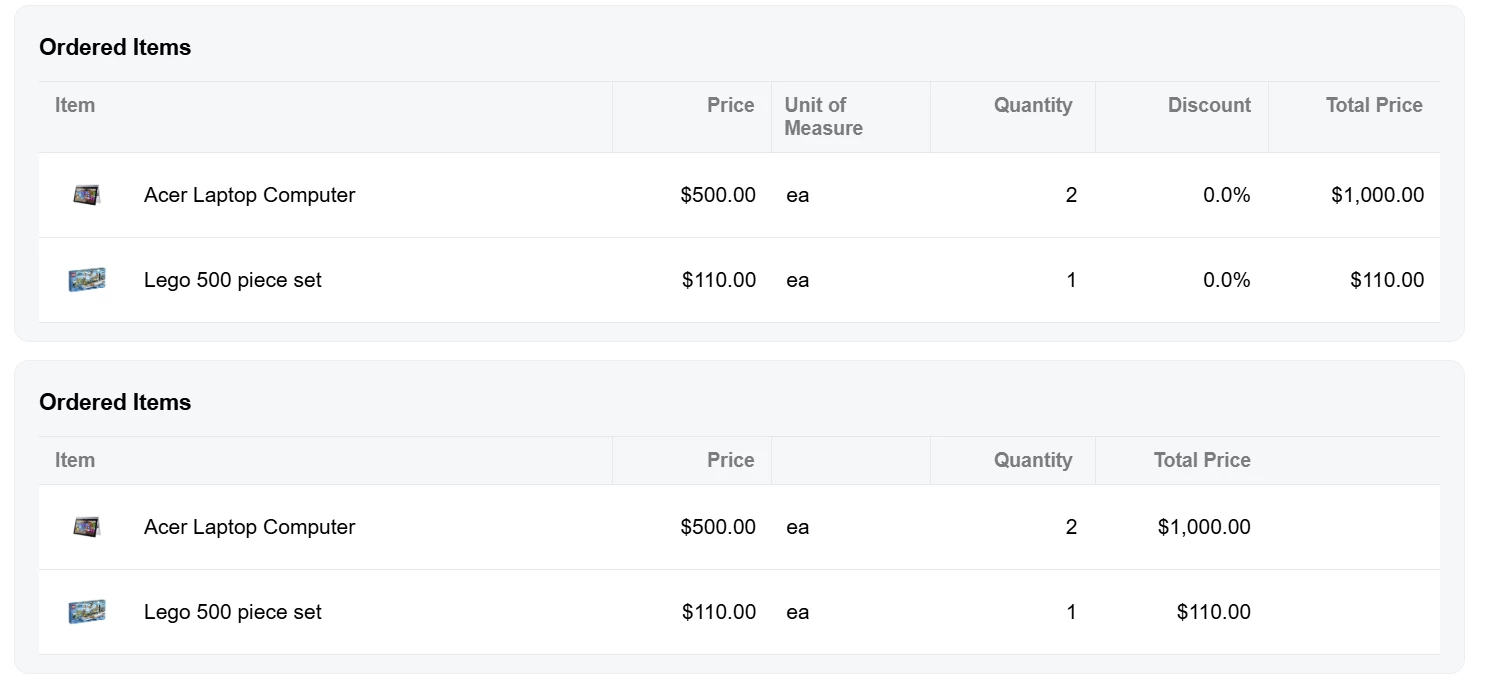
The <compose ... replace> line the AI suggested did nothing because replace with no value gives the build an empty selector, and it skips that element without an error. The blank header over "ea" in your screenshot is msg.UnitOfMeasure. SP504004's Labels class doesn't have it, so type the text into that div.


View original

10 replies

Forum|alt.badge.img+8
  • Captain II
  • Nov 6, 2026 8:32 PM UTC

You should be able to replace the qp-data-feed and replace it with your own. But, I’d be curious to see if hiding the field in the .ts file would work better.

Add an extension folder for the SP504004 file (usual Modern UI customization).

Something like:

SP504004_XXClientMod.ts

import { SOLine } from “../../view-models”;  //check this path for correctness

export interface SP504004_XXClientMod extends SP504004 {}
export class SP504004_XXClientMod {}

export interface SOLine_XXClientMod extends SOLine {}
export class SOLine_XXClientMod {
  DiscPct: PXFieldState<PXFieldOptions.Hidden>;
}


Translate

Steve Milner
Varsity III
Forum|alt.badge.img+7

@Joe Schmucker your read is right. The column isn't bound to a field. The header is a plain div that prints msg.Discount, and the cell prints a discount getter on the SOLine class in SP504004's view-models.ts, which reads SOLine__DiscPct and falls back to 0.

That's why hiding a field in TypeScript won't take it off (the field in that view is SOLine__DiscPct, not DiscPct). Django's first suggestion, replacing the markup, is the route.

The catch is that the data feed isn't in SP504004.html. The screen only has <compose class="sp-full-width" view-model="../sp-ordered-items">, and the build merges your HTML extension into the screen's own HTML without pulling composed templates in. A selector aimed at dfOrderedItems throws a build error: "screen HTML doesn't contain any elements that satisfies such querySelector".

The compose line is what you can reach. Remove it in your SP504004 extension and add your own copy of the ordered-items markup after the Fifth fieldset, minus the two discount divs. Your copy binds to SP504004's msg (its Labels class), which has no UnitOfMeasure, so give that header its own text.

The same template is composed on the Order screen (SP504000), so Discount still shows there unless you do the same on that screen.

Translate

Joe Schmucker
Captain II
Forum|alt.badge.img+3

Yup...I tried to hide it in the .ts extension about 12 different ways.

As you can see here, I tried just about everything that can be tried!  😑 I agree that hiding the field like this is pointless as the field isn’t actually a “field” in the html.

import {
PXFieldState,
readOnly,
isVisible,
PXFieldOptions,
PXView,
columnConfig,
GridCell
} from "client-controls";
import { SP504004 } from "src/screens/SP/SP504004/SP504004";
import { SPOrderedItems } from "src/screens/SP/sp-ordered-items";
import { SOLine } from "src/screens/SP/SP504004/view-models";

export interface SP504004_ICS extends SP504004 { }
export class SP504004_ICS { }

export interface SP504004_SPOLine extends SOLine { }

//export class SP504004_SPOLine {
// @columnConfig({ visible: false })
// SOLine__DiscPct: PXFieldState<PXFieldOptions.Hidden>;

// @columnConfig({ visible: false })
// DiscPct: PXFieldState<PXFieldOptions.Hidden>;
//}

//tried it this way too.
export class SP504004_SPOLine extends PXView {
@columnConfig({ visible: false })
SOLine__DiscPct: PXFieldState<PXFieldOptions.Hidden>;

@columnConfig({ visible: false })
DiscPct: PXFieldState<PXFieldOptions.Hidden>;
}


export interface SP504004_SPOrderedItems extends SPOrderedItems { }
//tried it this way too.
export class SP504004_SPOrderedItems {
//export class SP504004_SPOrderedItems extends PXView {
@columnConfig({ visible: false })
SOLine__DiscPct: PXFieldState<PXFieldOptions.Hidden>;

@columnConfig({ visible: false })
DiscPct: PXFieldState<PXFieldOptions.Hidden>;
}

I tried to hide this section in my html extension but I could not resolve my reference.  You will see I successfully removed two discount fields from the “main” stuff.  But I couldn’t figure out how to remove this from the sp-ordered-items html.  I think this is what I want to replace.

		<qp-data-feed id="dfOrderedItems" class="no-toolbar sp-data-feed sp-filled-section"
view="OrderedItems" auto-resize="true">
<template width="100%">
<qp-fieldset id="fsShipment" view.bind="OrderedItems" class="sp-data-feed-fieldset no-animation">
<field name="fieldImage" unbound replace-content class="sp-items-col-image sp-data-feed-field">
<div class="sp-image">
<div if.bind="OrderedItems.Data.value !== ''" class="sp-image-blob"
style="background-image: url(data:image/png;base64,${OrderedItems.Data.value})">
</div>
<div if.bind="OrderedItems.Data.value === ''" class="sp-image-empty small">
<qp-hyper-icon images.bind="{ normal: 'svg:sp@photo' }"></qp-hyper-icon>
</div>
</div>
</field>

<field name="fieldDescr" unbound replace-content class="sp-items-col-desc sp-data-feed-field">
<div class="col-sm-12 col-md-12 col-lg-6">
${OrderedItems.description}
</div>
<div class="col-lg-2 sp-items-price">${OrderedItems.unitPrice}</div>
<div class="col-lg-2 sp-items-uom"><span>/</span>${OrderedItems.unit.toLowerCase()}</div>
<div class="col-sm-12 col-md-12 col-lg-2 sp-items-qty">
<span>${msg.Qty}:</span>${OrderedItems.quantity}
</div>
</field>

<field name="fieldTotal" unbound replace-content
class="col-3 sp-data-feed-field sp-items-totals-col">
<div
class="col-lg-6 sp-items-discount ${OrderedItems.discount > 0 ? '' : 'sp-pane-view-invisible'}">
<span>${msg.Discount}: </span>${OrderedItems.discount}%
</div>
<div
class="col-lg-6 sp-items-extprice sp-grid-view-hidden ${OrderedItems.discount > 0 ? '' : 'sp-pane-view-invisible'}">
${OrderedItems.extPrice}
</div>
<div class="col-lg-6 sp-items-total">${OrderedItems.totalPrice}</div>
</field>
</qp-fieldset>
</template>
</qp-data-feed>

 This is my html extension which works to remove the main discount fields from the screen.

<template>
<field remove="#first field[name='CuryDiscTot_Text']"></field>
<field remove="#first-expanded field[name='CuryDiscTot_Text']"></field>
</template>

I tried using these options (in different tests) just to try to remove SOMETHING but they caused compiler errors. 

    <field remove="#dfOrderedItems"></field>
    <field remove="#dfOrderedItems_fsShipment"></field>
    <field remove="#dfOrderedItems_fsShipment_fieldTotal"></field>

<qp-data-feed remove="#dfOrderedItems"></qp-data-feed>


Since I am not removing something from the “main” html, I don’t know how to reference a “sub-file”.  

I still am not good at knowing how to reference objects that I want to modify.  Maybe I am close?


Translate

Joe Schmucker
Captain II
Forum|alt.badge.img+3

I found this topic from Daryl

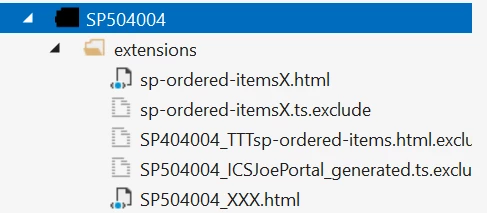
I tried renaming my extension to SP504004_XXX.html, then retried the various options in my extension but I get the same error that the element wasn’t found.  Just thought maybe this might point out something I might be doing wrong.

Translate

Joe Schmucker
Captain II
Forum|alt.badge.img+3

ok… i got it mostly working!   LOOKS BEATIFUL!

Now I just need to remove the original. 

I tried adding this but it throws a compiler error

    <qp-data-feed remove="#fsOrderedItems"></qp-data-feed>
    <qp-data-feed remove="#dfOrderedItems"></qp-data-feed>
 

Google AI suggest this but it throws a runtime error

    <qp-data-feed remove="#fsOrderedItems"></qp-data-feed>
    <qp-data-feed remove="#dfOrderedItems"></qp-data-feed>

AI also recommended adding this, but it doesn’t remove the file.

<compose view-model="src/screens/SP/sp-ordered-items" replace></compose>

Here is the “working code” other than removing the original stuff

	<div class="h-stack" tabindex="0">
<div class="h-stack gray-pane col-sm-12 col-md-7 col-lg-8 order-review">

<div class="sp-fieldset sp-items">
<qp-fieldset id="fsOrderedItems2" class="sp-feed-grid" caption="Ordered Items" view.bind="OrderedItems">
<field name="OrderedItemsFeed" unbound replace-content>
<div class="sp-items-header">
<div class="sp-items-col-image sp-items-header-item">${msg.Item}</div>
<div class="sp-items-col-desc">
<div class="col-lg-6 sp-items-header-desc"></div>
<div class="col-lg-2 sp-items-header-price">${msg.Price}</div>
<div class="col-lg-2 sp-items-header-uom">${msg.UnitOfMeasure}</div>
<div class="col-lg-2 sp-items-header-qty">${msg.Quantity}</div>
</div>
<div class="col-lg-3">
<div class="col-lg-6 sp-items-header-total">${msg.Total}</div>
</div>
</div>
</field>
</qp-fieldset>

<qp-data-feed id="dfOrderedItems2" class="no-toolbar sp-data-feed sp-filled-section"
view="OrderedItems" auto-resize="true">
<template width="100%">
<qp-fieldset id="fsShipment2" view.bind="OrderedItems" class="sp-data-feed-fieldset no-animation">
<field name="fieldImage" unbound replace-content class="sp-items-col-image sp-data-feed-field">
<div class="sp-image">
<div if.bind="OrderedItems.Data.value !== ''" class="sp-image-blob"
style="background-image: url(data:image/png;base64,${OrderedItems.Data.value})">
</div>
<div if.bind="OrderedItems.Data.value === ''" class="sp-image-empty small">
<qp-hyper-icon images.bind="{ normal: 'svg:sp@photo' }"></qp-hyper-icon>
</div>
</div>
</field>

<field name="fieldDescr" unbound replace-content class="sp-items-col-desc sp-data-feed-field">
<div class="col-sm-12 col-md-12 col-lg-6">
${OrderedItems.description}
</div>
<div class="col-lg-2 sp-items-price">${OrderedItems.unitPrice}</div>
<div class="col-lg-2 sp-items-uom"><span>/</span>${OrderedItems.unit.toLowerCase()}</div>
<div class="col-sm-12 col-md-12 col-lg-2 sp-items-qty">
<span>${msg.Qty}:</span>${OrderedItems.quantity}
</div>
</field>

<field name="fieldTotal" unbound replace-content
class="col-3 sp-data-feed-field sp-items-totals-col">
<div class="col-lg-6 sp-items-extprice sp-grid-view-hidden ${OrderedItems.discount > 0 ? '' : 'sp-pane-view-invisible'}">
${OrderedItems.extPrice}
</div>
<div class="col-lg-6 sp-items-total">${OrderedItems.totalPrice}</div>
</field>
</qp-fieldset>
</template>
</qp-data-feed>
</div>
</div>
</div>


If you guys can help me find a way to hide the original sp-ordered-items, I will be done with this!


Translate

Forum|alt.badge.img+8
  • Captain II
  • Nov 9, 2026 2:45 PM UTC

I had to do customizations to AR303000 to the contact grid and I found that it was easier to remove the grid and replace it with my own.

I used the following line, and this is within the main <template> </template> pair:

<template remove="#grdContacts"></template>

So maybe you can try:

<template remove="#fsOrderedItems"></template>
Translate

Joe Schmucker
Captain II
Forum|alt.badge.img+3
  • Author
  • Captain II
  • Nov 9, 2026 3:08 PM UTC

Hi ​@Django 

Since I am removing the Ordered Items section from the included html, my code fires first and the reference to the object doesn’t exist at the time my html is patched.  As such, I cannot remove it in my HTML.  I did a bunch of research, and I do not believe I can change the order that the files are compiled.  I tried naming my extension files so that they are alphabetically after the original files, but it I still get an error that the object cannot be resolved.

Note that only two of the files are included in the project as listed below.  The others were testing and I left them there so I could look to the myriad of things I tired.  I tried to put the code in my SP504004_XXX.html file.  It shows my stuff, but I cannot remove the original.  I tried moving the code into the sp-ordered-itemsX.html. It shows my stuff.  But is I try to remove the original using your technique it still throws the error.

I even tried to complete remove the entire original sp-ordered-items.html, but I could not remove it.


 I saw that Daryl had a similar issue.  I tried a bunch of different ways to rename my files to make them alphabetically “after” the base files.  

According to AI, this should remove the “compose” element from the original HTML but it does nothing.

    <compose view-model="src/screens/SP/sp-ordered-items" replace></compose>
Note that the object I am removing is NOT an element in the main HTML file.  It is a “compose”.

I tried over 150 things to do this using AI suggestions.  No luck.  

If I use the editor in the Project Editor, I get an error after removing the compose line and the screen won’t save.  

Maybe I should submit an acumatica ticket.  Maybe this cannot even be done.  It’s ridiculous that I (and you guys) are going through all this just to remove the discount % column.  I might just tell the customer it cannot be done.  I’ve spent days on this.  I am grateful for your help.  I don’t want to waste any more of your guys time.  

EDIT:  I tried your code     <template remove="#fsOrderedItems">
    </template>

It compiled, but did not remove the section.


Translate

Forum|alt.badge.img+8
  • Captain II
  • Nov 9, 2026 3:28 PM UTC

Definitely send a support ticket. I suspect that you’re close to the solution, if there is one.

What you’re wanting to do, either remove or add columns, is something that someone else will definitely want to do so the framework should support that.

Translate

Steve Milner
Varsity III
Forum|alt.badge.img+7
  • Varsity III
  • Answer
  • Nov 9, 2026 4:40 PM UTC

@Joe Schmucker don't give up yet. Hide the original instead of removing it:

<template modify="compose[view-model='../sp-ordered-items']" class="hidden"></template>

modify copies its attributes onto the element the selector finds, and .hidden is display: none !important in sp-common.scss, which SP504004 already loads. The compose is the only piece of the ordered items that exists in SP504004.html. fsOrderedItems and dfOrderedItems only appear in the browser, when the compose loads sp-ordered-items, so renaming your files can't put them in reach. Daryl's fieldset came from another extension's qp-include, which does get merged in, and that's why renaming worked for him.

Hiding beats removing here. Your copy's header and columns are styled by sp-ordered-items.scss, which only loads when the compose runs sp-ordered-items.ts.

We built this on 2026 R1 and the merged screen comes out with <compose class="hidden" view-model="../sp-ordered-items">. You can check yours the same way. The build writes the merged screen to SP504004.html under App_Data\TSCompleteScreens on the site.

The <compose ... replace> line the AI suggested did nothing because replace with no value gives the build an empty selector, and it skips that element without an error. The blank header over "ea" in your screenshot is msg.UnitOfMeasure. SP504004's Labels class doesn't have it, so type the text into that div.

Translate

Joe Schmucker
Captain II
Forum|alt.badge.img+3
  • Author
  • Captain II
  • Nov 9, 2026 4:46 PM UTC

​@Steve Milner  OMG.   IT WORKED


I was just in the process of changing the compose to hidden.  :-)  Glad to know that was an empty rabbit hole.


THANK YOU GUYS!!!!


In case I need to refer back or someone else wants to do this (prolly not likely) here is the final code:

<template>

<field remove="#first field[name='CuryDiscTot_Text']"></field>
<field remove="#first-expanded field[name='CuryDiscTot_Text']"></field>

<template modify="compose[view-model='../sp-ordered-items']" class="hidden">
</template>

<div class="h-stack" tabindex="0">
<div class="h-stack gray-pane col-sm-12 col-md-7 col-lg-8 order-review">

<div class="sp-fieldset sp-items">
<qp-fieldset id="fsOrderedItemsICS" class="sp-feed-grid" caption="Ordered Items" view.bind="OrderedItems">
<field name="OrderedItemsFeed" unbound replace-content>
<div class="sp-items-header">
<div class="sp-items-col-image sp-items-header-item">${msg.Item}</div>
<div class="sp-items-col-desc">
<div class="col-lg-6 sp-items-header-desc"></div>
<div class="col-lg-2 sp-items-header-price">${msg.Price}</div>
<div class="col-lg-2 sp-items-header-uom">${msg.UnitOfMeasure}</div>
<div class="col-lg-2 sp-items-header-qty">${msg.Quantity}</div>
</div>
<div class="col-lg-3">
<div class="col-lg-6 sp-items-header-total">${msg.Total}</div>
</div>
</div>
</field>
</qp-fieldset>

<qp-data-feed id="dfOrderedItems" class="no-toolbar sp-data-feed sp-filled-section"
view="OrderedItems" auto-resize="true">
<template width="100%">
<qp-fieldset id="fsShipment" view.bind="OrderedItems" class="sp-data-feed-fieldset no-animation">
<field name="fieldImage" unbound replace-content class="sp-items-col-image sp-data-feed-field">
<div class="sp-image">
<div if.bind="OrderedItems.Data.value !== ''" class="sp-image-blob"
style="background-image: url(data:image/png;base64,${OrderedItems.Data.value})">
</div>
<div if.bind="OrderedItems.Data.value === ''" class="sp-image-empty small">
<qp-hyper-icon images.bind="{ normal: 'svg:sp@photo' }"></qp-hyper-icon>
</div>
</div>
</field>

<field name="fieldDescr" unbound replace-content class="sp-items-col-desc sp-data-feed-field">
<div class="col-sm-12 col-md-12 col-lg-6">
${OrderedItems.description}
</div>
<div class="col-lg-2 sp-items-price">${OrderedItems.unitPrice}</div>
<div class="col-lg-2 sp-items-uom"><span>/</span>${OrderedItems.unit.toLowerCase()}</div>
<div class="col-sm-12 col-md-12 col-lg-2 sp-items-qty">
<span>${msg.Qty}:</span>${OrderedItems.quantity}
</div>
</field>

<field name="fieldTotal" unbound replace-content
class="col-3 sp-data-feed-field sp-items-totals-col">
<div class="col-lg-6 sp-items-extprice sp-grid-view-hidden ${OrderedItems.discount > 0 ? '' : 'sp-pane-view-invisible'}">
${OrderedItems.extPrice}
</div>
<div class="col-lg-6 sp-items-total">${OrderedItems.totalPrice}</div>
</field>
</qp-fieldset>
</template>
</qp-data-feed>
</div>
</div>
</div>
</template>


Translate