
Question

Performance - Just how expensive is RequestRefresh() during a Grid control?

  • Nov 27, 2026 3:33 AM UTC
  • 2 replies
  • 19 views
  • Translate All

willhowardnz
Freshman I
Forum|alt.badge.img

Hi all,

Trying to pick brains/confirm my understanding. (I haven’t done benchmarking on this).

I’ve been reading through code examples.


There’s a note in T210 that

You will use the PXView.RequestRefresh() method. To optimize the performance, by default, in the RowUpdated event, the system synchronizes the values in the UI with the data in PXCache for only the current record. Because you have updated the values in other detail records, you need to refresh the UI by using the PXView.RequestRefresh() method.


The code example then given will call RequestRefresh even if no other rows are updated by the RowUpdated event:
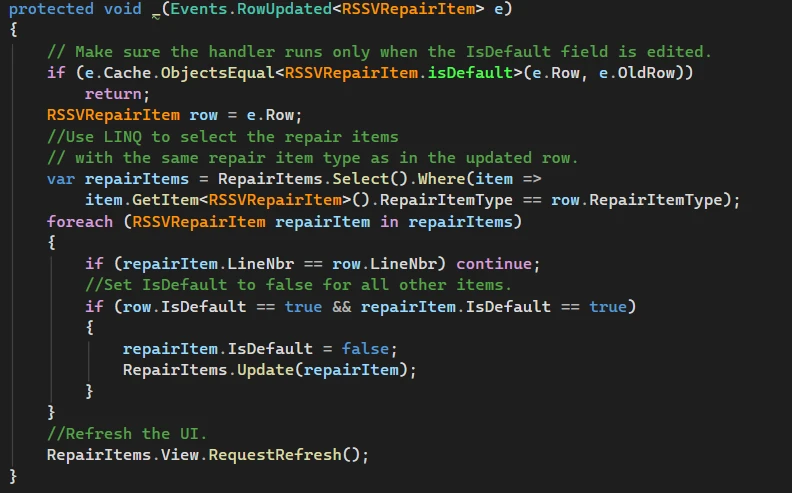
Example code from T210 for 26R1 , Page 52


When I was doing a lot of SQL development I know that minimizing empty result sets calling to other triggers can have a big impact.  

Does anyone with more experience know how bad the impacts of overly hitting RequestRefresh are though?

Suppositions/Questions:

  1. How big is the impact of calling a RequestRefresh() during a RowUpdated event in data grid?
  2. Given the instruction to keep RequestRefresh to a minimum to preserve performance, 
    Am I right that it’s important the RequestRefresh() event never be called inside of the ForEach
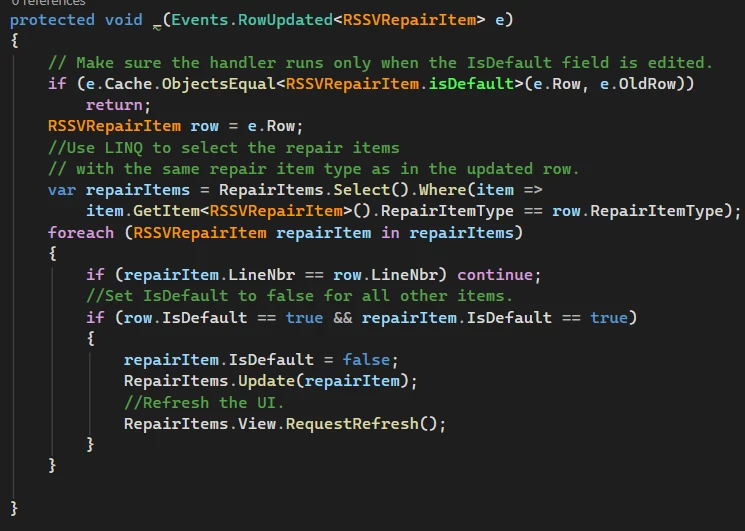
    RequestRefresh() inside of ForEach, presumably bad because it can be called repeatedly during the RowUpdated event
  3. Would it be best practice to detect for the screen actually having gone stale, or is the cost of checking that likely to outweigh the potential benefits or not calling for redraws of the grid control?
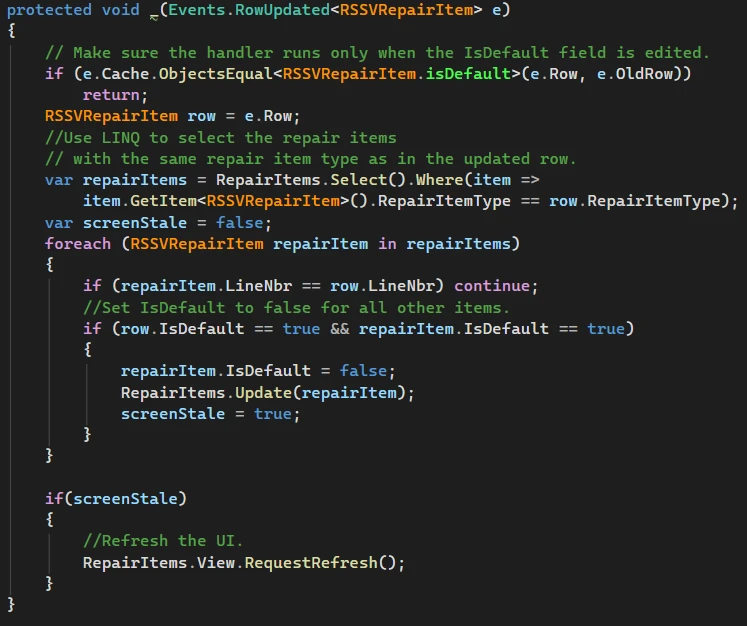
    Modified example code to add screenStale variable and only RequestRefresh if a redraw is required.


     

2 replies

Forum|alt.badge.img+9
  • Jr Varsity III
  • Nov 27, 2026 12:02 PM UTC

Hi ​@willhowardnz ,

Below are answers to your questions-

  1. How big is the impact? Usually small: one extra select of the view, plus a full page of rows sent back and re-rendered. It's only noticeable with large grid pages, expensive view delegates, or events that fire very often.

  2. Calling it inside the foreach? It doesn't hurt performance. RequestRefresh() only sets a flag, so N calls still give one refresh. Put it after the loop anyway because it reads more clearly. The real cost inside the loop is cache.Update(otherRow), which runs the whole event chain for each row and can recurse back into your handler.

  3. Should you detect staleness first? Yes. Checking a boolean costs almost nothing, and skipping a refresh you don't need saves a select, the extra payload and a re-render. Your screenStale flag is the right approach.

Hope it helps!!

Translate

KrunalDoshi
Pro II
Forum|alt.badge.img+9

Hi ​@willhowardnz,

PXView.RequestRefresh() should not be called indiscriminately, especially from frequently triggered events such as RowUpdated. However, I would distinguish between refreshing the view, synchronizing data to the UI, and actually causing a full grid redraw—because these aren't necessarily the same operation.

The T210 guidance is primarily addressing a specific scenario: when code modifies other detail records in the cache, Acumatica's normal synchronization may only update the current row in the UI, leaving the other rows visually stale.

I agree that RequestRefresh() should be used sparingly, although I wouldn't expect a single call to necessarily trigger a database query.

My approach would be to track whether any other records were actually modified and call RequestRefresh() once, after the loop, only if changes were made.

I would definitely avoid calling it inside a foreach, as multiple refresh requests for a single batch of changes are unnecessary.

I also don't think we need to check whether the entire grid is stale. Simply tracking whether we actually changed another row should be sufficient to determine whether a refresh is needed.

So, in my opinion, RequestRefresh() isn't something to avoid entirely; it should just be conditional and called once after the batch of updates as you have indicated but only when it is for another DAC or view.

Hope this is helpful!

Translate