


Hello, i don’t know if this is a complicated problem or if i’m just thinking in the wrong direction. I have a Dialog which pops out per button click. Inside this SmartPanel i have 2 Selectors which aren’t working. I tried using Standard ones which are working in other Screens, but i get the same error.
I have a Filter DAC CommSupplier, inside this DAC is a Checkbox and the 2 Selectors.
This is how i open the Dialog:
     public PXFilter<CommSupplierFilter> CommSupplierFilter;
     public PXAction<FSServiceOrder> commSupplier;
     [PXButton(CommitChanges = true)]
     [PXUIField(DisplayName = "Lieferanten beauftragen", MapEnableRights = PXCacheRights.Select)]
     protected IEnumerable CommSupplier(PXAdapter adapter)
     {
         if (Base.CurrentServiceOrder.Current == null)
             return adapter.Get();
         if(Base.ServiceOrderRecords.Current == null)
             return adapter.Get();

         if (CommSupplierFilter.Current == null)
         {
             CommSupplierFilter.Insert(new CommSupplierFilter());
         }

         CommSupplierFilter.Cache.Clear();
         CommSupplierFilter.Insert(new CommSupplierFilter());

         if (CommSupplierFilter.AskExt() == WebDialogResult.OK)
         {
             return adapter.Get();
         }

         return adapter.Get();
     }
Here is the SmartPanel aspx code:
</px:PXSmartPanel>
  <px:PXSmartPanel runat="server" ID="AG_CommSupplier_Dialog" Caption="Lieferanten Beauftragen" CaptionVisible="True" LoadOnDemand="True" AcceptButtonID="AG_CommSuppliert_Button1" CancelButtonID="AG_CommSuppliert_Button2" Key="CommSupplierFilter" AutoRepaint="True">
    <px:PXFormView runat="server" ID="AG_CommSupplier_PopUp" Caption="Lieferanten Beauftragen" DataMember="CommSupplierFilter" Width="100%" Visible="True" DataSourceID="ds">
      <Template>
        <px:PXCheckBox runat="server" ID="AG_CommSupplier_Checkbox1" DataField="ApplyToAll" Text="Alle Positionen" />
        <px:PXSelector runat="server" ID="CstPXSelector32" DataField="Group" />
        <px:PXSelector runat="server" ID="CstPXSelector33" DataField="VendorID" /></Template></px:PXFormView>
    <px:PXPanel runat="server" ID="AG_commSupplierPanel">
      <px:PXButton runat="server" ID="AG_CommSuppliert_Button1" DialogResult="OK" Text="OK" />
      <px:PXButton runat="server" ID="AG_CommSuppliert_Button2" DialogResult="Cancel" Text="Cancel" /></px:PXPanel></px:PXSmartPanel>
And here is the Code of my Filter DAC:
{
    [PXCacheName("Comm Supplier Filter")]
    [PXSerializable]
    public class CommSupplierFilter : PXBqlTable, IBqlTable
    {
        #region ApplyToAll
        public abstract class applyToAll : PX.Data.BQL.BqlBool.Field<applyToAll> { }

        [PXBool]
        [PXUIField(DisplayName = "Alle Positionen")]
        [PXDefault(true)]
        public bool? ApplyToAll { get; set; }
        #endregion

        #region Group
        public abstract class group : PX.Data.BQL.BqlInt.Field<group> { }

        [PXInt]
        [PXUIField(DisplayName = "Gruppe")]
        //[PXSelector(
        //    typeof(Search<FSSODetExt.usrGroupNr,
        //        Where<FSSODet.srvOrdType, Equal<Current<FSServiceOrder.srvOrdType>>,
        //            And<FSSODet.refNbr, Equal<Current<FSServiceOrder.refNbr>>,
        //            And<FSSODetExt.usrGroupNr, IsNotNull>>>>),
        //    typeof(FSSODetExt.usrGroupNr),
        //    DescriptionField = typeof(FSSODetExt.usrGroupNr))]
        [PXSelector(typeof(Search<PMProject.contractID>),
            typeof(PMProject.contractCD),
            typeof(PMProject.description),
            typeof(PMProject.customerID),
            typeof(PMProject.status),
            SubstituteKey = typeof(PMProject.contractCD), DescriptionField = typeof(PMProject.description), CacheGlobal = true, ValidateValue = false)]

        public int? Group { get; set; }
        #endregion

        #region VendorID
        public abstract class vendorID : PX.Data.BQL.BqlInt.Field<vendorID> { }

        [PXInt]
        [PXUIField(DisplayName = "Lieferant")]
        [PXSelector(
            typeof(SelectFrom<VendorR>
                .LeftJoin<Address>.On<
                    Address.bAccountID.IsEqual<VendorR.bAccountID>
                    .And<Address.addressID.IsEqual<VendorR.defAddressID>>>
                .SearchFor<VendorR.bAccountID>),
            typeof(VendorR.acctCD),
            typeof(VendorR.acctName),
            typeof(Address.addressLine1),
            typeof(Address.postalCode),
            typeof(Address.city),
            SubstituteKey = typeof(VendorR.acctCD),
            DescriptionField = typeof(VendorR.acctName),
            Filterable = true,
            ValidateValue = false)]
        public virtual int? VendorID { get; set; }
        #endregion

    }
}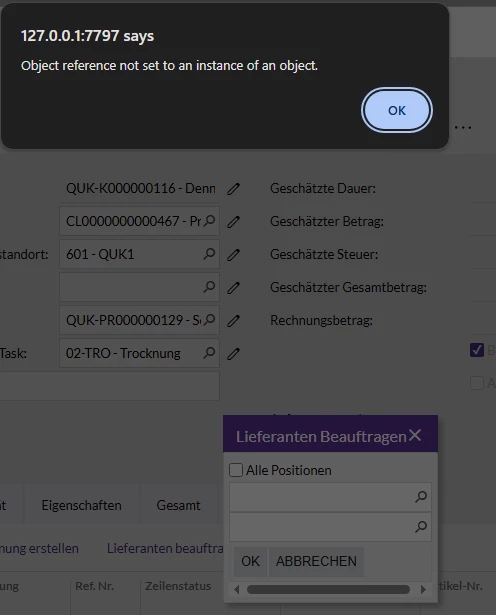
And this is the Error i get:
 at PX.Data.PXFirstChanceExceptionLogger.ProfilerFirstChanceException(Object o, FirstChanceExceptionEventArgs args)
 at PX.Web.UI.PXGrid.PerformSelect()
 at PX.Web.UI.PXSelectorBase.GetCallbackResult(PXCallbackCommand cmd)
 at PX.Web.UI.PXCallbackManager.RenderControlsData(PXCallbackResultMethod resultMethod, XmlWriter writer)
 at PX.Web.UI.PXCallbackManager.GetCallbackResultInternal(PXCallbackResultMethod resultMethod)
 at PX.Web.UI.PXCallbackManager.GetCallbackResult(PXCallbackResultMethod resultMethod)
 at System.Web.UI.Page.RenderCallback()
 at System.Web.UI.Page.ProcessRequestMain(Boolean includeStagesBeforeAsyncPoint, Boolean includeStagesAfterAsyncPoint)
 at System.Web.UI.Page.ProcessRequest(Boolean includeStagesBeforeAsyncPoint, Boolean includeStagesAfterAsyncPoint)
 at System.Web.UI.Page.ProcessRequest()
 at System.Web.UI.Page.ProcessRequest(HttpContext context)
 at PX.Web.UI.PXPage.ProcessRequest(HttpContext context)
 at System.Web.HttpApplication.CallHandlerExecutionStep.System.Web.HttpApplication.IExecutionStep.Execute()
 at System.Web.HttpApplication.<>c__DisplayClass285_0.<ExecuteStepImpl>b__0()
 at System.Web.HttpApplication.ExecuteStepImpl(IExecutionStep step)
 at System.Web.HttpApplication.ExecuteStep(IExecutionStep step, Boolean& completedSynchronously)
 at System.Web.HttpApplication.PipelineStepManager.ResumeSteps(Exception error)
 at System.Web.HttpApplication.BeginProcessRequestNotification(HttpContext context, AsyncCallback cb)
 at System.Web.HttpRuntime.ProcessRequestNotificationPrivate(IIS7WorkerRequest wr, HttpContext context)
 at System.Web.Hosting.PipelineRuntime.ProcessRequestNotificationHelper(IntPtr rootedObjectsPointer, IntPtr nativeRequestContext, IntPtr moduleData, Int32 flags)
 at System.Web.Hosting.PipelineRuntime.ProcessRequestNotification(IntPtr rootedObjectsPointer, IntPtr nativeRequestContext, IntPtr moduleData, Int32 flags)
 at System.Web.Hosting.UnsafeIISMethods.MgdIndicateCompletion(IntPtr pHandler, RequestNotificationStatus& notificationStatus)
 at System.Web.Hosting.UnsafeIISMethods.MgdIndicateCompletion(IntPtr pHandler, RequestNotificationStatus& notificationStatus)
 at System.Web.Hosting.PipelineRuntime.ProcessRequestNotificationHelper(IntPtr rootedObjectsPointer, IntPtr nativeRequestContext, IntPtr moduleData, Int32 flags)
 at System.Web.Hosting.PipelineRuntime.ProcessRequestNotification(IntPtr rootedObjectsPointer, IntPtr nativeRequestContext, IntPtr moduleData, Int32 flags)
I’d appreciate any help. If anything else is needed i’d be happy to share it.
Thanks
Best Regards
Rayen



