


ModernUI development gotchas

  • July 15, 2026
  • 2 replies
  • 55 views

Forum|alt.badge.img+8

I didn’t see a place to post the little gotchas that can turn into time eating development cycles so I thought I’d start it.

Today I had an issue with a screen that needed severe orthodontic work.
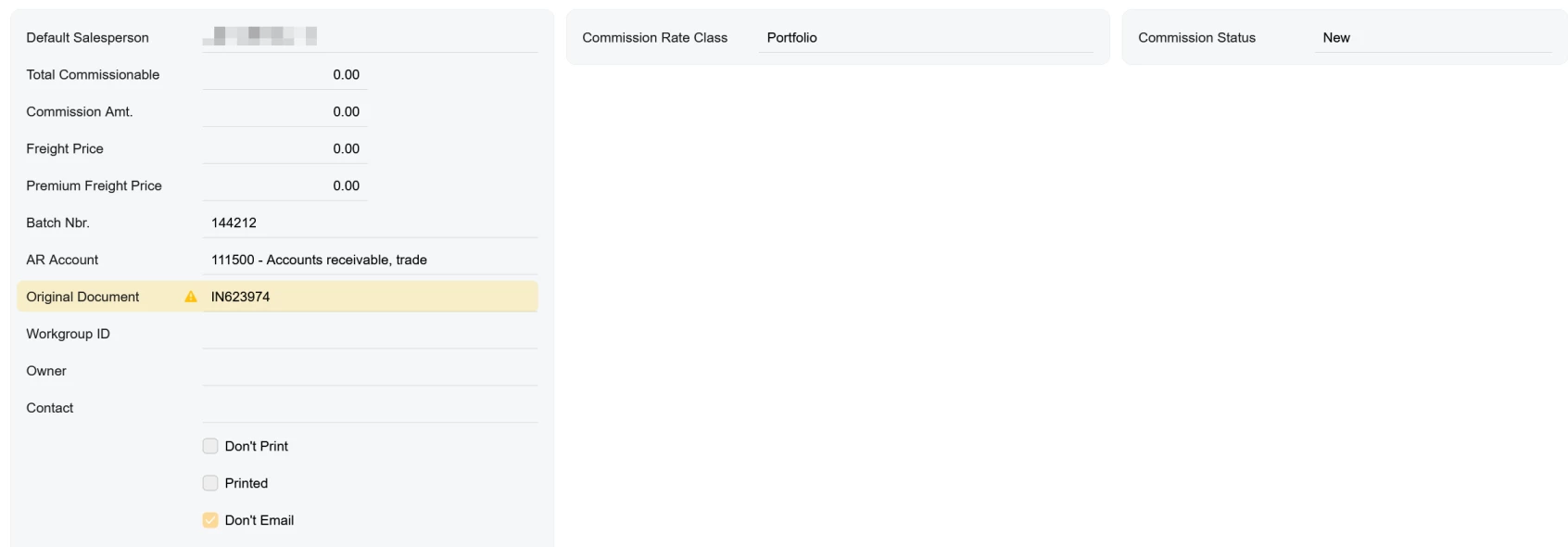
It was supposed to look like this:
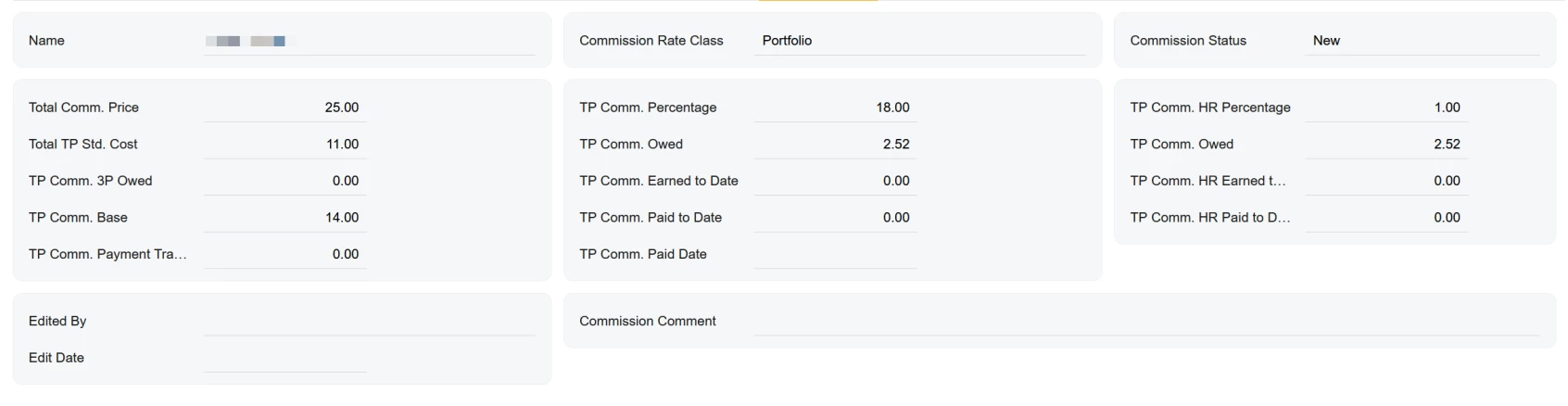
As it turns out, the issue was an “empty” qp-fieldset that I was having an issue with. When I removed the comment tags, the screen rendered properly instead of every following field from being placed into that “empty” fieldset.
 

<qp-template id="formTPCommissionsSetup" name="17-17-14">
<div id="colSetTPCommSetupA" slot="A">
<qp-fieldset id="fldSetTPCommSetupA" view.bind="CurrentDocument">
<!-- <field name="CurrentDocument.SalesPersonID_description"></field> -->
</qp-fieldset>
</div>
<div id="colSetTPCommSetupB" slot="B">
<qp-fieldset id="fldSetTPCommSetupB" view.bind="CurrentDocument">
<field name="CurrentDocument.UsrTPCommRateClass"></field>
</qp-fieldset>
</div>
<div id="colSetTPCommSetupC" slot="C">
<qp-fieldset id="fldSetTPCommSetupC" view.bind="CurrentDocument">
<field name="CurrentDocument.UsrTPCommStatus"></field>
</qp-fieldset>
</div>
</qp-template>


2 replies

Forum|alt.badge.img

Hii ​@Django , 

This appears to be a Modern UI layout limitation. In my case, the issue was caused by an empty <qp-fieldset>. The field inside the fieldset had been commented out:

 
<qp-fieldset view.bind="CurrentDocument">
<!-- <field name="CurrentDocument.SalesPersonID_description"></field> -->
</qp-fieldset>

With no renderable controls inside the fieldset, Modern UI placed all subsequent fields into that same fieldset, breaking the intended column layout. Removing the empty qp-fieldset (or adding at least one visible field) immediately restored the correct rendering.

It seems that every qp-fieldset should contain at least one rendered control. Empty fieldsets are not handled correctly by the current layout engine.


Forum|alt.badge.img

@Django 

Hi,

Try below modified code and make sure define your fields/element in typescript.

<qp-template id="formTPCommissionsSetup" name="17-17-14">
  <div id="colSetTPCommSetupA">
    <qp-fieldset id="fldSetTPCommSetupA" slot="A" view.bind="CurrentDocument">
      <!-- <field name="CurrentDocument.SalesPersonID_description"></field> -->
    </qp-fieldset>
  </div>
  <div id="colSetTPCommSetupB" slot="B" class="label-size-m">
    <qp-fieldset id="fldSetTPCommSetupB" view.bind="CurrentDocument" class="transparent-section">
      <field name="UsrTPCommRateClass"></field>
    </qp-fieldset>
  </div>
  <div id="colSetTPCommSetupC" slot="C" class="label-size-m">
    <qp-fieldset id="fldSetTPCommSetupC" view.bind="CurrentDocument" class="transparent-section">
      <field name="UsrTPCommStatus"></field>
    </qp-fieldset>
  </div>
</qp-template>

for your reference, you can Acumatica pre defined Form-Layouts

https://beacon.acumatica.com/r/UI-Development-Guide/Designing-the-Layout-of-an-Acumatica-ERP-Form/Form-Layout-Predefined-Templates#entry_0