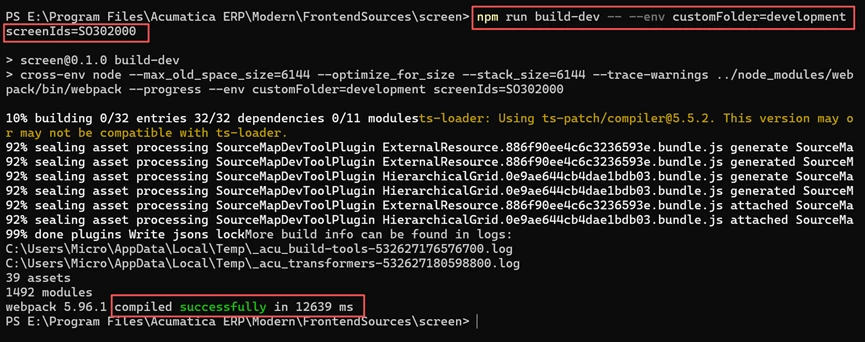
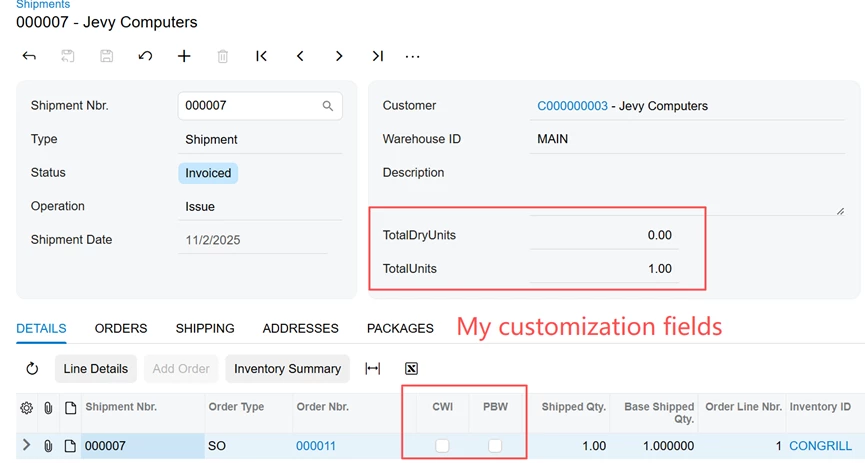
I have a project. The npm build for the Modern UI was successful, but an error occurs when publishing the project.
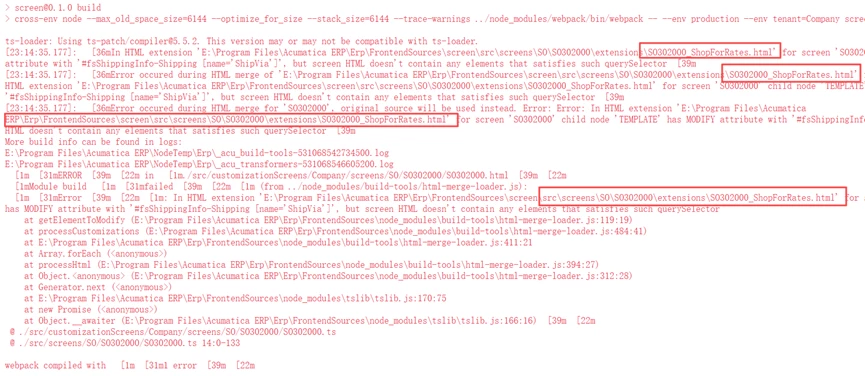
After checking the error details, it seems to be related to an official extension. I have a completely clean installation of Acumatica 2026 R1. I have not modified any system files or code at all. How can I resolve this?
Best answer by VardanV
@VardanV Thank you, I appreciate your help. yes, I run npm run getmodules from the FrontendSources folder successfully. However, still published with the same error after that.
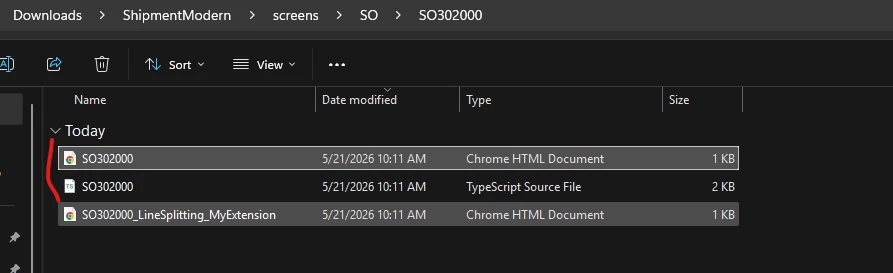
Why are you using the original Screen ID for your extensions?
Your changes for the .ts and .html files need to be added under the SO/SO302000/extensions/ folder. For your .ts and .html files, you should not use the original SO302000 name. Instead, please add additional text to the file names to differentiate your extension from the original screen.
For example:
SO302000_LineSplitCstMod.ts
SO302000_LineSplitCstMod.html
Please make this change and try to publish the package again.
If the error is still not resolved, please try publishing the package without the shipment file extensions. If the package publishes successfully without them, it means there is an issue inside the code. In that case, the issue can be identified by commenting out parts of the code and enabling them step by step to find the incorrect section.
There are a few known issues that can occur during package publishing in instances using the Modern UI. Please review the following points:
1. The tenant name in the instance should not contain spaces or dots, as this can cause package publishing issues.
2. There is an option to clear temporary files stored on the server, which typically requires assistance from Acumatica.
* You can first remove the Modern UI files and try publishing the package using the Classic UI packages. * If the package publishes successfully, then coordinate with Acumatica to clear the temporary server files.
3. If the above two points do not match your scenario, please review the issue with the developer to check whether the problem is related to customization conflicts.
@mohammadnawaz51 @Abhishek Niikam Thank you , but if I publish the package without modern files, successfully .Keep the package as published status and then add the modern files to the package, publish again, failed with error stil.
The only workaround is first publish witout issued modern files, then then npm them separately.
ts-loader: Using ts-patch/compiler@5.5.2. This version may or may not be compatible with ts-loader. [11:08:43.843]: [36mIn HTML extension 'E:\Program Files\Acumatica ERP\Modern\FrontendSources\screen\src\screens\SO\SO302000\extensions\SO302000_ShopForRates.html' for screen 'SO302000' child node 'TEMPLATE' has MODIFY attribute with '#fsShippingInfo-Shipping [name='ShipVia']', but screen HTML doesn't contain any elements that satisfies such querySelector[39m [11:08:43.843]: [36mError occured during HTML merge of 'E:\Program Files\Acumatica ERP\Modern\FrontendSources\screen\src\screens\SO\SO302000\extensions\SO302000_ShopForRates.html' for screen 'SO302000'. Error : Error: In HTML extension 'E:\Program Files\Acumatica ERP\Modern\FrontendSources\screen\src\screens\SO\SO302000\extensions\SO302000_ShopForRates.html' for screen 'SO302000' child node 'TEMPLATE' has MODIFY attribute with '#fsShippingInfo-Shipping [name='ShipVia']', but screen HTML doesn't contain any elements that satisfies such querySelector[39m [11:08:43.843]: [36mError occured during HTML merge for 'SO302000', original source will be used instead. Error: Error: In HTML extension 'E:\Program Files\Acumatica ERP\Modern\FrontendSources\screen\src\screens\SO\SO302000\extensions\SO302000_ShopForRates.html' for screen 'SO302000' child node 'TEMPLATE' has MODIFY attribute with '#fsShippingInfo-Shipping [name='ShipVia']', but screen HTML doesn't contain any elements that satisfies such querySelector[39m More build info can be found in logs: E:\Program Files\Acumatica ERP\NodeTemp\Modern\_acu_build-tools-660320758643500.log E:\Program Files\Acumatica ERP\NodeTemp\Modern\_acu_transformers-660320765606900.log [1m[31mERROR[39m[22m in [1m./src/customizationScreens/Company/screens/SO/SO302000/SO302000.html[39m[22m [1mModule build [1m[31mfailed[39m[22m[1m (from ../node_modules/build-tools/html-merge-loader.js): [1m[31mError[39m[22m[1m: In HTML extension 'E:\Program Files\Acumatica ERP\Modern\FrontendSources\screen\src\screens\SO\SO302000\extensions\SO302000_ShopForRates.html' for screen 'SO302000' child node 'TEMPLATE' has MODIFY attribute with '#fsShippingInfo-Shipping [name='ShipVia']', but screen HTML doesn't contain any elements that satisfies such querySelector at getElementToModify (E:\Program Files\Acumatica ERP\Modern\FrontendSources\node_modules\build-tools\html-merge-loader.js:119:19) at processCustomizations (E:\Program Files\Acumatica ERP\Modern\FrontendSources\node_modules\build-tools\html-merge-loader.js:484:41) at E:\Program Files\Acumatica ERP\Modern\FrontendSources\node_modules\build-tools\html-merge-loader.js:411:21 at Array.forEach (<anonymous>) at processHtml (E:\Program Files\Acumatica ERP\Modern\FrontendSources\node_modules\build-tools\html-merge-loader.js:394:27) at Object.<anonymous> (E:\Program Files\Acumatica ERP\Modern\FrontendSources\node_modules\build-tools\html-merge-loader.js:312:28) at Generator.next (<anonymous>) at E:\Program Files\Acumatica ERP\Modern\FrontendSources\node_modules\tslib\tslib.js:170:75 at new Promise (<anonymous>) at Object.__awaiter (E:\Program Files\Acumatica ERP\Modern\FrontendSources\node_modules\tslib\tslib.js:166:16)[39m[22m @ ./src/customizationScreens/Company/screens/SO/SO302000/SO302000.ts @ ./src/screens/SO/SO302000/SO302000.ts 14:0-136
To add, actually I have implemented 10+ screens, other screen publish sucessfully, only the shipment screen give errors.
ts-loader: Using ts-patch/compiler@5.5.2. This version may or may not be compatible with ts-loader. [11:08:43.843]: [36mIn HTML extension 'E:\Program Files\Acumatica ERP\Modern\FrontendSources\screen\src\screens\SO\SO302000\extensions\SO302000_ShopForRates.html' for screen 'SO302000' child node 'TEMPLATE' has MODIFY attribute with '#fsShippingInfo-Shipping [name='ShipVia']', but screen HTML doesn't contain any elements that satisfies such querySelector[39m [11:08:43.843]: [36mError occured during HTML merge of 'E:\Program Files\Acumatica ERP\Modern\FrontendSources\screen\src\screens\SO\SO302000\extensions\SO302000_ShopForRates.html' for screen 'SO302000'. Error : Error: In HTML extension 'E:\Program Files\Acumatica ERP\Modern\FrontendSources\screen\src\screens\SO\SO302000\extensions\SO302000_ShopForRates.html' for screen 'SO302000' child node 'TEMPLATE' has MODIFY attribute with '#fsShippingInfo-Shipping [name='ShipVia']', but screen HTML doesn't contain any elements that satisfies such querySelector[39m [11:08:43.843]: [36mError occured during HTML merge for 'SO302000', original source will be used instead. Error: Error: In HTML extension 'E:\Program Files\Acumatica ERP\Modern\FrontendSources\screen\src\screens\SO\SO302000\extensions\SO302000_ShopForRates.html' for screen 'SO302000' child node 'TEMPLATE' has MODIFY attribute with '#fsShippingInfo-Shipping [name='ShipVia']', but screen HTML doesn't contain any elements that satisfies such querySelector[39m More build info can be found in logs: E:\Program Files\Acumatica ERP\NodeTemp\Modern\_acu_build-tools-660320758643500.log E:\Program Files\Acumatica ERP\NodeTemp\Modern\_acu_transformers-660320765606900.log [1m[31mERROR[39m[22m in [1m./src/customizationScreens/Company/screens/SO/SO302000/SO302000.html[39m[22m [1mModule build [1m[31mfailed[39m[22m[1m (from ../node_modules/build-tools/html-merge-loader.js): [1m[31mError[39m[22m[1m: In HTML extension 'E:\Program Files\Acumatica ERP\Modern\FrontendSources\screen\src\screens\SO\SO302000\extensions\SO302000_ShopForRates.html' for screen 'SO302000' child node 'TEMPLATE' has MODIFY attribute with '#fsShippingInfo-Shipping [name='ShipVia']', but screen HTML doesn't contain any elements that satisfies such querySelector at getElementToModify (E:\Program Files\Acumatica ERP\Modern\FrontendSources\node_modules\build-tools\html-merge-loader.js:119:19) at processCustomizations (E:\Program Files\Acumatica ERP\Modern\FrontendSources\node_modules\build-tools\html-merge-loader.js:484:41) at E:\Program Files\Acumatica ERP\Modern\FrontendSources\node_modules\build-tools\html-merge-loader.js:411:21 at Array.forEach (<anonymous>) at processHtml (E:\Program Files\Acumatica ERP\Modern\FrontendSources\node_modules\build-tools\html-merge-loader.js:394:27) at Object.<anonymous> (E:\Program Files\Acumatica ERP\Modern\FrontendSources\node_modules\build-tools\html-merge-loader.js:312:28) at Generator.next (<anonymous>) at E:\Program Files\Acumatica ERP\Modern\FrontendSources\node_modules\tslib\tslib.js:170:75 at new Promise (<anonymous>) at Object.__awaiter (E:\Program Files\Acumatica ERP\Modern\FrontendSources\node_modules\tslib\tslib.js:166:16)[39m[22m @ ./src/customizationScreens/Company/screens/SO/SO302000/SO302000.ts @ ./src/screens/SO/SO302000/SO302000.ts 14:0-136
To add, actually I have implemented 10+ screens, other screen publish sucessfully, only the shipment screen give errors.
You need to run npm run getmodules from the FrontendSources folder, not from inside any of the subfolders.
@VardanV Thank you, I appreciate your help. yes, I run npm run getmodules from the FrontendSources folder successfully. However, still published with the same error after that.
@VardanV Thank you, I appreciate your help. yes, I run npm run getmodules from the FrontendSources folder successfully. However, still published with the same error after that.
Why are you using the original Screen ID for your extensions?
Your changes for the .ts and .html files need to be added under the SO/SO302000/extensions/ folder. For your .ts and .html files, you should not use the original SO302000 name. Instead, please add additional text to the file names to differentiate your extension from the original screen.
For example:
SO302000_LineSplitCstMod.ts
SO302000_LineSplitCstMod.html
Please make this change and try to publish the package again.
If the error is still not resolved, please try publishing the package without the shipment file extensions. If the package publishes successfully without them, it means there is an issue inside the code. In that case, the issue can be identified by commenting out parts of the code and enabling them step by step to find the incorrect section.
@VardanV Thank you, I appreciate your help. yes, I run npm run getmodules from the FrontendSources folder successfully. However, still published with the same error after that.
Why are you using the original Screen ID for your extensions?
@VardanV, thats what stood out to me in the error screenshot attached, hence the request for customization project. Glad you were able to catch that.