Hi everyone,
I’m working on a custom screen in Acumatica 25R2 Modern UI and I’m facing an issue with a qp-panel containing a qp-grid.
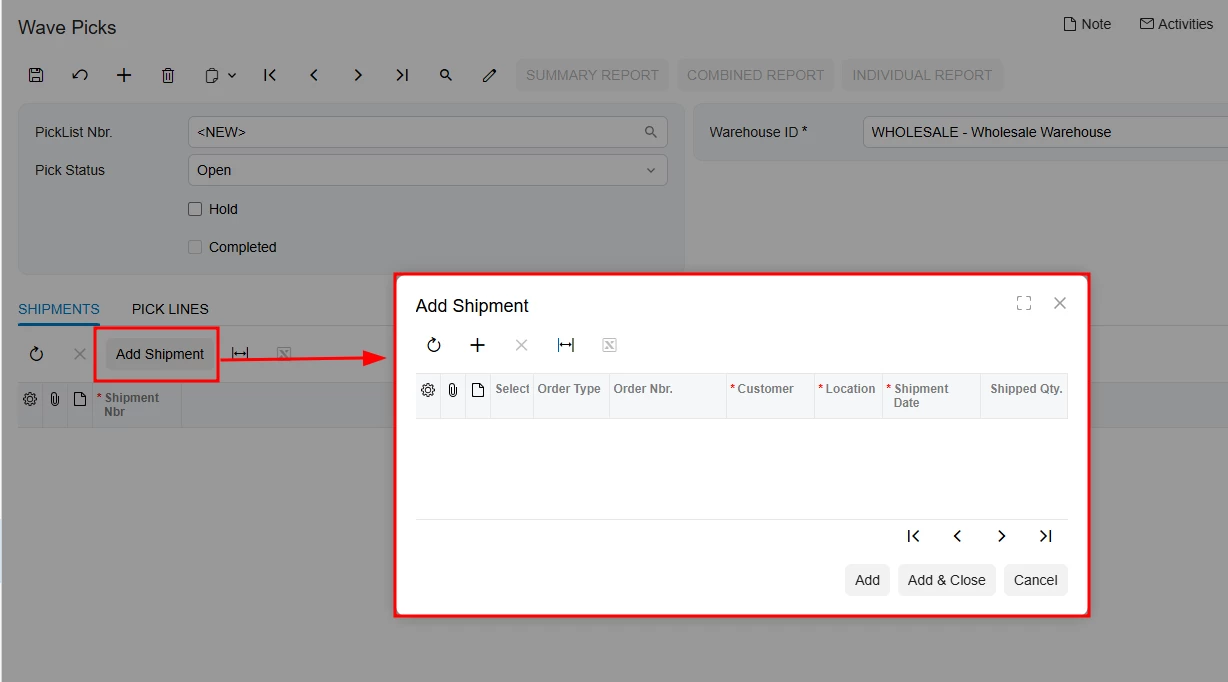
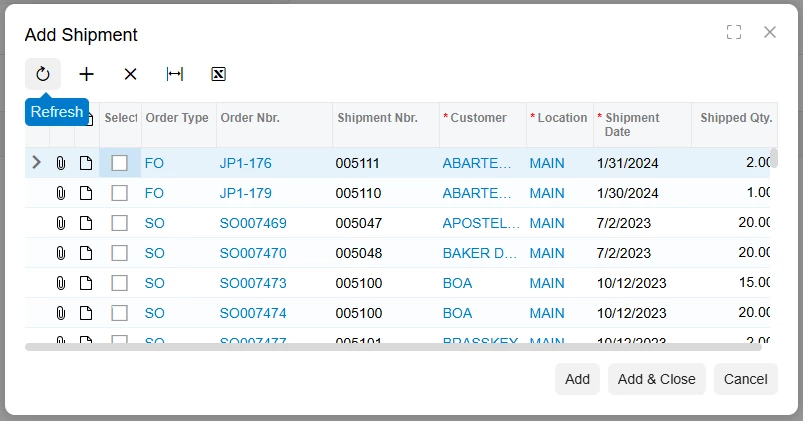
The scenario: I have a primary view for "Pick Lists" and a SmartPanel to "Add Shipments". When I click the action button to open the popup, the grid inside the panel remains empty. It only shows the data after I manually click the "Refresh" button inside the grid's toolbar.
What I've tried:
-
I tried using
syncState: trueorsyncChanges: truein thetopBarItemsconfiguration withinviews.ts, but I get a compilation error:TS2353: Object literal may only specify known properties. It seems these properties are not available in theIToolBarItemtype for 25R2. -
I added
auto-load="true"to theqp-gridin the HTML, but it still doesn't trigger the initial fetch. -
I implemented a
@handleEventin the.tsfile to callthis.view.refresh(), but the grid still initializes empty when the panel opens.
View definition (C#):
public SelectFrom<SOOrderShipment>
.InnerJoin<SOShipment>.On<SOShipment.shipmentNbr.IsEqual<SOOrderShipment.shipmentNbr>>
.Where<SOShipment.siteID.IsEqual<FRSOPickList.siteID.FromCurrent>>
.View shipmentlist;
Grid Configuration (view.ts):
@gridConfig({
allowInsert: false,
showFastFilter: GridFastFilterVisibility.False,
preset: GridPreset.Details,
topBarItems: {
addShipment: { index: 0, config: { commandName: "SelectShipment", text: "Add Shipment", popupPanel: "PanelAddShipment" } },
}
})
export class OrderList extends PXView {
addShipment: PXActionState;
@columnConfig({ width: 90 }) ShipmentNbr: PXFieldState;
}
@gridConfig({
autoAdjustColumns: true,
showFastFilter: GridFastFilterVisibility.False,
preset: GridPreset.Details
})
export class shipmentlist extends PXView {
@columnConfig({ allowSort: false, allowNull: false, width: 40, textAlign: TextAlign.Center, type: GridColumnType.CheckBox }) Selected: PXFieldState;
@columnConfig({ allowUpdate: false, width: 70 }) OrderType: PXFieldState;
@columnConfig({ allowUpdate: false, width: 108 }) OrderNbr: PXFieldState;
@columnConfig({ allowUpdate: false, width: 108 }) ShipmentNbr: PXFieldState;
@columnConfig({ allowUpdate: false, width: 81, format: "AAAAAAAAAA" }) CustomerID: PXFieldState;
@columnConfig({ allowUpdate: false, width: 63, format: ">AAAAAAA" }) CustomerLocationID: PXFieldState;
@columnConfig({ allowUpdate: false, width: 90 }) ShipDate: PXFieldState;
@columnConfig({ allowUpdate: false, allowNull: false, width: 81, textAlign: TextAlign.Right }) ShipmentQty: PXFieldState;
}
HTML:
<qp-panel id="PanelAddShipment" view.bind="shipmentlist" caption="Add Shipment">
<qp-grid id="grid4" view.bind="shipmentlist" auto-load="true" load-data="Always"></qp-grid>
<footer>
<qp-button id="btnAddShipment" caption="Add" state.bind="AddShipment"></qp-button>
<qp-button id="btnAddAndClose" caption="Add & Close" state.bind="AddShipment"
dialog-result="OK"></qp-button>
<qp-button id="btnCancel" caption="Cancel" dialog-result="OK"></qp-button>
</footer>
</qp-panel>