



On the transfer screen we don’t want people to click the InventoryID hyperlink on an item. Is there any way to disable that from getting a hyperlink on certain screens or does it automatically get added because it’s the Inventory ID field?
Phil
On the transfer screen we don’t want people to click the InventoryID hyperlink on an item. Is there any way to disable that from getting a hyperlink on certain screens or does it automatically get added because it’s the Inventory ID field?
Phil
Best answer by Brian Stevens
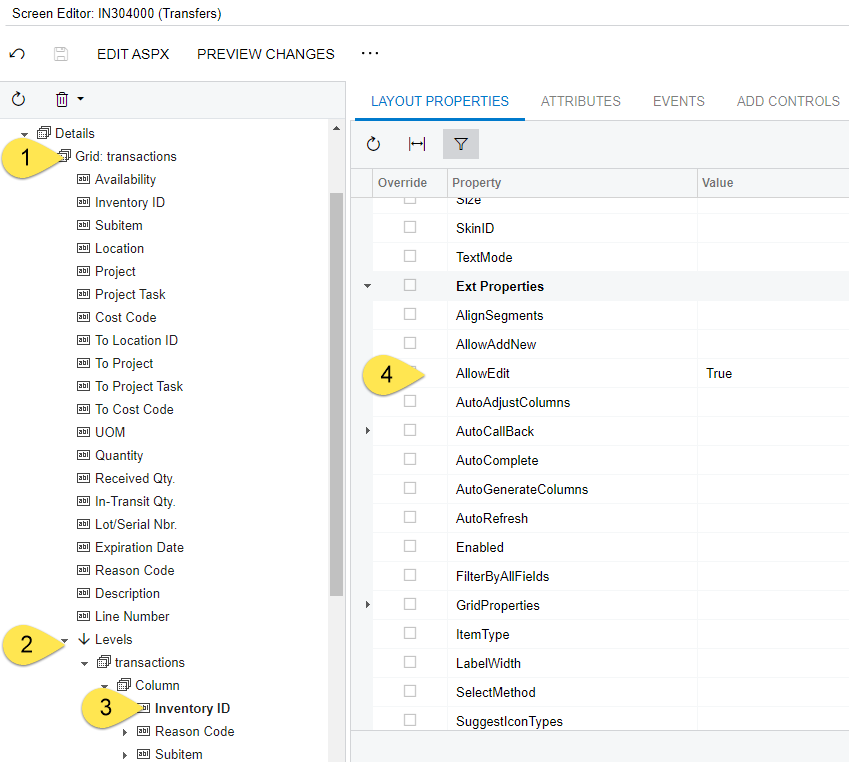
It is a hyperlink because the ASPX page has it marked as AllowEdit. To disable that feature, toggle the value to False as shown in the following screenshot of the Transfers screen in the Customization Project.
No account yet? Create an account
Enter your E-mail address. We'll send you an e-mail with instructions to reset your password.

