Answer

How to show Magnifier Icon for search box?

  • April 18, 2025
  • 9 replies
  • 160 views


Hope all are doing great. If anyone could help, it would be great.


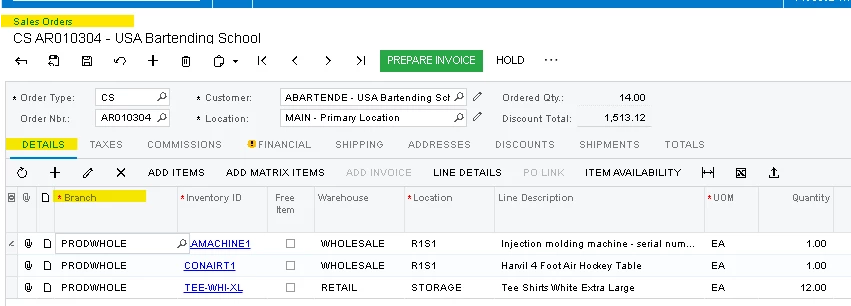
I would like to show the default magnifier icon (Selector Icon), as highlited below.

Appreciate for your help.


Best answer by Robert Sternberg

Hello, everyone. I would would like to provide you with further clarification.

I am getting a selector for Branch ID, however I need to show the static selecor icon in the grid field that is visible always.

If you would like the magnifying glass icon to always be visible, even when the field is not selected, that is likely not supported.

One possible workaround would be to add a separate column with the magnifying glass icon next to the field. However, since users can change column order, this approach may not be reliable and is generally not recommended.

Another option is to update the column header with a hint, such as (search here). You could also try including a symbol like (🔎), though I am not sure that would display in the headers and you might get a square box. 

9 replies

harutyungevorgyan
Jr Varsity I
Forum|alt.badge.img+2

Hello ​@emamsk38 ,

Is your field selector?
Does it contain a PXSelectorAttribute ?


  • Author
  • Freshman I
  • April 18, 2025

Yes, it has PXSelectorAttribute.


Forum|alt.badge.img+7
  • Captain II
  • April 18, 2025

If the field was added to the screen before it had the PXSelectorAttribute then you’ll need to remove the field from the grid and re-add it.


harutyungevorgyan
Jr Varsity I
Forum|alt.badge.img+2

Yes, it has PXSelectorAttribute.

If the suggestion from ​@Django would not help (which should help if you have PXSelectorAttribute), then please share the field in the DAC along with attributes and the part of the ASPX page for this field.


  • Author
  • Freshman I
  • April 19, 2025

@harutyungevorgyan Thanks for your quick response.

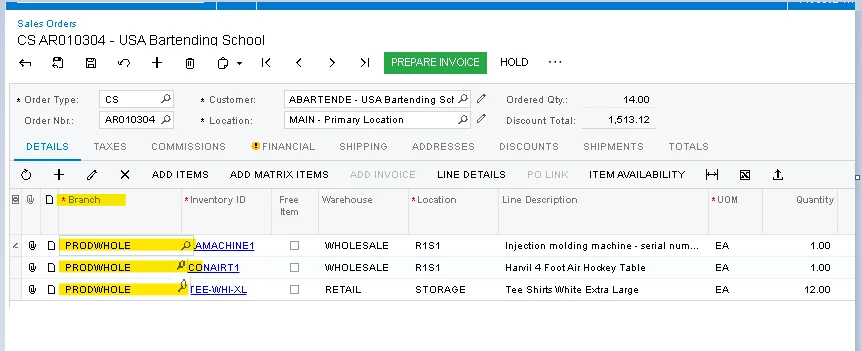
 You can find this field in sales order screen, Details tab Branch ID field, as highlited below.


  • Author
  • Freshman I
  • April 21, 2025

Hello, everyone. I would would like to provide you with further clarification.

I am getting a selector for Branch ID, however I need to show the static selecor icon in the grid field that is visible always.


Forum|alt.badge.img+1
  • Semi-Pro III
  • April 21, 2025

@emamsk38 

As far as I know, Acumatica doesn’t currently support always showing the selector icon in grid columns. I would recommend submitting a support ticket to Acumatica to confirm.


Robert Sternberg
Captain II
Forum|alt.badge.img+7

Hello, everyone. I would would like to provide you with further clarification.

I am getting a selector for Branch ID, however I need to show the static selecor icon in the grid field that is visible always.

If you would like the magnifying glass icon to always be visible, even when the field is not selected, that is likely not supported.

One possible workaround would be to add a separate column with the magnifying glass icon next to the field. However, since users can change column order, this approach may not be reliable and is generally not recommended.

Another option is to update the column header with a hint, such as (search here). You could also try including a symbol like (🔎), though I am not sure that would display in the headers and you might get a square box. 


  • Author
  • Freshman I
  • April 21, 2025

Thank you all for your valuable information and time.