Question

How to modify the default navigation link in the upper-left corner of the Entry screen

  • May 27, 2025
  • 4 replies
  • 77 views

Forum|alt.badge.img+6

      There is a known issue in Acumatica that has persisted for a long time, and the official team has not fixed it yet. We hope the official team can fix it as soon as possible.


       If the official team does not fix it, I will find a way around. However, I found that the program sometimes automatically reverts the link of PO3020PL back to the original (which gets timeout)

      Therefore, for the convenience of users, I want to modify the navigation link in the upper-left corner of the Purchase Order entry screen (PO302000)  so that clicking it will not return to PO3020PL but to my custom screen GI009999, for example.
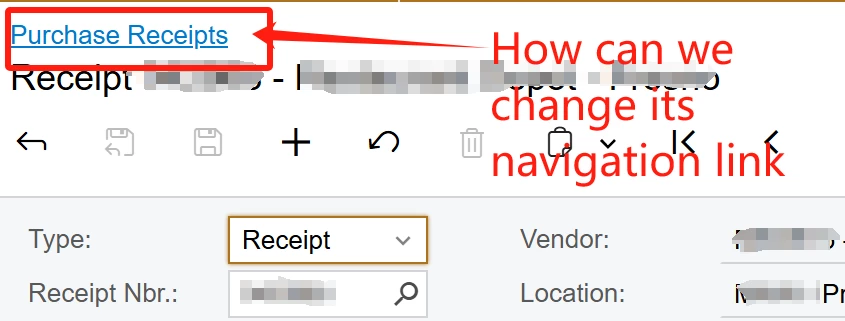
 

Can anyone give me some advice?

4 replies

DrewNisley
Pro I
Forum|alt.badge.img+3
  • Pro I
  • May 27, 2025

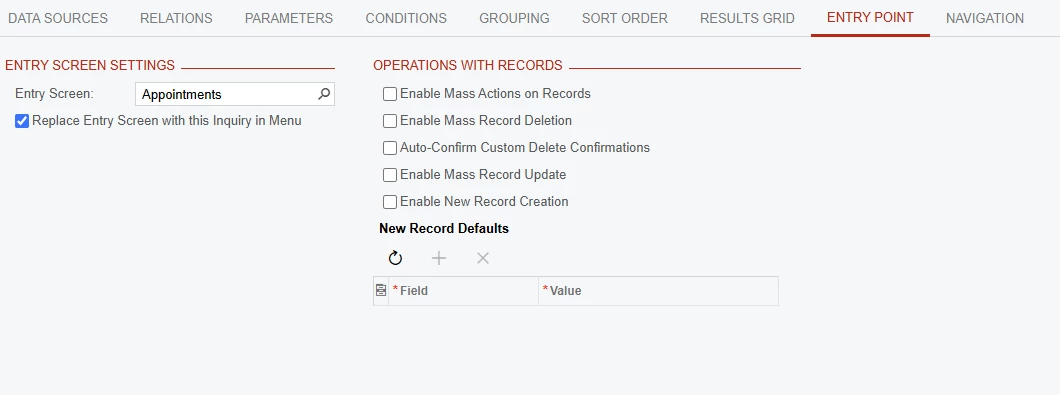
I believe the way to do this is to create your own GI and go into the entry point tab and select the box as shown below


Forum|alt.badge.img+6
  • Author
  • Captain II
  • May 28, 2025

@DrewNisley  Thank you, this can probably be done if I can access the PO3020PL in Generic Edit Paging, or if I can switch the entry points to "Purchase Receipt". Every time I try to switch the entry screen to , it freeze. The problem is due to the known issue,  I can't do what your suggest currently.
It's a long story—if you have time, you can view the details here:


So, do you know a way that I don't need to access the entry points tab to fulfill my requirement?


DrewNisley
Pro I
Forum|alt.badge.img+3
  • Pro I
  • May 28, 2025

@ray20 Interesting, that is a very strange situation. Unfortunately, I am not aware of another way to change that (or if there is a way at all); it is beyond my expertice. 


Chris Hackett
Community Manager
Forum|alt.badge.img
  • Acumatica Community Manager
  • July 3, 2025

Hi ​@ray20 were you able to find a solution? Thank you!