Question

How to Enable the Subaccount Field on the Journal Transactions Screen (GL301000)?

  • July 28, 2026
  • 8 replies
  • 111 views

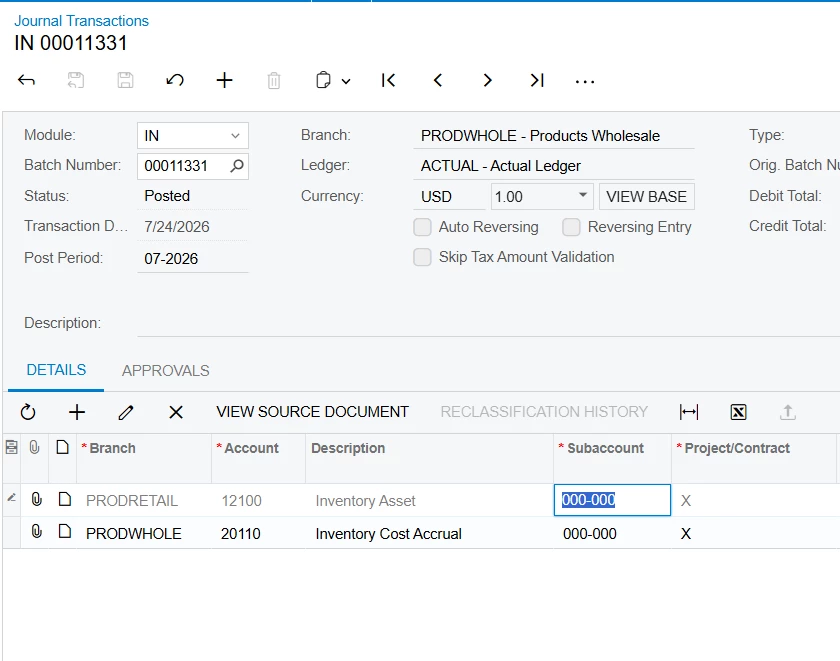
I'm trying to make the Subaccount (SubID) field editable on the Journal Transactions screen (GL301000), regardless of the Batch Module (GL, AR, AP, etc.) or the Batch Status (Balanced, Released, etc.).

My goal is to have the Subaccount field always enabled so that users can modify it.

I first tried the following graph extension:

using PX.Data;
using PX.Objects.GL;

namespace EnableSubaccount
{
public class JournalEntry_Extension : PXGraphExtension<JournalEntry>
{
protected virtual void _(Events.RowSelected<GLTran> e, PXRowSelected del)
{
del?.Invoke(e.Cache, e.Args);

if (e.Row == null)
return;

// Make the detail cache editable
Base.GLTranModuleBatNbr.AllowUpdate = true;
Base.GLTranModuleBatNbr.Cache.AllowUpdate = true;

// Enable only the Subaccount field
PXUIFieldAttribute.SetEnabled<GLTran.subID>(
e.Cache,
e.Row,
true);
}
}
}

Since that didn't work, I also tried this simpler version:

using PX.Data;
using PX.Objects.GL;

namespace EnableSubaccount
{
public class JournalEntry_Extension : PXGraphExtension<JournalEntry>
{
protected void _(Events.RowSelected<GLTran> e)
{
if (e.Row == null)
return;

PXUIFieldAttribute.SetEnabled<GLTran.subID>(
e.Cache,
e.Row,
true);
}
}
}

However, the Subaccount field remains disabled in all cases.

Any guidance or recommended approach would be greatly appreciated.

8 replies

  • Freshman I
  • July 28, 2026

Hi ​@Mido97,

You can try the below approach to make the SubID field editable on the Journal Transactions screen.

protected virtual void _(Events.RowSelected<GLTran> e, PXRowSelected del)
{
del?.Invoke(e.Cache, e.Args);

if (e.Row == null)
return;

Base.GLTranModuleBatNbr.AllowUpdate = true;
Base.GLTranModuleBatNbr.Cache.AllowUpdate = true;

PXUIFieldAttribute.SetReadOnly<GLTran.subID>(e.Cache, e.Row, false);
}

Hope this works. Thank you!


Forum|alt.badge.img+1
  • Pro I
  • July 28, 2026

PXUIFieldAttribute.SetEnabled<GLTran.subID>(..., true) alone is not enough on GL301000. The SubID field is controlled by the base JournalEntry logic, which re-evaluates the enabled state based on the batch status and module. As a result, any changes made in a RowSelected<GLTran> event are overridden by the framework.


Setting AllowUpdate = true on the cache or view also does not bypass this behavior.


In standard Acumatica, the Subaccount field is intentionally read-only once the transaction reaches certain states (and for transactions originating from other modules such as AP or AR). This is by design to preserve GL integrity.


Forum|alt.badge.img+3
  • Captain I
  • July 28, 2026

@Mido97 You can try something like the code below. Also, review the base RowSelected event implementation and adjust your customization accordingly. In the sample below, The base method is intentionally not called because calling it causes the fields to remain disabled


 [PXOverride]
public void GLTran_RowSelected(PXCache sender, PXRowSelectedEventArgs e,
Action<PXCache, PXRowSelectedEventArgs> baseMethod)
{
//baseMethod(sender, e); don't call baseMethod

GLTran tran = e.Row as GLTran;
if (tran == null) return;

Base.GLTranModuleBatNbr.Cache.SetAllEditPermissions(true);
foreach (string field in sender.Fields)
{
if (!string.Equals(field, nameof(GLTran.SubID), StringComparison.OrdinalIgnoreCase))
PXUIFieldAttribute.SetEnabled(sender, tran, field, false);
}
PXUIFieldAttribute.SetEnabled<GLTran.subID>(sender, tran, true);
}

Hope this helps.


Forum|alt.badge.img+2
  • Jr Varsity III
  • July 28, 2026

@Mido97  Hi,


This is one of those cases where the field looks like it should respond to SetEnabled in RowSelected, but doesn't — and the usual culprit is that GL301000's base graph controls Subaccount editability through FieldSelecting on the grid column (not just RowSelected), and FieldSelecting fires again on every grid refresh/render, after your RowSelected override has already run. So your SetEnabled(true) gets silently overwritten the next time the row is displayed.

Fix: override FieldSelecting and set ReturnState directly


using PX.Data;
using PX.Objects.GL;

namespace EnableSubaccount
{
public class JournalEntry_Extension : PXGraphExtension<JournalEntry>
{
protected virtual void _(Events.RowSelected<GLTran> e, PXRowSelected del)
{
del?.Invoke(e.Cache, e.Args);
if (e.Row == null) return;

PXUIFieldAttribute.SetEnabled<GLTran.subID>(e.Cache, e.Row, true);
}

// This is the one that actually sticks for grid columns
protected virtual void _(Events.FieldSelecting<GLTran.subID> e)
{
if (e.Row == null) return;

if (e.ReturnState is PXFieldState state)
{
state.Enabled = true;
}
}
}
}

Keep both handlers — RowSelected covers the field when it's rendered outside the grid (e.g. in a form view context or other controls), FieldSelecting covers the grid cell itself, which is almost certainly what you're editing on GL301000.


Dmitrii Naumov
Acumatica Moderator
Forum|alt.badge.img+7
  • Acumatica Moderator
  • July 28, 2026

@Mido97  I don’t think it’s a good idea, to be honest. 

Changing subaccounts in posted transactions would make account balances and reports wrong and it’ll corrupt the balances data stored in aggregated tables. 


  • Author
  • Freshman I
  • July 28, 2026

Thank you all for your answers.

The reason I want to update the SubID is that our default subaccount used to be 0, but we later changed the subaccount structure to 0-0-0-0. Now we simply need to replace the old value with the new one on existing transactions.

To make the SubID field editable, I tried the following customization:

using System;
using PX.Data;
using PX.Objects.GL;

namespace EnableSubaccount
{
public class JournalEntry_Extension : PXGraphExtension<JournalEntry>
{
[PXOverride]
public void GLTran_RowSelected(PXCache sender, PXRowSelectedEventArgs e,
Action<PXCache, PXRowSelectedEventArgs> baseMethod)
{
// baseMethod(sender, e); // intentionally NOT calling base

GLTran tran = e.Row as GLTran;
if (tran == null) return;

foreach (string field in sender.Fields)
{
if (!string.Equals(field, nameof(GLTran.SubID), StringComparison.OrdinalIgnoreCase))
PXUIFieldAttribute.SetEnabled(sender, tran, field, false);
}

PXUIFieldAttribute.SetEnabled<GLTran.subID>(sender, tran, true);
}
}
}

This successfully enables the SubID field, and I can change its value. However, when I try to save the record, I receive the following error:

The released record cannot be saved.

Does anyone have an idea how to update the SubID on released transactions ?


Laura03
Captain II
Forum|alt.badge.img+20
  • Captain II
  • July 31, 2026

Hello, after changing sub account structure from 1 segment with 1 character to 4 segments of one character each, go to Subaccounts screen.

Where you see existing Subaccounts that now looks like 0-  -  -  , overtype it with 0-0-0-0 and Save.

You will see that all existing transactions in Acumatica have magically changed from 0-  -  -  to 0-0-0-0. 
 

If you already added a Subaccounts 0-0-0-0 and you still see 0-  -  -  then you can’t follow my suggestion to overtype the Subaccounts yet. First change newly added 0-0-0-0 to something else like A-0-0-0. Then overtype 0- - -  with 0-0-0-0 and Save. 
 

No programming, no low code customization is needed to perform this action.


Laura03
Captain II
Forum|alt.badge.img+20
  • Captain II
  • July 31, 2026

Hello,

I have one more idea to add. If you ended up with BOTH 0- - -   And 0-0-0-0 and two Subaccounts should really be one Subaccount: Finance - Reclassify function will help the accountants easily move transactions from one Subaccount to another across multiple companies, branches, accounts and periods at the same time, while maintaining correct accounting practices and correct reports.

I recommend testing your solution in a test copy tenant before completing your solution in the live tenant.

Good luck!