Answer

How to click Yes to a popup on the Contact Maintenance graph on a Process screen

  • August 15, 2025
  • 9 replies
  • 123 views

Joe Schmucker
Captain II
Forum|alt.badge.img+3

I am creating a copy of a Contact record in a processing screen.  I instantiate a ContactMaint graph to do this.

After I create the graph             

  1. var contactGraph = PXGraph.CreateInstance<ContactMaint>();
  2. contactGraph.Contact.Current = new Contact();
  3. Set the values in the fields. For example, contactGraph.Contact.Current.BAccountID = bAccountTo.BAccountID;
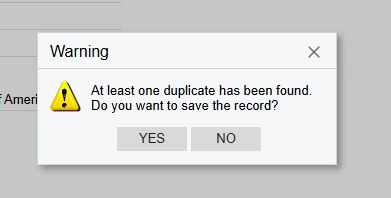
  4. If I put in an email address that is already in a contact for the respective BAccountID and contactGraph.Actions.PressSave();, an error with this value "At least one duplicate has been found. Do you want to save the record?";

If the email address in my new contact is not already in the DB for the current BAccountID, it saves just fine.  But if it is a duplicate (which I want to be able to do), there is an exception thrown that would ordinarily be easy to say yes to if you were doing this in the UI.

However, since this graph is created in the Processing screen, I cannot programmatically say “yes” to create a duplicate.  Once the Save is pressed, there is no dialogue to action against.  It simply throws an error.

I cannot find a way to trap this dialogue and say Yes.

Maybe it is not possible.  I can think of a workaround where I create a “dummy” email address for the contact, save it, then use a PXDatabase.Update to “fix” the email address.

Any ideas?  

 

Best answer by MichaelShirk

@Joe Schmucker I must still be missing something. 

The screenshot you shared looks like a regular dialogue box. 

My understanding is, that’s what is shown in the UI when you Save the record. 


What’s happening when you do the following. 
 

//First set the answer, then call the save action.

contactGraph.Contact.View.Answer = WebDialogResult.Yes;
contactGraph.Actions.PressSave();


9 replies

MichaelShirk
Captain II
Forum|alt.badge.img+5
  • Captain II
  • August 15, 2025

I’m a bit confused. Is it a dialogue box, or an error? What sort of error is thrown that allows you to click “yes” to continue?


Joe Schmucker
Captain II
Forum|alt.badge.img+3
  • Author
  • Captain II
  • August 16, 2025

In debug mode, it is an error.  e.Message = "At least one duplicate has been found. Do you want to save the record?"

I’m just assuming that if I was in the UI that this message would be a popup to ask if I wanted to save a contact that was considered a duplicate by Acumatica. 


Joe Schmucker
Captain II
Forum|alt.badge.img+3
  • Author
  • Captain II
  • August 16, 2025

I just opened the Andy Applegate contact, copied it, pressed New, pasted it and clicked save.  I got this.  When I click save in VS, it just throws an error and doesn’t give me a chance to programmatically click YES.


MichaelShirk
Captain II
Forum|alt.badge.img+5
  • Captain II
  • August 18, 2025

@Joe Schmucker Have you tried this method? 


Programmatically select a value in a dialogue box pop-up? | Community


Joe Schmucker
Captain II
Forum|alt.badge.img+3
  • Author
  • Captain II
  • August 18, 2025

Hi ​@MichaelShirk   I sure did.  That was the first one I found when searching for this.

The problem for me is that when I save the graph, (contactGraph.Actions.PressSave();) in Debug, an error is thrown and I cannot find a way to “intercept” it and supply “Yes” to the popup.

I tried doing var result = contactGraph.Actions.PressSave(); but that doesn’t compile.  I don’t even know if that is how you would do it, but I’m not sure what else to try.  

Thanks for taking the time to help me with this.

I’d like to use this code from the link you provided.  I just don’t know where I can use it since an actual “error” is thrown.  It might not really be an error, but just a “fake” error that initiates the popup.

//Set the cancelation dialogue answer and cancel linked order. prodGraph.ProdMaintRecords.View.Answer = WebDialogResult.Yes;

prodGraph.cancelorder.Press();


MichaelShirk
Captain II
Forum|alt.badge.img+5
  • Captain II
  • Answer
  • August 18, 2025

@Joe Schmucker I must still be missing something. 

The screenshot you shared looks like a regular dialogue box. 

My understanding is, that’s what is shown in the UI when you Save the record. 


What’s happening when you do the following. 
 

//First set the answer, then call the save action.

contactGraph.Contact.View.Answer = WebDialogResult.Yes;
contactGraph.Actions.PressSave();


Joe Schmucker
Captain II
Forum|alt.badge.img+3
  • Author
  • Captain II
  • August 18, 2025

@MichaelShirk  I will give that a try!  It will be a bit before I can test it, but I can’t wait to try that!


Joe Schmucker
Captain II
Forum|alt.badge.img+3
  • Author
  • Captain II
  • August 19, 2025

@MichaelShirk A pre-emptive YES prior to saving the record did the trick!  THANK YOU!!!!

I never even thought that after I did the Update command, the popup would be available prior to pressing save.  

Fortunately, I can click the Yes even if the popup isn’t showing.  

THANK YOU!!!!


MichaelShirk
Captain II
Forum|alt.badge.img+5
  • Captain II
  • August 19, 2025

@Joe Schmucker  Glad I could help!!