Answer

GI not redirecting to entry screen in mobile app

  • September 28, 2024
  • 8 replies
  • 129 views

jhouser
Captain II
Forum|alt.badge.img+6

I’m adding a Tasks GI to menu which is used in a dashboard. When a task record is opened, I need it to redirect to entry screen and allow editing. The redirect is not working. Opening a task record just shows the GI fields, but it’s not the entry screen. 

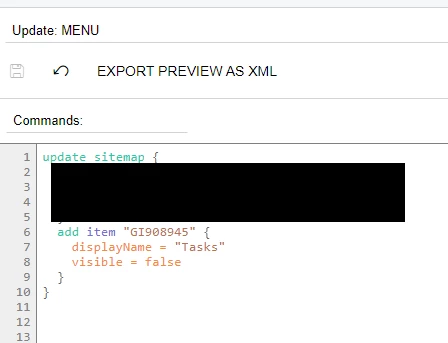
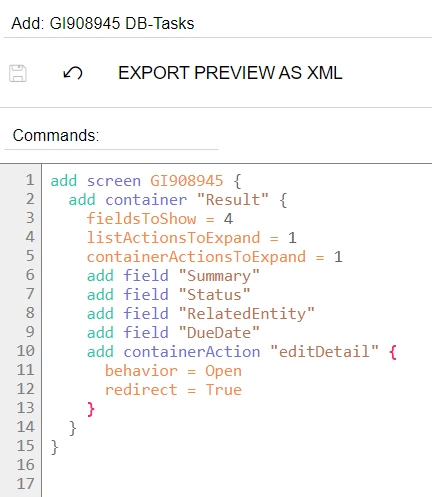
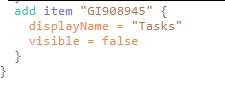
Below is my code. If anyone could look at it and tell me what might be wrong I’d appreciate it!


Best answer by jhouser

Per a colleague’s suggestion I compared GI to the Tasks primary list, since redirection did work with primary list and the same code. So I think GI was the problem, not code. I copied primary list to new GI, which worked. 

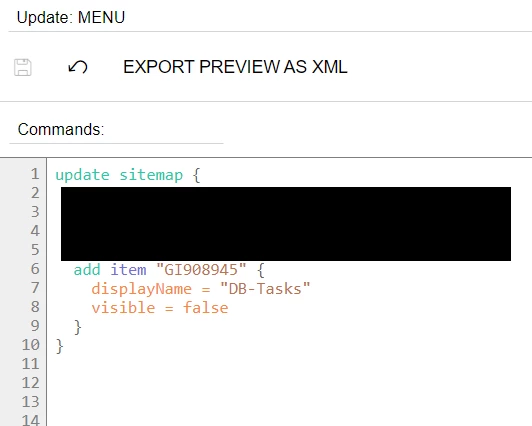
Still not 100% sure what difference in GI caused the problem, but I’ve spent too much time on this already. What I can say is copy of Tasks primary list worked, and below is the code I ended up using:


8 replies

DipakNilkanth
Pro III
Forum|alt.badge.img+13

Hi @jhouser,

Try to remove line 

containerActionsToExpand=1

Hope, it helps!


jhouser
Captain II
Forum|alt.badge.img+6
  • Author
  • Captain II
  • September 28, 2024

@Dipak Nilkanth Just tried your suggestion, unfortunately didn’t work. 


DipakNilkanth
Pro III
Forum|alt.badge.img+13

Hi @jhouser,

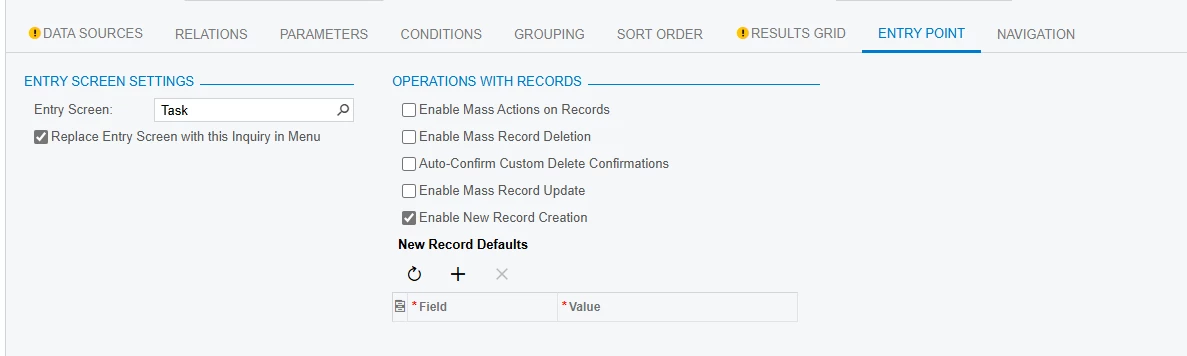
Have you assigned Entry Screen and Replace Entry Screen With this Inquiry in Menu checkbox set to true in the Entry Point section of GI.
 

Hope, it helps


jhouser
Captain II
Forum|alt.badge.img+6
  • Author
  • Captain II
  • September 30, 2024

@Dipak Nilkanth I did assign entry screen. I didn’t Replace, but I don’t want to do that and I don’t think it should be necessary. I’ve gotten this to work with another screen without checking that box. 


dcomerford
Captain II
Forum|alt.badge.img+15
  • Captain II
  • September 30, 2024

It should not matter but why have you set the visibility to false on the GI on the mobile 


jhouser
Captain II
Forum|alt.badge.img+6
  • Author
  • Captain II
  • September 30, 2024

@dcomerford It was showing up in Other and they didn’t want that. 


jhouser
Captain II
Forum|alt.badge.img+6
  • Author
  • Captain II
  • Answer
  • October 5, 2024

Per a colleague’s suggestion I compared GI to the Tasks primary list, since redirection did work with primary list and the same code. So I think GI was the problem, not code. I copied primary list to new GI, which worked. 

Still not 100% sure what difference in GI caused the problem, but I’ve spent too much time on this already. What I can say is copy of Tasks primary list worked, and below is the code I ended up using:


Chris Hackett
Community Manager
Forum|alt.badge.img
  • Acumatica Community Manager
  • October 6, 2024

Thank you for sharing your solution with the community @jhouser!