

Answer

GI for entry point of custom screen

  • November 20, 2025
  • 3 replies
  • 24 views

Forum|alt.badge.img

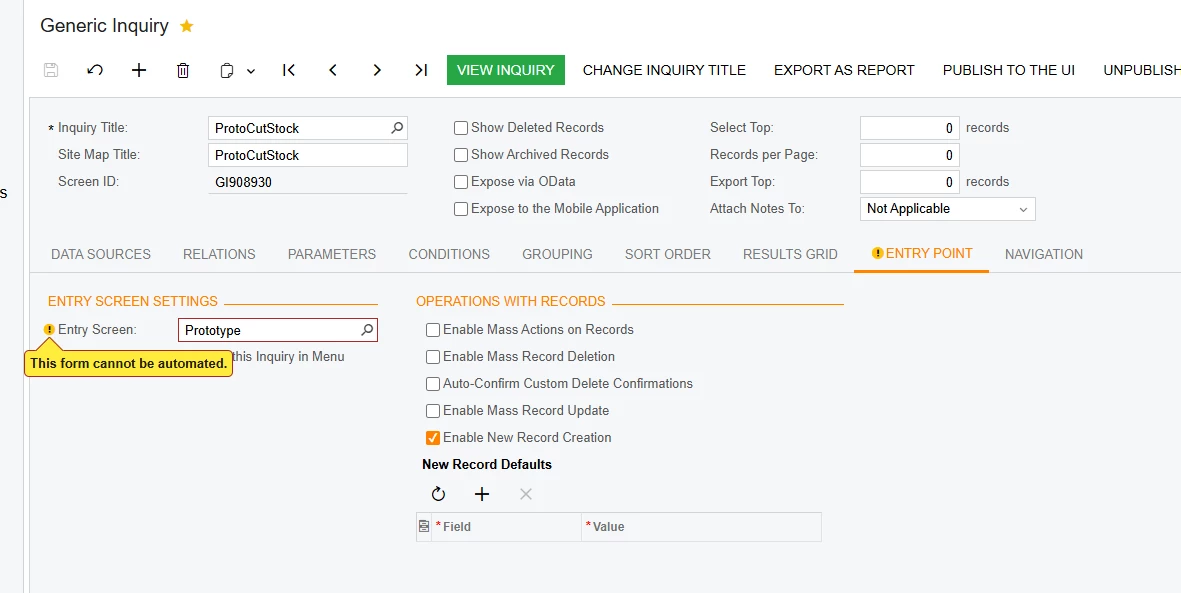
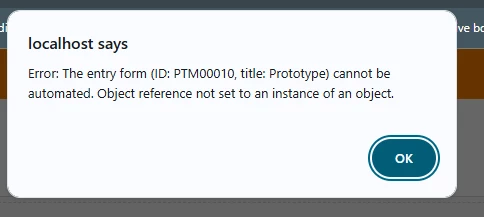
I created a new screen and i am trying make a GI the entry point for the screen. The screen is working fine with no issues. When i add the screen to the it has a warning that says “This form cannot be automated.” when i view the gi afterward,i get an error that says “Object reference not set to an instance of an object”. The new screen is added to the sitemap and works fine. I published the GI to the same workspace that the screen is in. I tried restarting the application and that didnt fix it. I also added the dll to the customization project and published it again. Nothing i have done so far has made it work. I went back and looked at the last video of T210 where they show how to do it and followed it but i am still getting the error. Does anyone know what this error means?
 

Best answer by justen0351

I got it. It ended up being access rights. When i changed them the error went away. Thats a strange error to have for access rights though.

3 replies

bwhite49
Captain II
Forum|alt.badge.img+10
  • Captain II
  • November 20, 2025

It might not like the “enable new record creation.” If you uncheck that checkbox, does the error go away?


Forum|alt.badge.img
  • Author
  • Varsity III
  • Answer
  • November 20, 2025

I got it. It ended up being access rights. When i changed them the error went away. Thats a strange error to have for access rights though.


bwhite49
Captain II
Forum|alt.badge.img+10
  • Captain II
  • November 20, 2025

I got it. It ended up being access rights. When i changed them the error went away. Thats a strange error to have for access rights though.

Nice. Yes, access rights can cause all sorts of issues. I have not encountered this issue of the entry screen yet, so thanks for figuring it out.

