Solved

Getting "Insufficient resources to perform operation" error on all Acumatica instances hosted on the same VM

  • February 17, 2026
  • 5 replies
  • 56 views

Forum|alt.badge.img

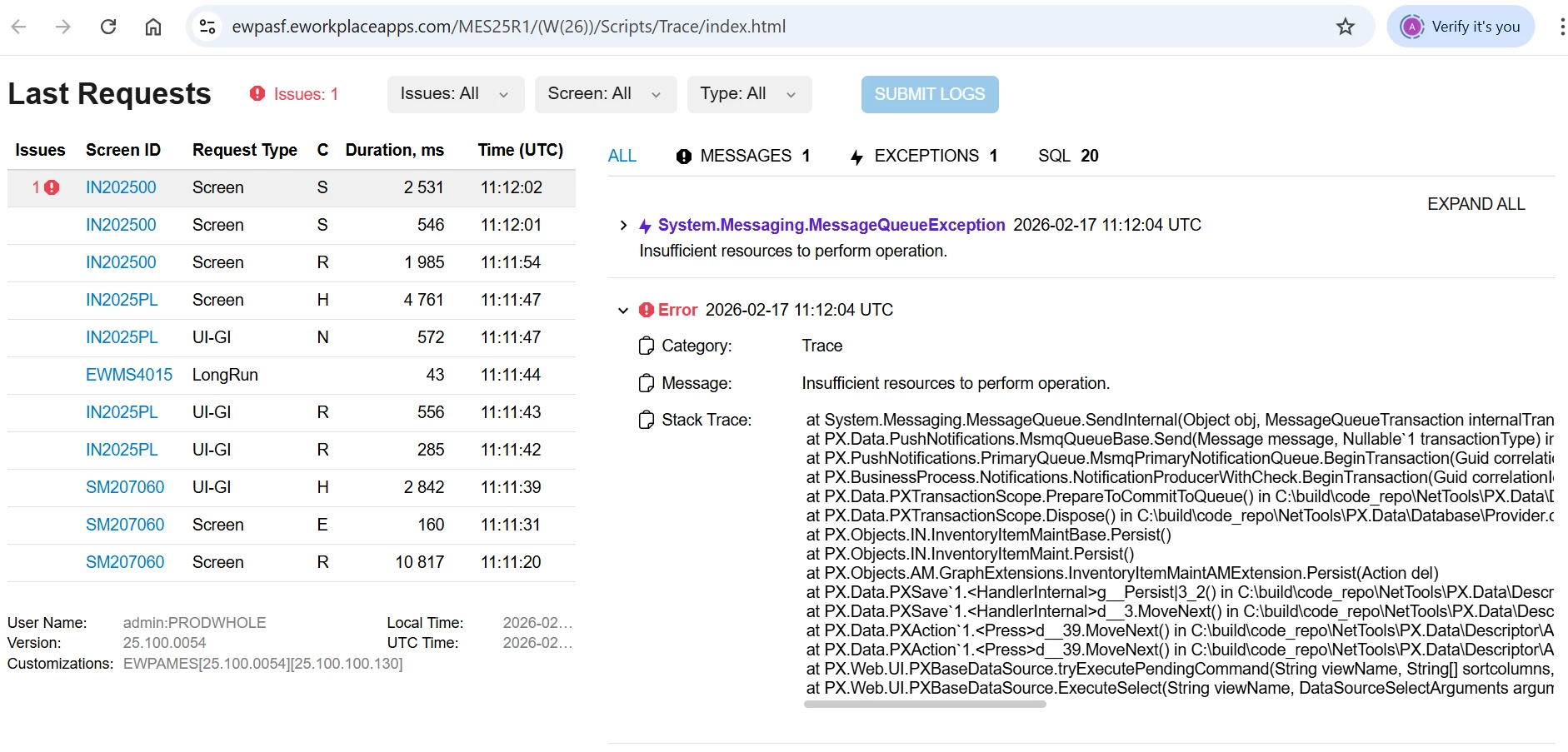
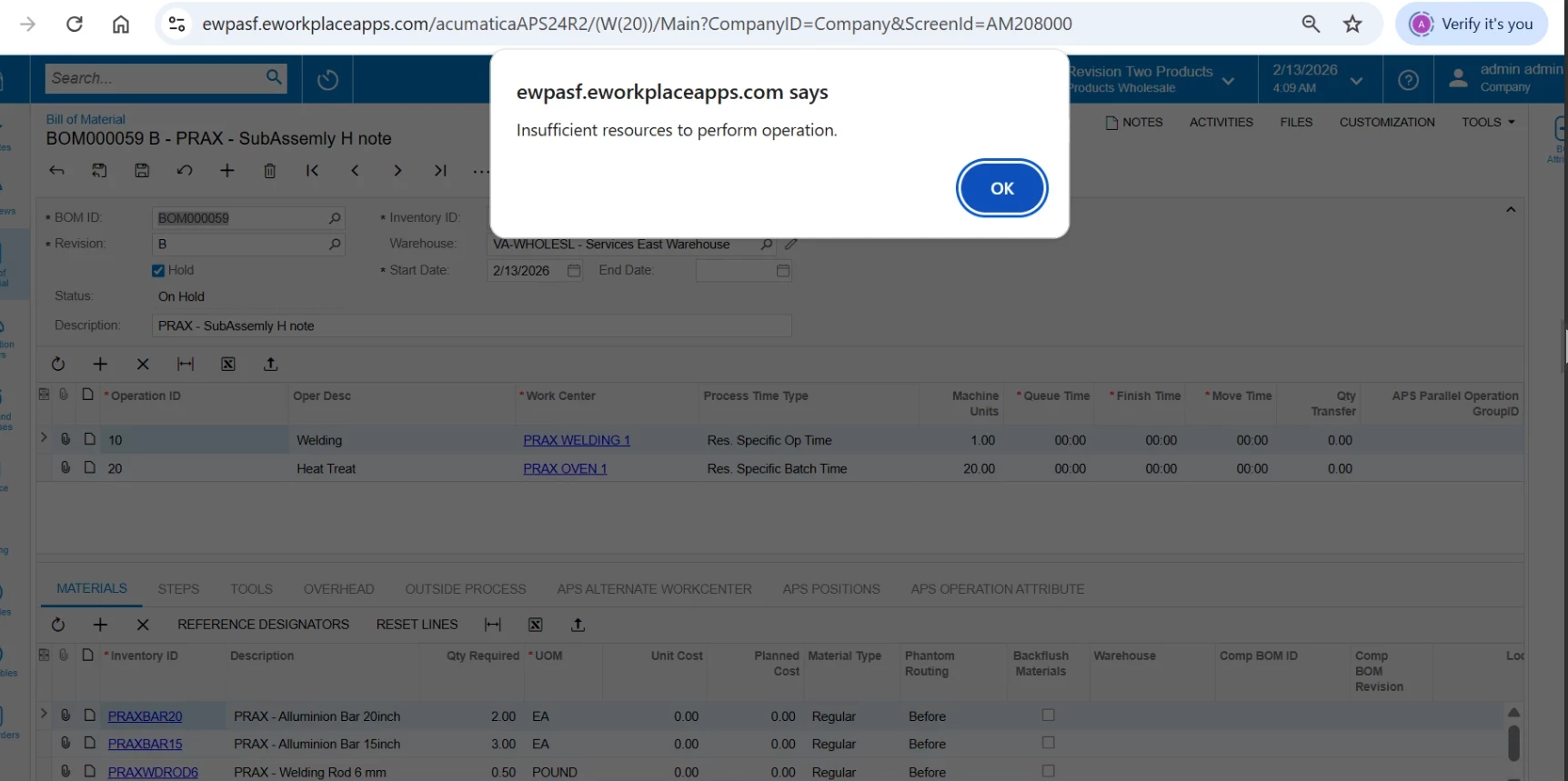
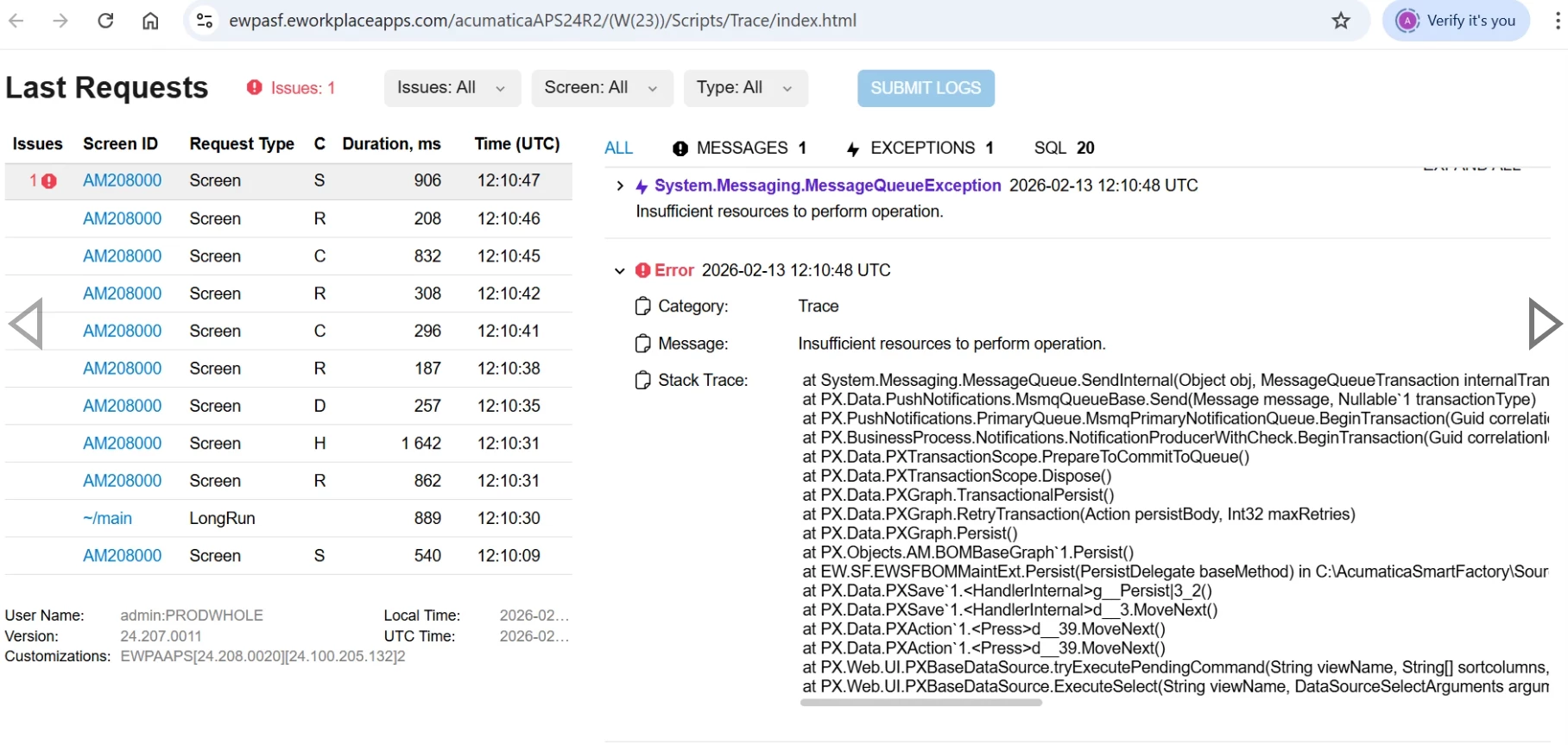
I am receiving the same error — “Insufficient resources to perform operation” — across all Acumatica instances hosted on the same VM on different screens. please support if anyone having solution. I am attaching trace also
 

Best answer by aryanjadhav50

Hi ​@ashrivastava42 

If others on the same site do not see the error, it seems like the computer hardware or operating system has a problem. Did the user try working from a different computer? Ask them to log in as same username to the operating system, and log in as the same username to Acumatica, from a different computer.

If the user can work in Acumatica from a different computer without seeing the message, then the problem is not Acumatica.

  • Have you ruled out a virus or malware?
  • Check the local machine for out of space on C:\ drive.
  • Try diagnostic tools such as Windows Memory Diagnostic.
  • When did the error begin happening, and what changed since Acumatica last worked without errors?

One more idea: Does the error happen with customizations temporarily unpublished?

5 replies

abhimanyuprajapati52
Jr Varsity I
Forum|alt.badge.img

Hi ​@ashrivastava42,

Recommended checks:

  1. Restart the Message Queuing service.

  2. Verify sufficient disk space on the drive hosting MSMQ.

  3. Check Computer Management → Message Queuing → Private Queues for large or stuck queues.

  4. Review Windows Event Viewer logs for MSMQ errors.

  5. If the issue started after a Windows update, review recent updates.

There is an existing Community discussion that explains this issue and its resolution in more detail:

https://community.acumatica.com/system-health-and-performance-118/insufficient-resources-to-perform-operation-17341


Forum|alt.badge.img+1
  • Jr Varsity I
  • Answer
  • February 17, 2026

Hi ​@ashrivastava42 

If others on the same site do not see the error, it seems like the computer hardware or operating system has a problem. Did the user try working from a different computer? Ask them to log in as same username to the operating system, and log in as the same username to Acumatica, from a different computer.

If the user can work in Acumatica from a different computer without seeing the message, then the problem is not Acumatica.

  • Have you ruled out a virus or malware?
  • Check the local machine for out of space on C:\ drive.
  • Try diagnostic tools such as Windows Memory Diagnostic.
  • When did the error begin happening, and what changed since Acumatica last worked without errors?

One more idea: Does the error happen with customizations temporarily unpublished?


Forum|alt.badge.img
  • Author
  • Freshman I
  • February 17, 2026

Getting same error on another instance of Stockitem screen


Sharing trace also, please help I am stuck.
 

 at System.Messaging.MessageQueue.SendInternal(Object obj, MessageQueueTransaction internalTransaction, MessageQueueTransactionType transactionType) at PX.Data.PushNotifications.MsmqQueueBase.Send(Message message, Nullable`1 transactionType) in C:\build\code_repo\NetTools\PX.Data\PushNotifications\MsmqQueueBase.cs:line 64 at PX.PushNotifications.PrimaryQueue.MsmqPrimaryNotificationQueue.BeginTransaction(Guid correlationId) at PX.BusinessProcess.Notifications.NotificationProducerWithCheck.BeginTransaction(Guid correlationId) at PX.Data.PXTransactionScope.PrepareToCommitToQueue() in C:\build\code_repo\NetTools\PX.Data\Database\Provider.cs:line 3644 at PX.Data.PXTransactionScope.Dispose() in C:\build\code_repo\NetTools\PX.Data\Database\Provider.cs:line 3548 at PX.Objects.IN.InventoryItemMaintBase.Persist() at PX.Objects.IN.InventoryItemMaint.Persist() at PX.Objects.AM.GraphExtensions.InventoryItemMaintAMExtension.Persist(Action del) at PX.Data.PXSave`1.<HandlerInternal>g__Persist|3_2() in C:\build\code_repo\NetTools\PX.Data\Descriptor\Action\CommonActions.cs:line 97 at PX.Data.PXSave`1.<HandlerInternal>d__3.MoveNext() in C:\build\code_repo\NetTools\PX.Data\Descriptor\Action\CommonActions.cs:line 80 at PX.Data.PXAction`1.<Press>d__39.MoveNext() in C:\build\code_repo\NetTools\PX.Data\Descriptor\Action\PXAction.cs:line 1297 at PX.Data.PXAction`1.<Press>d__39.MoveNext() in C:\build\code_repo\NetTools\PX.Data\Descriptor\Action\PXAction.cs:line 1256 at PX.Web.UI.PXBaseDataSource.tryExecutePendingCommand(String viewName, String[] sortcolumns, Boolean[] descendings, Object[] searches, Object[] parameters, PXFilterRow[] filters, DataSourceSelectArguments arguments, Boolean& closeWindowRequired, Int32& adapterStartRow, Int32& adapterTotalRows) at PX.Web.UI.PXBaseDataSource.ExecuteSelect(String viewName, DataSourceSelectArguments arguments, PXDSSelectArguments pxarguments)


Forum|alt.badge.img+1
  • Jr Varsity I
  • February 17, 2026

Getting same error on another instance of Stockitem screen


Sharing trace also, please help I am stuck.
 

 at System.Messaging.MessageQueue.SendInternal(Object obj, MessageQueueTransaction internalTransaction, MessageQueueTransactionType transactionType) at PX.Data.PushNotifications.MsmqQueueBase.Send(Message message, Nullable`1 transactionType) in C:\build\code_repo\NetTools\PX.Data\PushNotifications\MsmqQueueBase.cs:line 64 at PX.PushNotifications.PrimaryQueue.MsmqPrimaryNotificationQueue.BeginTransaction(Guid correlationId) at PX.BusinessProcess.Notifications.NotificationProducerWithCheck.BeginTransaction(Guid correlationId) at PX.Data.PXTransactionScope.PrepareToCommitToQueue() in C:\build\code_repo\NetTools\PX.Data\Database\Provider.cs:line 3644 at PX.Data.PXTransactionScope.Dispose() in C:\build\code_repo\NetTools\PX.Data\Database\Provider.cs:line 3548 at PX.Objects.IN.InventoryItemMaintBase.Persist() at PX.Objects.IN.InventoryItemMaint.Persist() at PX.Objects.AM.GraphExtensions.InventoryItemMaintAMExtension.Persist(Action del) at PX.Data.PXSave`1.<HandlerInternal>g__Persist|3_2() in C:\build\code_repo\NetTools\PX.Data\Descriptor\Action\CommonActions.cs:line 97 at PX.Data.PXSave`1.<HandlerInternal>d__3.MoveNext() in C:\build\code_repo\NetTools\PX.Data\Descriptor\Action\CommonActions.cs:line 80 at PX.Data.PXAction`1.<Press>d__39.MoveNext() in C:\build\code_repo\NetTools\PX.Data\Descriptor\Action\PXAction.cs:line 1297 at PX.Data.PXAction`1.<Press>d__39.MoveNext() in C:\build\code_repo\NetTools\PX.Data\Descriptor\Action\PXAction.cs:line 1256 at PX.Web.UI.PXBaseDataSource.tryExecutePendingCommand(String viewName, String[] sortcolumns, Boolean[] descendings, Object[] searches, Object[] parameters, PXFilterRow[] filters, DataSourceSelectArguments arguments, Boolean& closeWindowRequired, Int32& adapterStartRow, Int32& adapterTotalRows) at PX.Web.UI.PXBaseDataSource.ExecuteSelect(String viewName, DataSourceSelectArguments arguments, PXDSSelectArguments pxarguments)


Above I also give you the steps to check and after that also check the below steps as well and let me know if you get your solution or not.

Common Causes

  • Microsoft Message Queuing service stopped or unstable

  • MSMQ private queue full or corrupted

  • Low disk space on application server

  • High memory pressure

  • Large number of stuck notification messages

  • Heavy Business Events or automation processes

  • Manufacturing (AM) extension triggering additional events during save

How to Resolve

  1. On the application server, verify that “Microsoft Message Queuing” service is running. Restart the service.

  2. Open Computer Management → Services and Applications → Message Queuing → Private Queues. Check queue size. Purge excessive/stuck messages if necessary (preferably outside business hours).

  3. Check available disk space and memory on the server.

  4. Restart IIS after MSMQ restart.

  5. If SaaS, contact hosting provider to restart MSMQ and verify server resources.

Additional Check
If this happens frequently:

  • Review active Business Events

  • Review Push Notification configuration

  • Temporarily disable Business Events and test


Forum|alt.badge.img+9
  • Captain II
  • February 17, 2026

@ashrivastava42 


You can try to reset caches & restart application in the apply updates screen in the case there is something stuck in the queue.


It is also worth checking System Monitor for any long running processes that shouldn’t be there.