



Solved

Find the site patch details in code

  • February 5, 2026
  • 4 replies
  • 57 views

Patrick Chen
Semi-Pro I
Forum|alt.badge.img+3

Hey all

    One of the things we do to maintain our customer base is have our customization send the customer’s Acumatica version back to the office so we can track where everyone is.  Does anyone know how to retrieve the site’s patch status in code?  It’s not in the version table, but i figure someone her might know.

Thanks!
Best answer by Samvel Petrosov

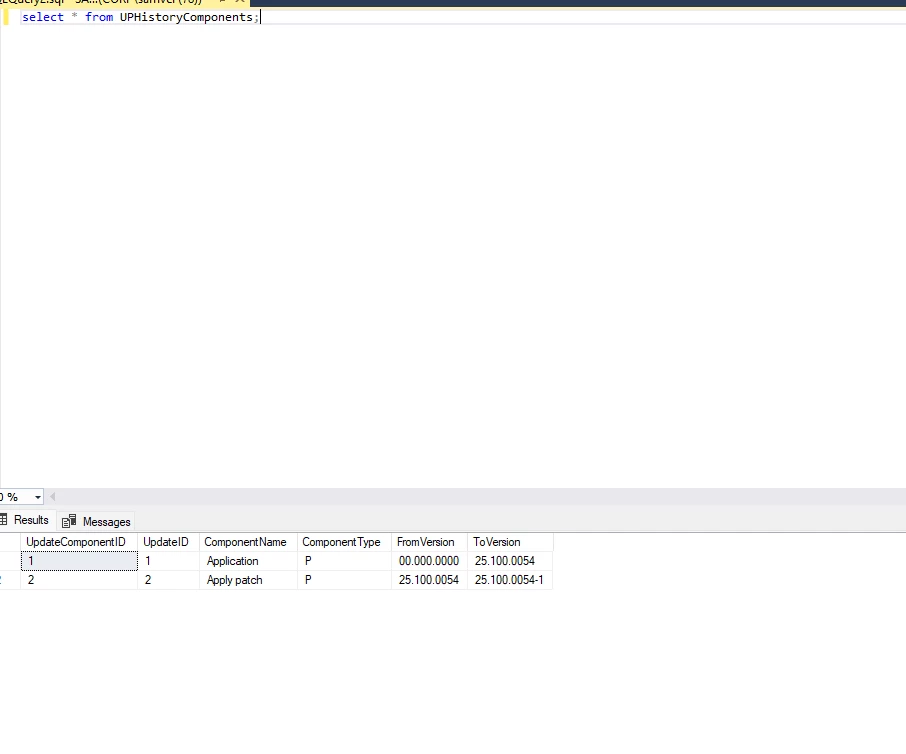
I think the easiest option is to read the last record from the UPHistoryComponents table.

The ToVersion seems to contain patch number if there is patch applied.


4 replies

Forum|alt.badge.img+9
  • Captain II
  • February 5, 2026

@Patrick Chen 


Does the version number not contain the patch? i.e. 25.200.xxxx is unpatched, 25.201.xxxx is patch 1 and so on.


Patrick Chen
Semi-Pro I
Forum|alt.badge.img+3
  • Author
  • Semi-Pro I
  • February 5, 2026

Hey Aiwan!  25.201.xxxx refers to the service pack that was created in addition to 25.200.  A patch is one level below that so that if you look at the log in screen of Acumatica you might see Build 25.200.0248.3 +  Which means I have 3 patches without the service pack.  It’s getting that .3 that I’m struggling with.


Samvel Petrosov
Jr Varsity II
Forum|alt.badge.img+9
  • Jr Varsity II
  • Answer
  • February 6, 2026

I think the easiest option is to read the last record from the UPHistoryComponents table.

The ToVersion seems to contain patch number if there is patch applied.


Patrick Chen
Semi-Pro I
Forum|alt.badge.img+3
  • Author
  • Semi-Pro I
  • February 6, 2026

Thanks Samvel!
